
Non-Human Identity Security in Azure: Lessons from the Storm-3168 Attack
Most security programs are built around people. MFA, device compliance, conditional access, joiner-mover-leaver processes, privileged access reviews all of it assumes an identity that belongs to someone with a desk and a laptop.
Meanwhile, the identities doing most of the work in a mature Azure tenant belong to nobody in particular. Applications, deployment pipelines, integrations, background jobs, and now AI agents all authenticate, hold permissions, and operate around the clock. They tend to accumulate access quietly, and they rarely get reviewed with the same rigor as a human admin account.
An incident Microsoft published in September gives a sharp illustration of why that matters. In its Storm-3168 report, Microsoft Security Research described how an attacker used two compromised Azure service principals to map a tenant for most of a day and then destroy a significant part of it.
None of this means service principals are unsafe. They are a normal, necessary part of running cloud infrastructure. It does raise one question worth putting to your own team this week:
If one of your non-human identities were compromised this morning, how much of your Azure environment could it reach by lunchtime?
Key Takeaways
- Two compromised service principals were enough to enumerate an Azure tenant and delete storage accounts, a Key Vault, and app resources because the access was already assigned to them.
- Reconnaissance ran for more than 15 hours before anything was destroyed. The destructive burst took about seven minutes. That gap is where detection has to land.
- Some defenses held: resource locks blocked deletions, and attempts to remove Backup and Site Recovery protection failed.
- Managed identities remove the credential problem. They do not remove the authorization problem a managed identity with Contributor on a subscription is still a large blast radius.
- Non-human identity security comes down to six repeatable controls: inventory, ownership, credential hygiene, least privilege, monitoring, and lifecycle.
- Architecture is the backstop. Subscription and management group boundaries decide how far any single compromised identity can travel.
What happened in the Storm-3168 attack
Microsoft disclosed the activity on September 25, 2026, attributing it to Storm-3168, the actor behind the JADEPUFFER operation that Sysdig documented in July. The Azure intrusion itself took place in early June and ran for roughly 18 hours.
Two compromised service principals from the same tenant did the work, and they split it between them. The first spent around 15 and a half hours enumerating virtual machines, subscriptions, resource groups, and resources, racking up more than 300 successful read operations. About 90 minutes into that, the second service principal enumerated VMs and resource groups across two subscriptions in roughly five seconds. Sixteen hours later, it went through App Service configuration stores, most likely hunting for more credentials.
Then the pace changed. Following a failed key-listing attempt against a storage account that no longer existed, the second identity moved into destruction and attempted more than 150 destructive or credential-collection operations in 35 minutes, with the concentrated deletion window lasting about seven minutes. Storage accounts, Azure SQL databases, a Key Vault, a Function App, an App Service plan, virtual machines, and recovery protection controls were all targeted. Most of the storage accounts it went after were successfully deleted.
Both identities came from the same infrastructure, shared a network fingerprint, and called Azure Resource Manager with the user agent python-requests/2.34.2 rather than through the portal. Microsoft’s assessment is that the timing, the division of labor, and the overlapping token streams strongly indicate scripted or automated execution.
What didn't work is just as instructive
Not everything the attacker tried succeeded, and the failures point directly at controls worth verifying in your own tenant. Several SQL database deletions failed because the attacker called an unsupported API version. Attempts to remove Azure Backup protection locks and Azure Site Recovery locks failed. Where storage accounts carried a CannotDelete lock, the deletion was blocked.
Those are not exotic defenses. Resource locks and recovery protection are standard Azure features that many organizations apply inconsistently, and in this incident they were the difference between a deleted resource and a recoverable one. x
How the credentials got out
Microsoft could not confirm the initial compromise path for both identities, but it traced one of them to a public GitHub issue where a client ID, client secret and tenant ID had been posted in plaintext. The secret had been removed from the visible issue, but it remained reachable through the issue’s edit history.
The practical rule: an exposed credential is a compromised credential. Deleting it from where it was posted does nothing, version history, caches and forks keep it alive. The only safe response is to revoke or rotate it, then review what that identity could reach while it was exposed.
What is a non-human identity?

A non-human identity is any identity used by an application, workload, service, or automated process rather than by a person. In a Microsoft environment, this covers service principals, managed identities, application registrations, automation and deployment identities, workload identities, API integrations, CI/CD pipelines, background services and, increasingly, AI agents.
Microsoft’s service account governance guidance treats managed identities and service principals as types of service accounts used by automated workloads to reach Azure, Microsoft 365, SaaS applications and databases. They are not a problem to be eliminated. A business application needs to read its database, a pipeline needs to provision infrastructure, an agent needs to call an API.
The problem starts when an organization can’t answer three questions about one of them: who owns this, what can it reach, and does it still need to? In most tenants we review, the first question is the one that stalls the conversation.
Why non-human identities carry a different kind of risk
MFA doesn't apply
A workload can’t respond to a push notification. These identities authenticate with client secrets, certificates, tokens, federated credentials or platform-managed credentials, which means the human playbook, MFA, device compliance, interactive sign-in risk, mostly doesn’t transfer. Protection has to come from credential handling, permission scope, ownership, monitoring and lifecycle instead.
They run at machine speed
A compromised user account tends to generate the kind of activity someone notices: odd sign-in locations, unusual hours, a mailbox rule. A compromised workload identity can issue hundreds of API calls in minutes, and Storm-3168 is the demonstration, 150-plus operations in 35 minutes, with the core destruction compressed into about seven. Any control that depends on a human noticing and reacting inside that window is not a control.
Ownership evaporates
Service principals get created for a migration, a vendor integration, a proof of concept, a deployment project, a script someone wrote in a hurry. The project ends. The identity doesn’t. A year later the application has been rewritten or retired, and the identity still holds the permissions it was given on day one, but the person who requested it has changed teams and nobody can say what it is for.
This is why Microsoft’s guidance on securing service principals asks organizations to establish an owner, an expected lifetime, a review schedule and a lifecycle process for each one. Without that, non-human identities become a quiet, growing part of your attack surface that no one is auditing.
Excessive permissions decide the blast radius
A compromised identity is a problem. A compromised identity with broad permissions is an incident.
Picture two application identities. The first has Storage Blob Data Reader on a single storage account. The second has Contributor across the subscription. Both get compromised on the same morning. One produces a data exposure review; the other produces the kind of day Storm-3168’s victim had.
Microsoft’s managed identity best practices say this directly: grant only the permissions needed, at the narrowest appropriate scope, because broader roles and scopes increase the number of resources exposed if that identity is compromised.
Least privilege gets discussed constantly for administrator accounts and much less often for workloads. For each non-human identity, the questions are the same five:
- What actions does this workload actually perform in production?
- Which specific resources does it need to touch?
- Does it need write access, or only read?
- Can the assignment be scoped to a resource or resource group instead of a subscription?
- Does the access still serve a current business requirement?
The answer to question three is where most of the risk sits. A reporting workload that only retrieves data should not hold permissions that let it modify or delete that data, and “Contributor was easier during development” is how that happens.
Azure service principal vs managed identity: what actually differs
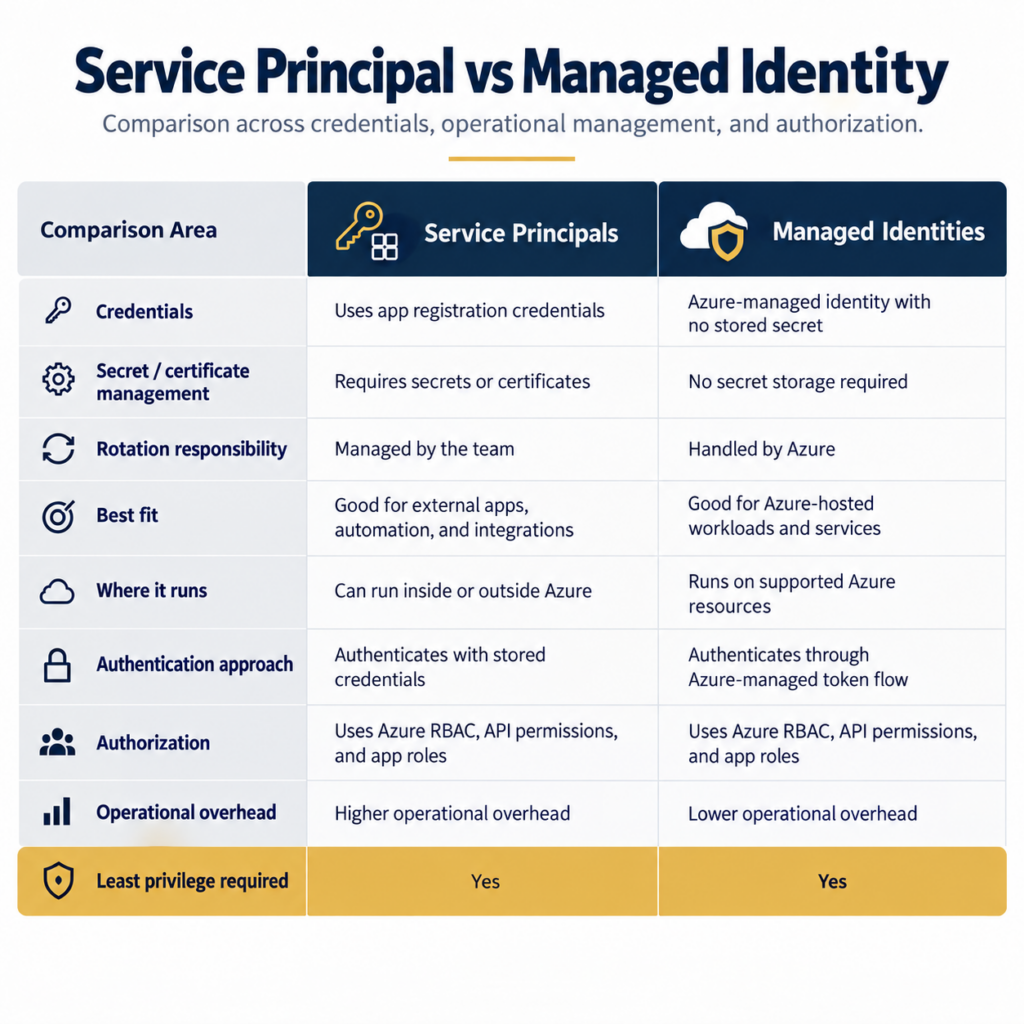
This is the most common question that comes up when teams start reviewing workload identity, and the answer is narrower than people expect. Both represent non-human workloads. What differs is who handles the credential.
| Azure service principal | Azure managed identity |
Typical use | Applications, integrations, automation, external or multi-cloud workloads | Azure-hosted workloads and resources |
Authentication | Client secrets, certificates or federated credentials | Azure manages the underlying credentials |
Credential rotation | Your responsibility to track and rotate | Handled by the platform |
Credential exposure risk | Depends entirely on how the secret is stored and handled | Removes the stored secret from the equation |
Authorization | Permissions must be assigned | Permissions must be assigned |
Least privilege required | Yes | Yes |
Managed identity solves the credential problem, not the permission problem
A managed identity removes the need to keep a client secret in application configuration, scripts, pipelines, environment variables or, as in Storm-3168, a public repository. That is a real and significant reduction in risk, and Microsoft recommends moving Azure-hosted workloads to managed identities where they can be used.
But the identity still needs permissions to do its job, and those permissions are assigned by you. A managed identity with Owner on a subscription is not safer than a service principal with Owner on a subscription. If an attacker reaches the workload that can request that token, the outcome is the same.
So the useful question isn’t “service principal or managed identity.” It’s which identity model fits this workload, and have we scoped it to exactly what the workload does? Our guide to managed identity for AI agents in Azure works through that decision in more depth.
Seven things to verify about your non-human identities
Storm-3168 is a reasonable prompt for a review. Here is what that review should cover.
1. Do you know which identities exist?
Everything else depends on this. Build an inventory of service principals, managed identities, application registrations, automation and deployment identities, workload identities and agent identities. Expect it not to match your application inventory: retired integrations leave identities behind, and those orphans are exactly what an attacker wants to find.
2. Does each one have an owner?
Every important identity needs a named person who knows why it exists, which workload uses it, what permissions it needs, how those get reviewed, and what happens when the workload is retired. An identity without an owner can’t be governed, because there’s no one to ask whether its access is still justified.
3. Are the long-lived credentials still necessary?
Look for client secrets created years ago and never revisited. Where the workload runs in Azure, a managed identity usually removes the credential entirely. Where a secret is genuinely required, it needs an expiry, a rotation process and somewhere safe to live. It does not belong in source code, a pipeline variable in plaintext, or a public repository.
4. Are permissions wider than the workload needs?
Review your Azure RBAC assignments with particular attention to anything holding access at management group level, subscription level, across large resource groups, or in privileged directory roles. For each one, ask whether a narrower role or a tighter scope would still let the workload function. Usually it would.
5. Are credentials actually protected?
Where secrets and certificates are unavoidable, they belong in Key Vault or an equivalent, not embedded in code or configuration. Add secret scanning to your repositories if you don’t have it, and remember the GitHub lesson from this incident: removing a secret from a visible comment doesn’t remove it from history.
6. Can you see what these identities do?
This is the control that would have mattered most in Storm-3168, because 15 hours of enumeration preceded the damage. Microsoft Entra sign-in logs cover service principal sign-ins, and the behaviors worth alerting on are reasonably well defined:
- Unusual volumes of resource enumeration, particularly read operations across subscriptions
- Sign-ins from unfamiliar infrastructure or unexpected user agents
- Key Vault access outside the normal pattern, or attempts to list storage keys
- Changes to role assignments or privileges
- Bulk resource modification or deletion
- An identity reaching resources it has never touched before
The goal is to understand each identity’s normal behavior well enough that abnormal behavior stands out. A workload identity is actually easier to baseline than a person — it does the same handful of things every day.
7. What happens when the application retires?
Identity lifecycle should follow workload lifecycle. When an application or integration is decommissioned, the checklist includes the service principal or managed identity, every role assignment, secrets and certificates, group memberships, API permissions, and any integration access. Microsoft’s service account guidance recommends defining a lifetime and a recurring review rather than letting identities persist by default, and the default, in practice, is forever.
Why Azure architecture decides how far an attacker gets
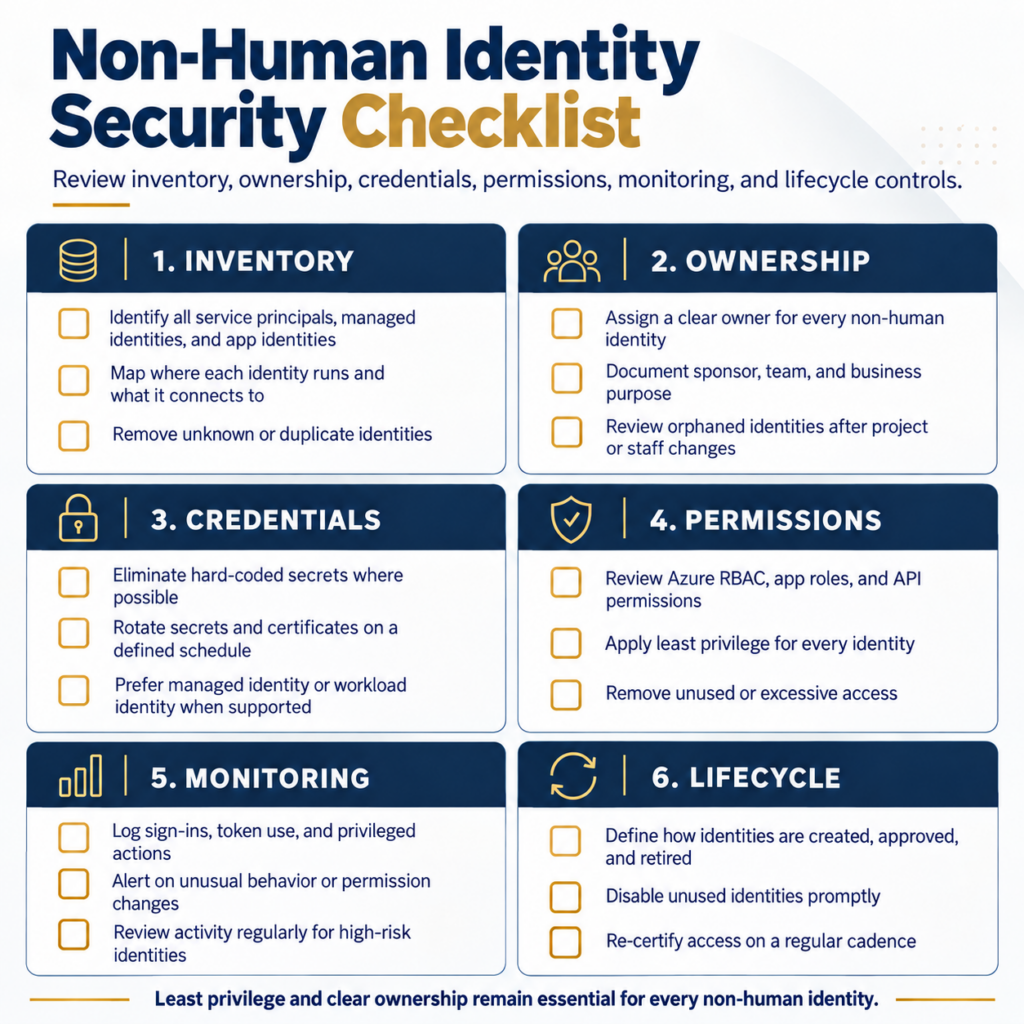
Identity security doesn’t operate in isolation from how the environment is built. The structure of your Azure estate determines how far a valid but compromised identity can travel, which makes this an architecture conversation as much as a security one.
Four areas carry most of the weight:
- Management groups and subscription boundaries. Production, development, shared services and sensitive workloads generally shouldn’t sit inside one administrative and security boundary. The aim isn’t complexity for its own sake — it’s making sure one compromised identity can’t see everything.
- Azure RBAC design. Roles should reflect what workloads actually do. Narrower assignments reduce the number of resources at risk when something goes wrong.
- Azure Policy. Policy applies a consistent baseline rather than leaving each workload team to decide independently. It’s also how you find the identities that drifted outside the standard.
- Centralized monitoring. If logging, alerting and ownership differ from one subscription to the next, your security team is investigating with partial visibility, which is a slow way to work during a seven-minute window.
And then there’s recovery protection, which this incident put directly in scope. Storm-3168 attempted to remove Backup and Site Recovery locks. It’s worth asking whether an identity in your tenant that can modify production resources can also interfere with the mechanisms you would use to recover them. Separating those permissions is one of the cheapest resilience improvements available.
A well-designed Azure Landing Zone is what makes these guardrails consistent instead of per-project, and we cover the same platform controls from the AI side in our guide to enterprise AI infrastructure on Azure.
AI agents make this urgent, not different
Everything above applies to applications and automation. It applies with more force to AI agents, because agents are being granted exactly the kind of broad, cross-system access that creates large blast radii.
A production agent might read business data, query Microsoft 365, call Microsoft Graph, hit internal APIs, invoke tools, trigger workflows and create or modify records. Each of those is an authorization decision, and the security question can’t stop at whether the agent can authenticate. The question is what it can do afterwards.
Microsoft’s AI defense guidance applies the same identity and least-privilege principles to agents, workloads, plugins, and tools: explicit identities, scoped authorization, minimum required rights, and tighter controls around consequential actions. Which means AI agent governance isn’t a new discipline; it’s workload identity security, applied to a faster-growing population of identities. We cover the Microsoft-specific side of that in our article on AI agent governance with Microsoft Entra Agent ID.
The principles don’t change: unique identity, clear ownership, minimum permissions, defined scope, monitoring, lifecycle management.
A non-human identity security checklist for Azure
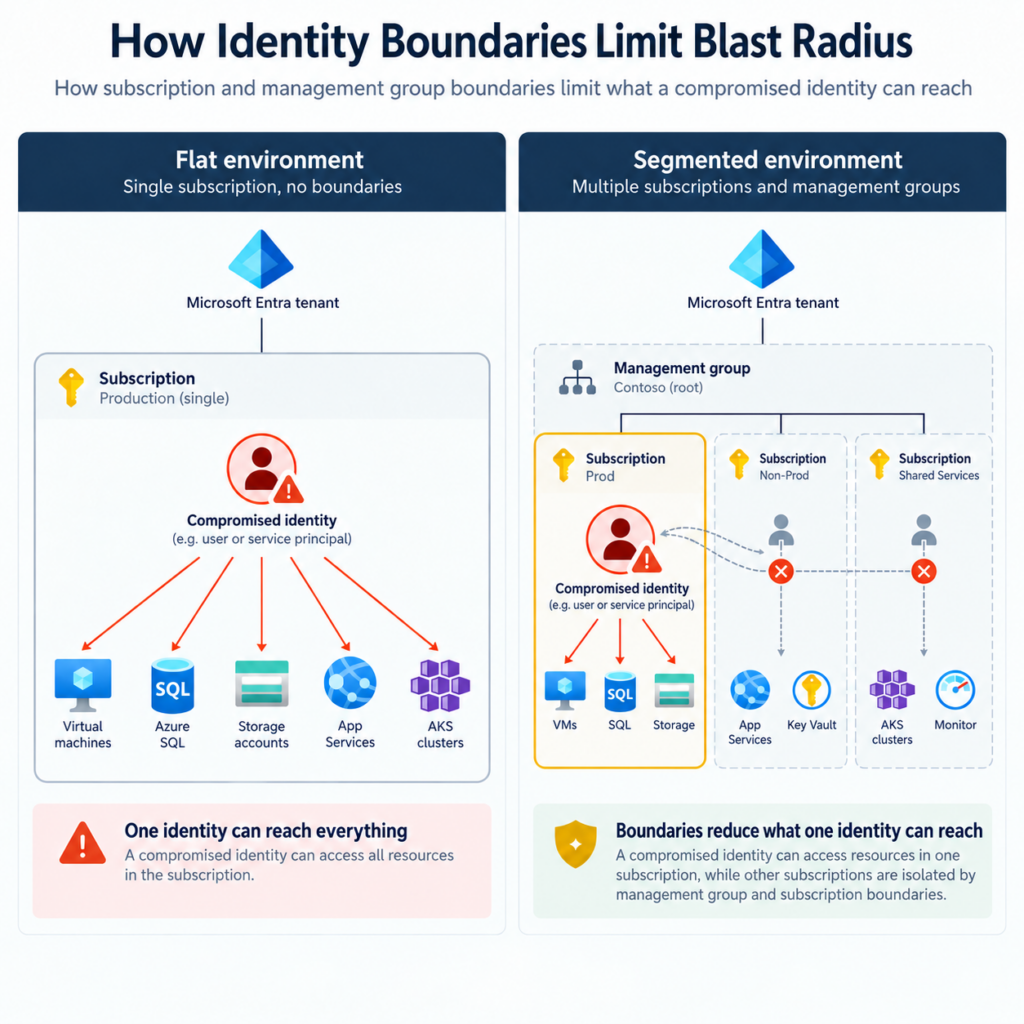
You don’t need to redesign every workload. Start by finding out which of these your IT and security teams can answer with confidence.
Area | Questions to answer |
Inventory | Do we have a complete list of non-human identities? Do we know which workload uses each one? |
Ownership | Does every important identity have a named, current owner? |
Credentials | Which identities still use client secrets? When were they last rotated? Are any in source control? |
Permissions | Which identities hold subscription or management group scope? Could any be narrowed? |
Monitoring | Can we spot unusual service principal activity? Do we have visibility across all subscriptions? |
Lifecycle | Are unused identities and role assignments removed? Does retirement include identity cleanup? |
Resilience | Can an identity that modifies production also affect backups, locks or recovery? |
AI agents | Are agent identities governed with the same rules as other workload identities? |
If several answers are unclear, the first priority is visibility rather than remediation. You cannot apply least privilege to identities you don’t know exist.
What Storm-3168 means for IT and security leaders
The takeaway is not to avoid service principals. They, managed identities and other workload identities are fundamental to running anything in the cloud. The takeaway is that these identities need the same deliberate governance as any other privileged access path, and in most organizations they don’t have it yet.
A workable model has six parts: inventory so you know what exists, ownership so someone is accountable, credential protection so secrets are reduced and the remaining ones are handled properly, least privilege so scope is tight, monitoring so abnormal behavior surfaces, and lifecycle management so access disappears when the workload does. Architecture sits underneath all six, deciding how far any single failure can spread.
Cloud environments now depend heavily on identities that never sit at a desk, type a password or answer an MFA prompt. They should be governed with the same seriousness as the ones that do.
Related Posts:
AI agent governance with Microsoft Entra Agent ID
Azure Landing Zone Design & Implementation
AI Readiness Assessment
Zero Trust security guide
AI Agent Governance, Security & ROI
Not sure what your non-human identities can reach?
Horizons Consulting is a Microsoft Solutions Partner for Infrastructure (Azure) and Data & AI. We work with internal IT, cloud and security teams to build Azure foundations around identity, least privilege, workload boundaries, governance, monitoring and operational ownership — and we document and hand over the environment so your team can run it.
Book a free 30-minute AI Infrastructure Review with a certified Azure architect. If your Azure estate has grown faster than its identity model, that’s a good place to start.
Frequently asked questions
A non-human identity is one used by an application, workload, service or automated process rather than a person. In Azure that includes service principals, managed identities, application registrations, workload identities, CI/CD pipeline identities and AI agent identities.
Microsoft disclosed on September 25, 2026 that an actor it tracks as Storm-3168 used two compromised Azure service principals in a single tenant. Over roughly 18 hours in early June, the identities enumerated the environment and then deleted storage accounts, a Key Vault and app resources in a burst lasting about seven minutes. Microsoft linked the activity to JADEPUFFER.
No. They are a standard part of cloud operations. The risk comes from how their credentials are handled and how much access they hold, not from the identity type itself.
Both represent non-human workloads. A managed identity has its credentials created, protected and rotated by Azure, which removes the need to store a secret. A service principal typically authenticates with a secret, certificate or federated credential that your organization manages. Permissions have to be assigned, and kept tight, for both.
Yes. A managed identity removes the credential risk, not the authorization risk. Microsoft's guidance is explicit that unnecessary permissions increase the security blast radius of a managed identity just as they would for any other principal.
Start with enterprise applications and app registrations in Microsoft Entra ID, managed identities assigned to Azure resources, and role assignments across your management groups and subscriptions. Cross-check that list against your application inventory — the identities that don't map to a live workload are the ones to investigate first.
Treat it as compromised. Revoke or rotate the credential rather than only deleting it from where it appeared, since version history and caches keep copies. Then review what that identity could access during the exposure window and check the sign-in and activity logs for use you don't recognize.
Directly. An agent is a workload identity with unusually broad reach across data and systems. The same controls apply: a unique identity, a named owner, scoped permissions, monitoring and a retirement process.