AI Readiness Assessment Guide: How Zero Trust Security Helps Enterprises Prepare for AI
Artificial intelligence is quickly becoming part of daily business operations. Enterprise teams are using AI to summarize documents, analyze data, support customers, improve productivity, and automate routine work. Microsoft Copilot, AI assistants, and custom AI agents are no longer future ideas. They are already becoming part of how modern organizations work.
But AI adoption also creates a serious question for business leaders:
Is your organization ready to use AI securely?
For many enterprises, the answer is not as simple as buying licenses or turning on a new tool. AI depends on data, identity, access, devices, applications, and cloud infrastructure. If these areas are not properly secured, AI can make existing security gaps more visible and more risky.
That is why an AI readiness assessment is important.
Before deploying AI across your organization, an AI Readiness Assessment can help identify security, governance, and infrastructure gaps that may impact your AI adoption.
An AI readiness assessment helps organizations understand whether their environment is prepared for safe, scalable, and responsible AI adoption. It reviews the foundation behind AI, including identity security, data governance, cloud readiness, endpoint management, compliance, and monitoring.
This is where Zero Trust security becomes critical.
Zero Trust is based on a simple idea: never assume trust. Every access request should be verified. Every user should receive only the access they need. Every environment should be monitored as if a breach could happen.
For enterprises preparing for AI, this is not just a cybersecurity concept. It is a business requirement.
AI can deliver significant business value, but only when the environment supporting it is secure, governed, and ready to scale.
Start with an AI Readiness Assessment to identify potential gaps and build a stronger foundation for secure AI adoption.
Table of Contents
- What Is an AI Readiness Assessment?
- Why AI Readiness Needs Zero Trust Security
- Common AI Security Risks for Enterprises
- Core Areas to Review in an AI Readiness Assessment
- How Zero Trust Architecture Supports AI Security
- Microsoft Security Controls That Support AI Readiness
- AI Readiness Assessment Checklist
- How to Build a Secure AI Adoption Roadmap
- FAQs
Key Takeaways
- AI readiness is not only about AI tools or licenses.
- An AI readiness assessment helps enterprises review identity, data, devices, cloud, security, governance, and monitoring.
- Zero Trust security gives organizations a strong foundation for secure AI adoption.
- The most important Zero Trust principles are verify explicitly, use least privilege access, and assume breach.
- Common AI security risks include excessive permissions, sensitive data exposure, weak identity controls, shadow AI, unmanaged devices, and poor monitoring.
- Microsoft Entra ID, Intune, Purview, Defender, Sentinel, and Azure governance tools can support enterprise AI security.
- Enterprises should assess and secure their environment before deploying AI or Microsoft Copilot at scale.
What Is an AI Readiness Assessment?
An AI readiness assessment is a structured review of your organization’s ability to adopt AI securely and effectively.
It is not only a technical review. It is also a business readiness exercise.
The goal is to answer important questions before AI becomes widely used across the business:
Can AI access sensitive data?
Are user permissions properly managed?
Are devices secure and compliant?
Are employees using approved AI tools?
Is data classified and protected?
Are security teams able to monitor AI-related activity?
Are governance and compliance policies clear?
These questions matter because AI works with business information. It may access files, emails, chats, documents, reports, customer records, financial data, and internal knowledge sources. If the right controls are not in place, AI can increase the impact of weak permissions, poor data governance, and unmanaged access.
A strong AI readiness assessment helps business owners and IT leaders understand what needs to be fixed before AI is deployed at scale. It also helps reduce business risk. Instead of reacting to problems later, the organization can build a safer foundation first. Explore the Benefits of AI in the Workplace.
For enterprises preparing for Microsoft Copilot, custom AI agents, or AI-powered business applications, this assessment should become a first step.
Why AI Readiness Needs Zero Trust Security
AI adoption changes how information moves across the organization.
In traditional systems, users usually search manually for files, reports, or application data. With AI, users may ask a question and receive summarized answers from many connected sources. This can improve productivity, but it can also expose sensitive information if access controls are not properly managed.
For example, an employee may not intentionally search for confidential financial data. But if that employee already has access to a poorly governed SharePoint site, an AI tool may surface that information in a response.
This is not an AI problem only. It is an access control problem.
Zero Trust security helps reduce this risk by applying three important principles.
The first principle is to verify explicitly. Every access request should be checked based on user identity, device health, location, risk, and business context.
The second principle is least privilege access. Users should only have access to the information and systems they need for their role.
The third principle is assume breach. Organizations should continuously monitor activity, detect unusual behavior, and limit the spread of potential threats.
Together, these principles create a stronger AI security framework.
For enterprise business owners, this means AI can be adopted with more confidence. Teams can use AI to improve productivity while reducing the risk of data exposure, unauthorized access, and compliance issues.
Common AI Security Risks for Enterprises
AI can create value, but it can also increase risk when the environment is not ready. The following AI security risks should be reviewed before any large-scale deployment.
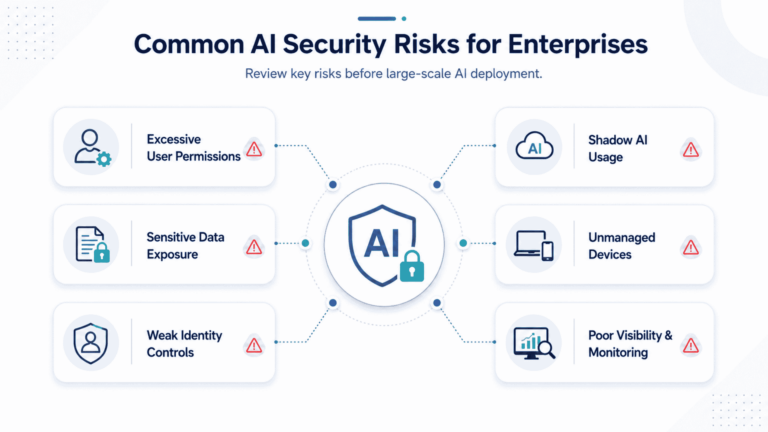
1. Excessive User Permissions
Many organizations have years of accumulated access permissions. Employees may still have access to old folders, previous projects, shared drives, or systems they no longer use.
When AI is introduced, these permissions matter more. AI can quickly search and summarize information that users technically have access to, even if that access is no longer appropriate.
This is one of the most common risks in enterprise AI security.
2. Sensitive Data Exposure
Sensitive data often exists across email, Teams, SharePoint, OneDrive, file shares, CRM systems, ERP platforms, and cloud storage. If that data is not classified or protected, AI tools may process it without enough control.
This can create privacy, legal, financial, or reputational risk.
3. Weak Identity Controls
If identity controls are weak, unauthorized users may gain access to systems that connect with AI tools. Missing MFA, weak passwords, unmanaged guest users, and excessive admin rights can all increase exposure.
Strong identity security is one of the most important parts of AI readiness.
4. Shadow AI Usage
Employees may use public or unapproved AI tools to complete work faster. They may paste business data into tools that are not governed by company policies.
This creates risk because the organization may not know what data is being shared, where it is going, or how it is being stored.
5. Unmanaged Devices
AI tools are often accessed from laptops, mobile devices, home networks, and remote locations. If devices are not managed or compliant, data can be exposed through lost devices, outdated software, malware, or insecure access.
Endpoint readiness should be included in every AI security assessment.
6. Poor Visibility and Monitoring
Security leaders need to know who is accessing data, which applications are being used, and where risks are appearing. Without proper monitoring, AI adoption can reduce control instead of improving it.
This is why monitoring, reporting, and incident response must be part of the AI readiness conversation.
Core Areas to Review in an AI Readiness Assessment
A complete AI readiness assessment should review the full business environment, not only the AI tool itself. For enterprise organizations, the following areas are most important.
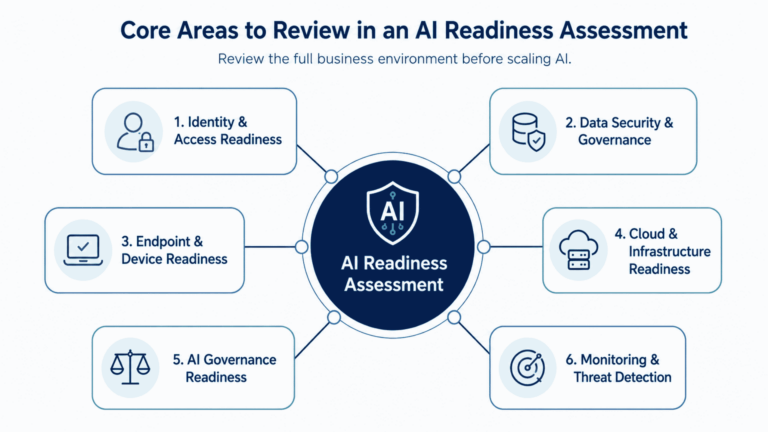
1. Identity and Access Readiness
Identity is the control layer for modern AI adoption. Before giving users access to AI tools, organizations should review how identity and permissions are managed.
This includes MFA coverage, Conditional Access policies, role-based access, privileged accounts, guest users, and access review processes.
The assessment should answer:
Are all users protected with MFA?
Are access policies based on risk?
Are privileged accounts limited and monitored?
Are guest users still needed?
Are permissions reviewed regularly?
If identity is weak, AI security becomes weak.
For Microsoft environments, this is where Microsoft Entra ID plays an important role. It helps manage user identities, access policies, and Zero Trust controls across the business.
2. Data Security and Governance Readiness
AI is only as safe as the data it can access.
If business data is overexposed, outdated, duplicated, or poorly classified, AI can increase the risk. Data governance helps the organization define what data exists, who owns it, who can access it, and how it should be protected.
An AI readiness assessment should review:
Sensitive data locations
SharePoint and OneDrive permissions
Teams sharing settings
External sharing
Data classification
Retention policies
Sensitivity labels
Data Loss Prevention policies
This is especially important for industries such as financial services, healthcare, insurance, professional services, and government, where data privacy and compliance requirements are high.
Microsoft Purview can support this area by helping classify, protect, and govern sensitive information across Microsoft 365 and connected systems.
3. Endpoint and Device Readiness
Employees need secure devices to use AI safely.
If users access AI tools from unmanaged devices, outdated systems, or personal laptops, the risk of data leakage increases. Device security is also important for remote and hybrid work environments.
A readiness assessment should review:
Device enrollment
Microsoft Intune policies
Endpoint protection
Patch management
BYOD controls
Device compliance
Remote access policies
This is where endpoint management becomes a business enabler. When devices are properly managed, users can work from anywhere while security teams maintain control.
4. Cloud and Infrastructure Readiness
Many enterprise AI workloads depend on cloud infrastructure. Whether the organization is using Microsoft Copilot, Azure OpenAI, AI agents, or data analytics platforms, the cloud foundation must be secure and scalable.
An assessment should review:
Azure environment design
Role-based access control
Network segmentation
Logging and monitoring
Backup and recovery
Security policies
Azure landing zone readiness
Defender for Cloud configuration
Cloud infrastructure should not grow without governance. AI can increase cloud usage, data movement, and workload complexity. Without proper controls, this can lead to security gaps, higher costs, and operational risk.
For organizations preparing Azure environments for AI workloads, a well-designed Azure Landing Zone architecture can provide the governance, networking, identity, security, and monitoring foundation needed to support scalable deployment.
5. AI Governance Readiness
AI governance defines how AI should be used inside the business.
This is not only an IT policy. It should involve leadership, legal, compliance, security, HR, and business teams.
An AI governance review should cover:
Approved AI tools
Acceptable use policies
Data handling rules
Employee training
Risk ownership
Compliance requirements
Review and approval process for AI use cases
Reporting and accountability
Without governance, AI adoption can become inconsistent. One department may use AI responsibly, while another may use unapproved tools or expose sensitive data.
Governance helps create clear rules before AI usage expands.
6. Monitoring and Threat Detection Readiness
AI adoption should not reduce visibility.
Security teams need clear insight into access, usage, alerts, and unusual behavior. Monitoring also helps leadership understand whether AI is being used safely and where additional controls are needed.
An assessment should review:
Microsoft Defender coverage
Microsoft Sentinel configuration
Audit logs
Alert response process
AI usage reporting
Incident response plans
Security dashboards
Monitoring is part of the “assume breach” mindset. Even with strong policies, organizations should expect risk to change over time and prepare to respond quickly.
How Zero Trust Architecture Supports AI Security
Zero Trust architecture gives organizations a practical model for securing AI adoption.
It connects identity, data, devices, applications, infrastructure, and monitoring into one security approach. Instead of trusting users or systems by default, the organization checks each request and limits access based on real business need.
Here is how Zero Trust supports AI readiness:
| AI Readiness Challenge | Zero Trust Control |
|---|---|
| Users have too much access | Least privilege and access reviews |
| Sensitive data is not protected | Classification, labels, and DLP |
| Devices are unmanaged | Endpoint compliance and Conditional Access |
| AI usage is not visible | Monitoring, logging, and reporting |
| Admin access is risky | Privileged access management |
| Cloud workloads are exposed | Segmentation, RBAC, and security policies |
| External sharing is uncontrolled | Guest access governance |
This approach helps reduce AI security risks before they become business problems.
A Zero Trust model also supports long-term AI growth. As the organization adds more AI use cases, the same security framework can help govern access, protect data, and improve monitoring.
Microsoft Security Controls That Support AI Readiness
For organizations using Microsoft technologies, several tools can support AI readiness and Zero Trust security.
Microsoft Entra ID helps manage identity, MFA, Conditional Access, privileged access, and identity governance.
Microsoft Intune helps manage devices, enforce compliance, and protect endpoints used by employees.
Microsoft Purview helps classify data, apply sensitivity labels, manage retention, and enforce Data Loss Prevention policies.
Microsoft Defender helps detect and respond to threats across endpoints, identities, cloud apps, and workloads.
Microsoft Sentinel helps security teams centralize monitoring, analyze threats, and respond to incidents.
Azure Policy and role-based access control help govern cloud infrastructure and limit unnecessary access.
Together, these tools can support a stronger AI security assessment and provide the foundation for secure Microsoft Copilot adoption.
For many enterprises, the challenge is not whether these tools exist. The challenge is whether they are configured properly, aligned to business risk, and managed as part of a clear AI readiness plan.
AI Readiness Assessment Checklist
Business leaders can use the following checklist as a starting point.
Identity and Access
- MFA is enforced for all users.
- Conditional Access policies are active.
- Privileged accounts are limited and monitored.
- Guest users are reviewed.
- Access reviews are scheduled.
- High-risk accounts are identified.
Data Security
- Sensitive data is identified.
- Data is classified and labeled.
- External sharing is reviewed.
- DLP policies are active.
- Retention policies are documented.
- SharePoint, Teams, and OneDrive permissions are reviewed.
Endpoint Security
- Devices are enrolled in management.
- Compliance policies are enforced.
- Endpoint protection is active.
- BYOD access is controlled.
- Remote access is secure.
- Patch management is in place.
Cloud and Infrastructure
- Azure access is reviewed.
- RBAC is properly configured.
- Security policies are enforced.
- Logs are collected and monitored.
- Backup and recovery plans are documented.
- Cloud workloads are protected.
AI Governance
- Approved AI tools are defined.
- AI usage policy is documented.
- Employees are trained.
- Risk ownership is assigned.
- Compliance requirements are reviewed.
- AI use cases are approved before rollout.
Monitoring and Response
- Security alerts are reviewed.
- AI usage is monitored.
- Incident response plans are updated.
- Audit logs are available.
- Reporting dashboards are created.
- Security teams have clear ownership.
- If several of these areas are incomplete, the organization may not be fully ready for enterprise AI adoption.
How to Build a Secure AI Adoption Roadmap
AI readiness should lead to a practical roadmap. The roadmap should help leadership understand what to fix first, what can wait, and how to roll out AI with less risk.
A simple roadmap can follow five phases.
Phase 1: Assess
Start with a current-state review. Identify risks across identity, data, devices, cloud, applications, governance, and monitoring.
The goal is to understand where the organization stands today.
Phase 2: Secure
Address the most important risks first. This may include enforcing MFA, reducing excessive permissions, improving device compliance, classifying data, and strengthening cloud controls.
The goal is to reduce risk before AI is widely adopted.
Phase 3: Govern
Create clear policies for AI usage. Define which tools are approved, what data can be used, who owns AI risk, and how employees should be trained.
The goal is to make AI usage consistent across the business.
Phase 4: Deploy
Roll out AI in phases. Start with selected users, departments, or use cases. Monitor adoption, collect feedback, and adjust policies as needed.
The goal is to avoid uncontrolled rollout.
Phase 5: Improve
AI readiness is not a one-time project. Continue reviewing access, data, usage, security alerts, and business impact.
The goal is to keep the AI environment secure as the organization grows.
How Horizons Consulting Helps Enterprises Prepare for AI
Horizons Consulting enables organizations to establish the secure, scalable Microsoft foundation required for successful AI and Microsoft Copilot adoption.
For enterprise leaders, AI readiness extends far beyond deploying a new tool. It requires a comprehensive evaluation of the identities, data, devices, cloud services, and governance controls that AI solutions rely on every day.
Our consultants help organizations assess, strengthen, and optimize their Microsoft environment through:
- AI readiness assessments
- Microsoft Copilot readiness and deployment planning
- Azure infrastructure reviews
- Microsoft 365 tenant assessments
- Entra ID and identity security evaluations
- Cloud security and Zero Trust assessments
- Microsoft Purview governance and compliance reviews
- Intune and endpoint management readiness assessments
- Microsoft Defender and Microsoft Sentinel security readiness reviews
- AI governance and risk management roadmaps
Our objective is to provide organizations with the visibility, security, and strategic direction needed to adopt AI with confidence. By identifying gaps, reducing risk, and aligning technology with business goals, we help enterprises build a strong foundation for long-term AI success.
AI has the potential to transform productivity and decision-making, but its value depends on a secure and well-governed environment. With a mature Zero Trust strategy and the right Microsoft security controls in place, organizations can accelerate AI adoption while maintaining control, compliance, and resilience.
Frequently Asked Questions (FAQs)
Why is Zero Trust security important for AI readiness?
Zero Trust security is important because AI tools may access large amounts of business data. If users have too much access or sensitive data is not protected, AI can increase exposure. Zero Trust reduces this risk by verifying access, limiting permissions, and monitoring activity.
What are the biggest AI security risks for enterprises?
The biggest AI security risks include excessive access permissions, sensitive data exposure, shadow AI usage, weak identity controls, unmanaged devices, poor monitoring, and unclear governance policies.
How does Zero Trust architecture support AI security?
Zero Trust architecture supports AI security by connecting identity, device security, data protection, cloud controls, and monitoring. It ensures that access is verified, permissions are limited, and suspicious activity is detected.
What should be included in an AI security assessment?
An AI security assessment should review identity controls, MFA, Conditional Access, privileged access, data classification, DLP, endpoint compliance, cloud security, AI usage policies, monitoring, and incident response readiness.
How does Microsoft Copilot relate to AI readiness?
Microsoft Copilot works across Microsoft 365 applications and business data. Before deploying Copilot, organizations should review permissions, data governance, security policies, compliance needs, and user readiness.