
Azure Landing Zone Architecture: A Practical Guide for Enterprise IT Teams
Getting workloads into Azure is the easy part. Keeping the environment secure, governed and understandable three years later, after a dozen teams and a few acquisitions have passed through it, is the hard part.
Most environments follow the same path. It starts with a handful of subscriptions. Then a second business unit arrives, a security review adds new requirements, an acquisition brings in someone else’s tenant, and an AI project asks for data access and private networking nobody planned for. Nothing here is unreasonable on its own. Together, though, they turn Azure into something that takes a specialist to explain.
An Azure landing zone architecture is how you get ahead of that. It sets out how resources are organized, who has access to what, how networks connect, which policies apply automatically, and how application teams deploy workloads without rebuilding those controls each time. Microsoft describes an Azure landing zone as a proven, flexible architecture for governing, securing, and scaling a multi-subscription environment, split into a shared platform foundation and the workload environments that sit on top of it.
For an enterprise IT team, the point isn’t to deploy a landing zone. It’s to end up with an Azure foundation your own people can keep operating as workloads, teams, and technologies change.
Key Takeaways
- An Azure landing zone gives you a repeatable foundation where workloads run under consistent identity, networking, security, governance, and operational controls.
- Microsoft splits the architecture into a platform landing zone and application, or workload, landing zones.
- Your design should reflect how your organization actually operates, not just reproduce a reference diagram.
- Identity, networking, security, governance, and monitoring need to be designed together, not bolted on after workloads are live.
- A brownfield estate doesn’t have to be rebuilt. Most organizations move toward landing zone architecture in stages.
- AI workloads should extend the existing foundation rather than get their own separate “AI landing zone” with a different governance model.
- Infrastructure as Code is what makes landing zone changes reviewable and repeatable over time.
What is an Azure landing zone?
An Azure landing zone is the governed foundation you host and operate Azure workloads on. It settles the decisions that application teams shouldn’t have to make again on every project, including:
- Subscription and management group structure
- Identity and access
- Networking and connectivity
- Azure Policy baseline
- Security controls
- Logging and monitoring
- Operational standards
- Cost ownership
- Workload onboarding
Microsoft places landing zones in the Ready phase of the Cloud Adoption Framework, which connects cloud strategy and planning to deployment, governance, security, and ongoing management. That context matters, because a landing zone is not just a group of subscriptions or a Bicep template. It is one part of a cloud operating model.
A good landing zone answers questions like these once, at the platform level:
- Who can deploy resources, and where should workloads run?
- Which security requirements apply automatically?
- How does an application connect to shared services and to on-premises systems?
- Where do security and operational logs land?
- Who owns each subscription, each workload and the resulting bill?
If your platform team is answering those questions again in every project kickoff, that’s the gap a landing zone fills.
How Azure landing zone architecture works
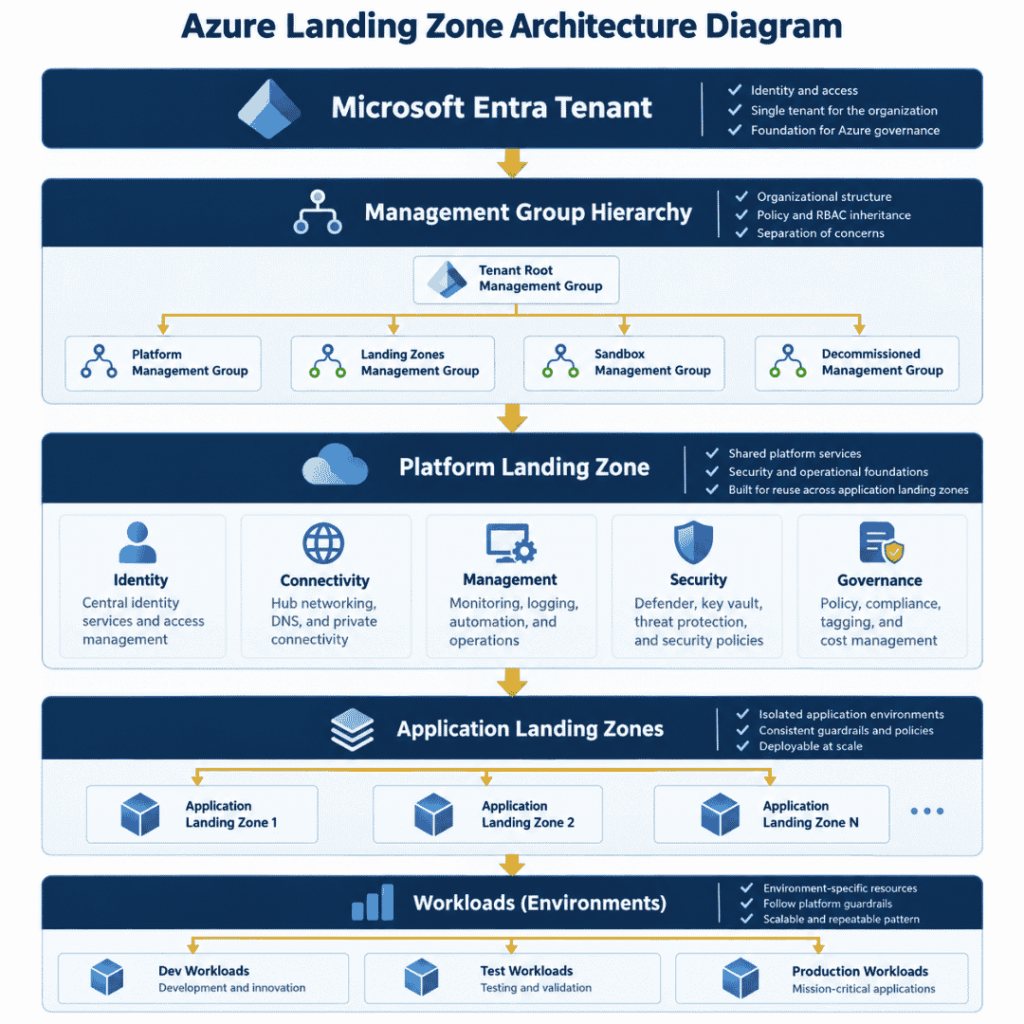
At a high level, the architecture separates the shared Azure platform from the workloads that use it:
Microsoft Entra tenant → management group hierarchy → platform landing zone (shared identity, connectivity, management, security, governance) → application landing zones → dev, test and production workloads
Management groups sit above subscriptions and give you a governance hierarchy. Assign an Azure Policy at the right level and every subscription beneath it inherits the control, so the platform team can set guardrails without owning every application resource.
In Microsoft’s current guidance, application landing zones are where workload teams deploy and operate their own resources while inheriting the platform’s security and governance requirements. The result should be a balance: too little central control gives you inconsistency, and too much makes the platform team a bottleneck that application teams route around. Microsoft’s design principles lean toward subscription democratization for exactly this reason. Subscriptions, not resource groups, become the unit of workload scale, and workload owners get real autonomy inside the platform’s guardrails.
Platform landing zone vs. application landing zones
This distinction shapes most of the rest of the design, so it’s worth being precise about it.
Platform landing zone
The platform landing zone holds the shared capabilities used across the estate: the management group hierarchy, connectivity, DNS, central monitoring, security tooling, policy assignments, shared identity services, and the process for provisioning new subscriptions. Microsoft recommends most organizations run one platform landing zone per Microsoft Entra tenant.
Application or workload landing zones
An application landing zone holds the resources for one workload. It may span development, test and production. Another workload gets its own, with whatever availability, networking or regulatory requirements that workload happens to have. A PCI-scoped payments application and an internal reporting tool can sit on the same platform and still be governed very differently.
Platform landing zone | Application / workload landing zone |
Shared Azure foundation | Environment for a single workload |
Central governance and policy | Workload resources |
Shared connectivity and DNS | Application-specific networking |
Platform security controls | Workload-specific controls |
Central monitoring foundation | Application monitoring |
Owned by the platform team | Owned by the workload or application team |
The value of the split is practical. Application teams get room to work without being handed the keys to the whole platform, and the platform team gets a defensible boundary for what it does and doesn’t operate.
Core Azure landing zone design areas
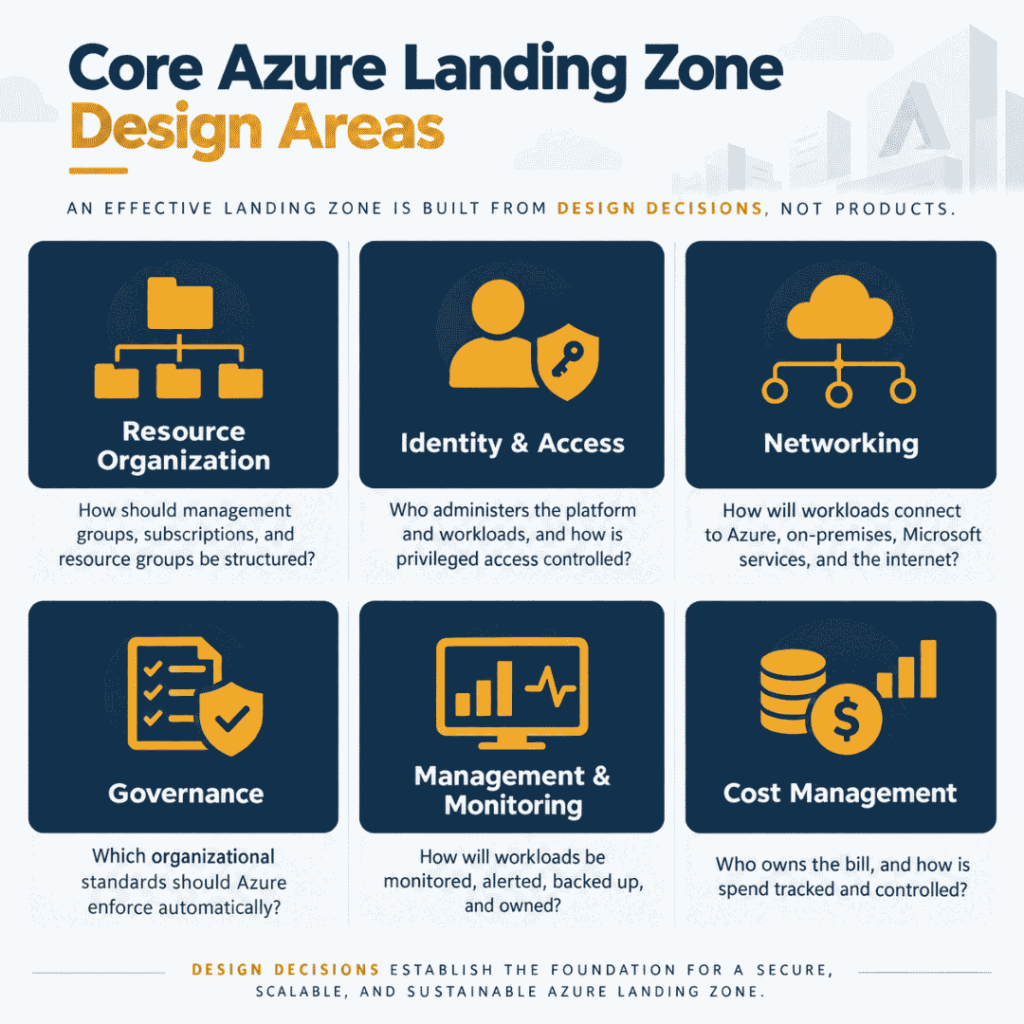
An effective landing zone is built out of decisions rather than products. Microsoft’s landing zone design areas cover resource organization, identity, networking, governance, security, management and related platform concerns. For IT leaders, they come down to a practical set of questions.
Resource organization
How should management groups, subscriptions and resource groups be structured? Base the answer on business ownership, production and non-production separation, security boundaries, regulatory requirements, workload lifecycle, policy inheritance and cost allocation.
One thing to avoid: building a management group for every box on the org chart. Reorganizations happen far more often than governance boundaries change, and the structure should serve policy and operations rather than reporting lines.
Identity and access
Who administers the platform, who manages individual workloads, and which access should be standing versus elevated on request? The design needs to cover Microsoft Entra ID, Azure RBAC, administrative roles, privileged access, service principals, managed identities, workload identities and separation of duties.
Networking
How should workloads reach other Azure workloads, shared services, on-premises systems, Microsoft services, external applications and the internet? Network design is the hardest thing on this list to change once dozens of workloads depend on it, which is why the major connectivity decisions belong in the landing zone rather than in the first project that needs them.
Governance
Which organizational requirements should Azure enforce on its own? Approved regions, required tags, security configurations, resource restrictions, naming standards and logging requirements are all candidates. Azure Policy turns those standards into guardrails instead of a wiki page nobody reads, and gives you compliance evidence as a by-product.
Management and monitoring
No workload should reach production before someone decides how it will be monitored. The landing zone should set expectations for Azure Monitor, Log Analytics workspace design, alerts, diagnostic settings, Microsoft Sentinel where appropriate, backup and recovery, and operational ownership.
Cost management
Governance should also answer a blunt question: who owns the bill? Subscriptions, tags, budgets, alerts and cost-center mapping are what make cloud spend visible to the teams that create it. This is usually the control that pays for itself first.
Identity and access in an Azure landing zone
Identity is the most important boundary in Azure. Microsoft’s landing zone guidance emphasizes managing authorization across both the platform and application landing zones, so that authenticated identities get only the access they actually need.
A practical design separates three kinds of access.
Human administrators. Platform administrators need access to shared services. They shouldn’t automatically hold permanent access to every application, and privileged access should be time-bound and reviewed.
Application teams. Workload teams need enough control to deploy and operate their applications without waiting on a platform administrator for routine changes, while staying inside the governance boundary the platform sets.
Workload identities. Applications need identities too. Where Azure-native identity options exist, workloads shouldn’t be storing credentials at all. This matters more every quarter as automation and AI agents start reaching into storage accounts, databases, APIs, and search services.
For a deeper look at this, see Horizons’ guide to managed identity for AI agents in Azure, which explains how managed identities, workload identities and agent identities fit together, and our article on AI agent governance with Microsoft Entra Agent ID.
The principle worth carrying into every review: authentication and authorization are separate decisions. Giving a workload a secure identity says nothing about whether that identity’s permissions are correctly scoped.
Azure landing zone network design
Networking is the other area where early decisions have long consequences. An enterprise landing zone usually has to address hub-and-spoke topology or Azure Virtual WAN, ExpressRoute and VPN connectivity, private endpoints, DNS, internet ingress and egress, firewall architecture, segmentation, and connectivity between landing zones.
There’s no topology that fits everyone. A company running mostly cloud-native applications needs something very different from an enterprise with 300 on-premises applications and a complex hybrid estate. The aim is a network foundation that meets workload requirements without asking every application team to design enterprise connectivity from scratch.
It’s equally important not to over-build. Architecture should follow business, security, and workload requirements, not reproduce every component in a reference diagram because it was in the diagram. Every extra component is something your team has to operate, patch, and explain to an auditor.
Azure landing zone security and governance
Security in a landing zone starts before the first production workload. Rather than asking each application team to work out how to secure Azure, the platform sets a baseline covering Azure Policy, Microsoft Defender for Cloud, centralized logging, Azure RBAC, Privileged Identity Management, network security requirements, encryption, backup standards, secret management, and resource configuration standards.
A useful way to frame it: centralize the guardrails, decentralize workload delivery. The platform team defines what can’t be ignored. The workload team decides how to build within it. Compliance gets easier too, because the control is applied once and inherited rather than recreated by hand on every project.
Security should still track workload risk. A public marketing site, an internal line-of-business app, a regulated financial workload, and an AI agent reading sensitive Microsoft 365 data will all need different workload-level controls, even while they share the same foundation.
Extending your Azure landing zone for AI workloads
AI creates new infrastructure requirements. It does not require a separate Azure architecture.
Microsoft’s current guidance states that emerging technologies, AI included, can be deployed into application landing zones without changing the overall architecture. New governance or security requirements are introduced at the platform level and applied consistently to the workloads that need them.
That distinction matters commercially as well as technically. The goal is to extend your Azure landing zone for AI workloads, not to stand up an isolated “AI landing zone” with its own governance model that someone will have to reconcile later.
AI workloads do raise extra questions, usually around managed identity and AI agent identity, model and endpoint access, Microsoft Graph permissions, sensitive data, private networking, API access, secrets, logging, agent monitoring, data residency and security controls.
A single agent makes this concrete. It might authenticate to Azure Storage, call an Azure AI service, hit an internal API and retrieve Microsoft 365 content. Each of those connections is another identity, authorization, networking and monitoring decision, and each should land inside the platform architecture you already have.
Microsoft’s open-source AI Landing Zone reference architecture shows what a production AI application landing zone looks like in Bicep and Terraform, and Entra Agent ID best practices cover the identity side. If you’re at the earlier stage of working out whether your identity, data, and governance foundation can support AI at all, start with our AI readiness assessment.
Azure landing zones after a merger or acquisition
M&A exposes weak Azure architecture faster than anything else. An acquired company tends to arrive with a different management group structure, sometimes a separate tenant, inconsistent subscriptions, its own RBAC model, separate networks and security tooling, incomplete logs, workloads nobody can fully account for, different tagging, and unclear cost ownership.
The first instinct is usually to move everything into the parent’s environment. That’s rarely the right opening move. Understand what you inherited first, then use your landing zone architecture as the target operating model for deciding what should stay separate, come under common governance, move into an existing landing zone, follow a new workload landing zone pattern, be modernized, or be switched off.
Our guidance on Azure integration after M&A works through this across governance, landing zone fit, subscriptions, networking, identity, security, cost and workload rationalization, and our article on designing Azure landing zones for post-merger IT integration covers the dual-estate lens in more depth.
The principle to hold onto: an acquired Azure environment shouldn’t get to set the architecture the combined organization operates for the next five years.
Greenfield vs. brownfield Azure landing zones
Landing zone guidance often reads as though everyone is starting with an empty tenant. Most enterprises aren’t.
Greenfield
With an empty tenant you can set standards before the workloads arrive: management groups, subscription patterns, network architecture, policy, logging, RBAC and Infrastructure as Code. The risk here is the opposite of the usual one. Teams over-engineer the platform for requirements that never materialize, and the first workload takes six months to land.
Brownfield
A brownfield environment already has production in it, and usually some combination of inconsistent subscription ownership, broad RBAC assignments, public endpoints, missing policies, hand-built infrastructure, mixed naming standards, patchy logging and workloads that can’t easily move.
You don’t need to rebuild it. A workable brownfield strategy identifies the highest-risk gaps first, defines the target architecture, and brings existing workloads under better governance in stages. Report-only policy assignments and audit-effect policies are useful here: you can measure how far the estate is from the standard before you start enforcing it. That’s almost always safer than one large redesign.
Azure landing zone implementation options
Once the architecture is agreed, the question is how to deploy it.
Landing zone accelerators
Microsoft provides deployment options that follow its landing zone guidance, available through the Azure portal, Bicep and Terraform. They’re a strong starting point if you want to follow Microsoft-recommended patterns.
An accelerator still doesn’t make your design decisions. Your team has to determine which architecture applies, which controls are required, how networking should work, who owns the platform, which policies get enforced, and how workloads are onboarded.
Subscription vending
Once the platform exists, application landing zones shouldn’t be created by hand. Subscription vending automates the request: a workload team asks for a subscription, and the pipeline creates it, places it in the right management group, applies the policy baseline, sets budgets and deploys baseline networking. Microsoft publishes Bicep and Terraform vending modules for this. It’s the single control that does most to prevent governance debt, because a subscription created outside the process is where drift starts.
Infrastructure as Code
Landing zones suit IaC particularly well. Bicep or Terraform, deployment pipelines and version-controlled configuration make infrastructure reviewable, repeatable and testable, and they stop environments drifting apart because two administrators configured things differently a year apart.
Custom implementation
Some enterprises need more customization, usually because they already have a mature Azure estate, complex hybrid networking, regulatory requirements, an existing security platform, M&A-driven environments or an unusual operating model. Microsoft guidance should inform the architecture in those cases without forcing the organization into a template that doesn’t match how it works.
If you’d like help with this, Horizons’ Azure Landing Zone Design & Implementation service covers the platform foundation, workload landing zone model, identity, networking, governance, security, IaC, and operational handoff.
Keep the landing zone current
A landing zone is not a one-time deployment. Azure changes, applications change, security requirements change, and so does the organization. The healthiest way to treat it is as a product with an owner, a backlog and a change process.
Plan to review Azure Policy, management groups, networking, logging requirements, security tooling, identity controls, IaC modules, subscription patterns, workload onboarding and documentation on a regular cadence. Microsoft’s guidance on expanding landing zones takes the same position: the initial deployment is a starting point, not the finished state.
Version-controlled IaC makes this far easier, because changes get reviewed before they’re deployed and applied the same way across every environment.
Common Azure landing zone mistakes
Copying the reference architecture without understanding the business. Microsoft’s guidance is a starting point, not a substitute for design decisions about your workloads, operating model, security requirements and team structure.
Designing only for the first workload. The first application shouldn’t set the architecture for everything that follows. Think in patterns.
Over-engineering the platform. More components don’t make better architecture. Every one of them carries operational cost.
Giving workload teams too much privileged access. Autonomy for application teams doesn’t require unrestricted access to the platform. Define the ownership boundary explicitly.
Treating networking as an afterthought. Connectivity is the hardest thing to change later. Decide early.
Ignoring existing Azure resources. A landing zone strategy needs a path for workloads that are already running, not only for new deployments.
Deploying once and walking away. Without an owner, a backlog, a change process and documentation, drift starts again immediately.
Azure landing zone readiness checklist
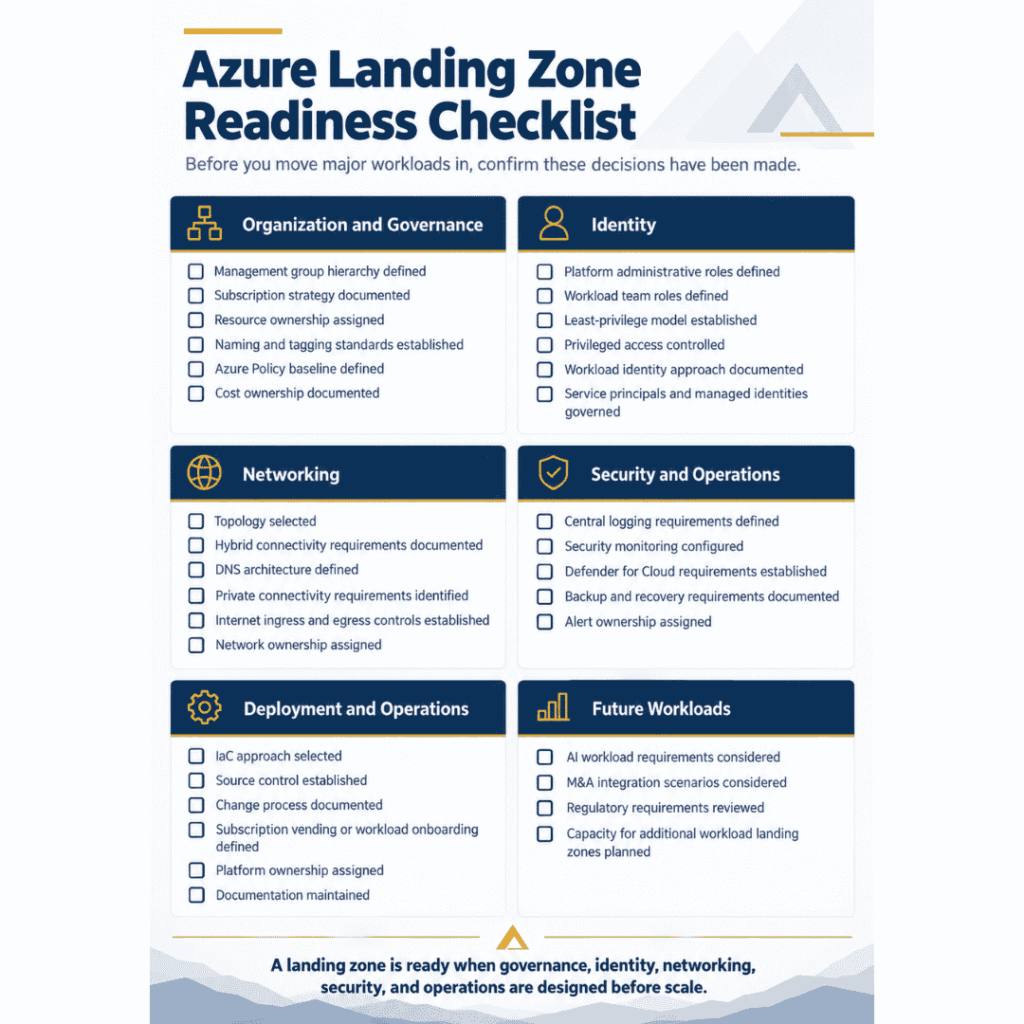
Before you move major workloads in, check whether these decisions have actually been made.
Area | Decisions to confirm |
Organization and governance | Management group hierarchy defined · Subscription strategy documented · Resource ownership assigned · Naming and tagging standards established · Azure Policy baseline defined · Cost ownership documented |
Identity | Platform administrative roles defined · Workload team roles defined · Least-privilege model established · Privileged access controlled · Workload identity approach documented · Service principals and managed identities governed |
Networking | Topology selected · Hybrid connectivity requirements documented · DNS architecture defined · Private connectivity requirements identified · Internet ingress and egress controls established · Network ownership assigned |
Security and operations | Central logging requirements defined · Security monitoring configured · Defender for Cloud requirements established · Backup and recovery requirements documented · Alert ownership assigned |
Deployment and operations | IaC approach selected · Source control established · Change process documented · Subscription vending or workload onboarding defined · Platform ownership assigned · Documentation maintained |
Future workloads | AI workload requirements considered · M&A integration scenarios considered · Regulatory requirements reviewed · Capacity for additional workload landing zones planned |
If several of these are still open, adding more workloads will increase complexity faster than your platform team can absorb it.
When should you review your Azure landing zone?
A review tends to be worth the effort when one of these is true:
- Azure adoption is accelerating, or new business units are moving in
- AI workloads are entering production
- An acquisition has introduced another Azure environment
- Subscription sprawl is increasing
- Security teams can’t enforce standards consistently
- Cloud costs have no clear owner
- Workloads are using inconsistent network patterns
- An audit has exposed governance gaps
- The organization is modernizing its cloud operating model
The purpose of a review isn’t architectural purity. It’s to find where the current environment is creating security, operational, cost or scalability problems, and to decide which changes are actually worth making.
Build an Azure foundation your IT team can operate
The value of a landing zone isn’t the diagram. It’s what the diagram makes possible: application teams that can deploy without reinventing identity, networking, security, governance and monitoring; security teams with guardrails they can apply consistently; and a platform team with clear ownership and operational standards.
It also gives you a foundation that can absorb what comes next, including AI workloads, without a redesign. The goal was never to implement every Azure capability available. It’s to build a secure, governed, repeatable Azure environment that matches how your organization needs to operate.
Planning or modernizing an Azure landing zone?
Horizons Consulting helps enterprise IT teams design and implement Azure landing zones across platform architecture, workload landing zones, identity, connectivity, security, governance, monitoring, and Infrastructure as Code. We work alongside your internal team, document the environment, and hand over a platform your organization can keep operating. No ongoing dependency.
Book a free 30-minute AI Infrastructure Review with a certified Azure architect, or explore Azure Landing Zone Design & Implementation.
Frequently asked questions
An Azure landing zone is a scalable Azure foundation that sets common architecture and governance for workloads. It typically covers resource organization, identity, networking, security, policy, management and operational controls.
It defines how the platform landing zone, management groups, subscriptions, shared services, governance controls and application landing zones work together. Microsoft separates it into a shared platform foundation and the application landing zones where individual workloads run.
A platform landing zone provides shared enterprise capabilities such as governance, connectivity and centralized services. An application or workload landing zone holds the Azure resources for a specific workload and operates inside the guardrails the platform sets.
In Microsoft's current model each workload has an application landing zone, which can include several environments and one or more subscriptions depending on the workload's requirements, ownership boundaries and subscription limits.
Usually not. Brownfield environments can move toward landing zone principles in stages. The right approach depends on your current architecture, workload dependencies, business risk and the cost of change.
Not simply because they use AI. Microsoft's guidance is that AI workloads can be deployed within application landing zones while reusing the broader architecture, with governance and security requirements extended as new needs appear.
It's the automated process for issuing a new subscription to a workload team, including management group placement, policy baseline, budgets and baseline networking. It keeps application landing zones consistent as the estate grows.
Both support Infrastructure as Code for landing zones. The choice depends on your existing tooling, team skills, multi-cloud requirements and source-control practices. The more important principle is keeping infrastructure repeatable and version controlled instead of relying on manual configuration.
There's no single schedule. Review the architecture when significant workload, organizational, security, compliance or technology changes happen, and keep continuous ownership of policy, IaC, identity, networking and operational standards in between.