
Azure Managed Identity for AI Agents: What IT Teams Should Know Before Production
Managed identity in Azure solves one of the hardest problems in AI infrastructure: managing credentials. It does not solve the rest.
AI agents are moving beyond simple conversations. In production they retrieve information, call APIs, query data stores, trigger workflows, and act across business systems. Each of those connections raises a question IT teams cannot leave until the end of the project:
What identity should the AI workload use, and what should that identity be allowed to access?
For AI workloads hosted in Azure, managed identity is often part of the answer. An Azure managed identity is a workload identity in Microsoft Entra ID that lets supported Azure resources authenticate to other services without developers storing passwords, application secrets, or certificates. Microsoft manages the underlying credentials and their lifecycle.
But credential-free authentication does not automatically make an AI agent secure.
IT teams still need to decide whether managed identity is the right identity model for the workload, how authorization should be scoped, whether the agent acts independently or on behalf of a user, and how the AI agent identity will be governed after go-live.
Those decisions belong in the AI infrastructure design, not in permissions added later just to make the agent work.
This guide explains how managed identity in Azure works, how it relates to workload identity and the newer Microsoft Entra agent identities, and what IT and security teams should settle before an AI agent reaches production.
Table Of Contents
- What Is a Managed Identity in Azure?
- Managed Identity vs. Workload Identity in Azure
- Why AI Agents Need a Different Identity Model
- System-Assigned vs. User-Assigned Managed Identity in Azure
- Authentication Is Not the Same as Authorization
- How Much Access Should an AI Agent Have?
- Microsoft Graph Permissions for AI Agents
- Where Managed Identity Fits in an Azure Landing Zone for AI
- Managed Identity and Infrastructure as Code
- Common Azure Managed Identity Mistakes in AI Deployments
- AI Agent Identity Checklist: What to Decide Before Production
- Frequently Asked Questions
Key Takeaways
- A managed identity in Azure is a Microsoft Entra workload identity that lets supported Azure resources authenticate without stored application credentials.
- Managed identity is one type of Azure workload identity. Applications, service principals, and the newer Microsoft Entra agent identities are others, and each fits different AI agent scenarios.
- Managed identity suits many Azure-hosted AI workloads, but it should not be the default identity model for every AI agent.
- System-assigned and user-assigned managed identities have different lifecycle and operational characteristics.
- Authentication and authorization are separate decisions. A securely authenticated workload can still be overprivileged.
- AI agents that access Microsoft Graph need authorization decisions beyond Azure RBAC.
- Identity, permissions, monitoring, networking, and policy should be designed together inside the Azure landing zone.
- Infrastructure as Code keeps AI agent identity and access configuration consistent across development, testing, and production.
What Is a Managed Identity in Azure?
Applications regularly need to authenticate to other services.
An application might read from Azure Storage, connect to Azure SQL, query Azure Cosmos DB, retrieve a secret from Azure Key Vault, or call another API protected by Microsoft Entra ID.
Historically, that meant configuring credentials: passwords, application secrets, access keys, or certificates.
That creates an operational problem. Credentials need to be created, stored securely, protected from accidental exposure, rotated, and eventually retired. Hard-coded credentials and poorly managed secrets cause both security incidents and outages.
Managed identities in Azure remove that burden.
Microsoft describes managed identities for Azure resources as a feature of Microsoft Entra ID. Supported Azure resources use them to request Microsoft Entra tokens and authenticate to downstream services, and developers never see or handle the underlying credentials. There is no additional cost to use them.
In simple terms:
The Azure workload gets an identity without your team having to manage a password for that identity.
That makes Azure managed identity particularly useful for service-to-service communication inside Azure, and a natural starting point for AI workloads that need to reach storage, databases, search indexes, and AI services.
Managed Identity vs. Workload Identity in Azure: How the Terms Fit Together
IT teams often hear “managed identity” and “workload identity” used interchangeably. The terms are related, but they are not the same thing, and the difference matters when you are deciding which Azure workload identity an AI agent should use.
In Microsoft Entra ID, a workload identity is any identity assigned to a software workload (an application, service, script, or container) so that it can authenticate and access other resources. Microsoft groups three things under that label: applications, service principals, and managed identities.
A managed identity is a special type of service principal. What makes it special is that Azure creates and rotates its credential automatically. Nobody on your team ever holds a secret for it.
In practice, that means:
- Every Azure managed identity is a workload identity. It represents a non-human workload and appears in Microsoft Entra ID alongside other service principals.
- Not every workload identity is a managed identity. An app registration with a client secret is also a workload identity, but one where your team owns and rotates the credential.
- Workload identity federation lets workloads running outside Azure (GitHub Actions, Kubernetes pods, other clouds) exchange their own tokens for Microsoft Entra tokens without secrets. A managed identity can also serve as the federated credential for an app registration, which is the mechanism behind the Microsoft Foundry agent identities described below.
- Microsoft Entra Workload ID is Microsoft’s name for the premium governance features (Conditional Access for service principals, risk detection, and access reviews) that apply to workload identities. Note that those Conditional Access policies target service principals; managed identities are not covered, so their governance relies on RBAC scope, monitoring, and lifecycle controls.
Why does this matter for AI agents? When a team says “we’ll use workload identity for the agent,” it should be clear whether that means a managed identity on the compute hosting the agent, an app registration with federated credentials, or a dedicated Microsoft Entra agent identity. Each has a different lifecycle, a different owner, and a different governance path.
Why AI Agents Need a Different Identity Model
An AI application rarely operates completely by itself. Depending on its purpose, it may need access to:
- Azure Storage
- databases
- search services
- APIs
- application backends
- internal tools
- Microsoft AI services
- business data
- Microsoft 365 services
Each connection introduces an identity and authorization decision.
If developers solve every integration by creating another secret, service credential, or highly privileged application registration, the identity architecture becomes difficult to govern as the environment grows. A managed identity gives supported Azure-hosted workloads a credential-free option, which is why it is usually the first choice.
Managed identity is part of AI workload identity architecture. It is not a universal answer for every AI agent.
Traditional applications operate within relatively predictable boundaries. AI agents can be more dynamic. An agent might interpret a user request, decide which tool to use, access a data source, call an API, and then perform an action based on the result.
Microsoft’s Cloud Adoption Framework now treats AI agent adoption as a distinct enterprise scenario, with guidance for planning, governing and securing, building, and operating agents.
The more an agent can act, the more important its identity boundary becomes. IT teams therefore need to ask:
- Who is performing this action?
- What system is the agent trying to access?
- What permission is required?
- Is the agent acting independently, or is it representing a specific user?
Those questions determine the appropriate identity and authorization model.
Autonomous Workload vs. Agent Acting on Behalf of a User
Consider two different agent scenarios.
An internal processing agent analyzes approved documents from an Azure data store every night and writes the results to another controlled Azure resource. That workload operates autonomously. A managed identity or another workload identity model may be appropriate, depending on the architecture and services involved.
Now consider an employee-facing agent that performs an action based on the permissions of the signed-in employee. That is a different authorization model. The system may need to preserve delegated user context instead of giving the agent an independent identity with broad access to the same systems.
These should not be treated as interchangeable scenarios.
Microsoft Entra Agent Identities: Where AI Agent Identity Is Heading
Microsoft’s identity architecture is also evolving specifically for agents. Current Microsoft Foundry guidance introduces agent identities in Microsoft Entra ID: dedicated identities that give administrators a consistent way to inventory agents, apply policies, and audit activity, while letting each agent authenticate to downstream systems without embedding secrets in prompts, code, or connection strings.
Managed identity still plays a role in that model. It authenticates the agent identity blueprint to Microsoft Entra ID through federation, and the resulting token is exchanged for a scoped token targeting the downstream resource. Each layer (managed identity, agent identity, and downstream resource) carries its own least-privilege role assignments. For a broader look at the platform, see Horizons’ overview of the Microsoft Foundry agent stack.
For IT teams, the practical lesson is simple: choose the AI agent identity model based on how the workload operates, not because one identity type has become the default architecture pattern.
System-Assigned vs. User-Assigned Managed Identity in Azure
Azure provides two forms of managed identity: system-assigned and user-assigned. Both remove the need for your team to manage credentials directly, but their lifecycle and management models differ.
Consideration | System-Assigned Managed Identity | User-Assigned Managed Identity |
Creation | Created for a specific Azure resource | Created as a separate Azure resource |
Lifecycle | Tied to the parent resource | Managed independently |
Resource reuse | Used by one resource | Can be associated with multiple supported resources |
Deletion | Deleted when the parent resource is deleted | Remains until explicitly deleted |
Permission lifecycle | Changes with resource lifecycle | Can remain consistent when workload resources change |
Typical fit | Workload closely tied to one resource | Workloads requiring an independent identity lifecycle or repeatable access patterns |
Microsoft’s own managed identity best-practice guidance describes user-assigned identities as more efficient across a broader range of scenarios, because they can be created and given role assignments before the resources that use them exist, and because they can be reused across supported resources. That does not mean they should automatically be shared across unrelated workloads.
When a System-Assigned Managed Identity Makes Sense
A system-assigned identity is useful when the workload belongs directly to one Azure resource and the identity should disappear when that resource is removed.
If a particular Azure-hosted component should have its own identity and permissions for exactly as long as it exists, tying the two lifecycles together simplifies cleanup and reduces orphaned identities.
Microsoft Entra Agent Identities: Where AI Agent Identity Is Heading
A user-assigned identity is managed separately from the workload resource. That is useful when:
- permissions need to be established before the compute resource exists
- Azure resources may be replaced while identity permissions remain stable
- the deployment process needs a predictable identity
- multiple supported resources intentionally need the same identity
The important word is intentionally.
Sharing one identity across unrelated AI applications simply because it is easier makes access boundaries harder to understand and audit.
Authentication Is Not the Same as Authorization
This is one of the most important points for IT and security teams: managed identity in Azure does not automatically mean least privilege.
Removing passwords and secrets improves the authentication model. It does not determine what the workload is allowed to do.
A production identity architecture needs to answer three separate questions.
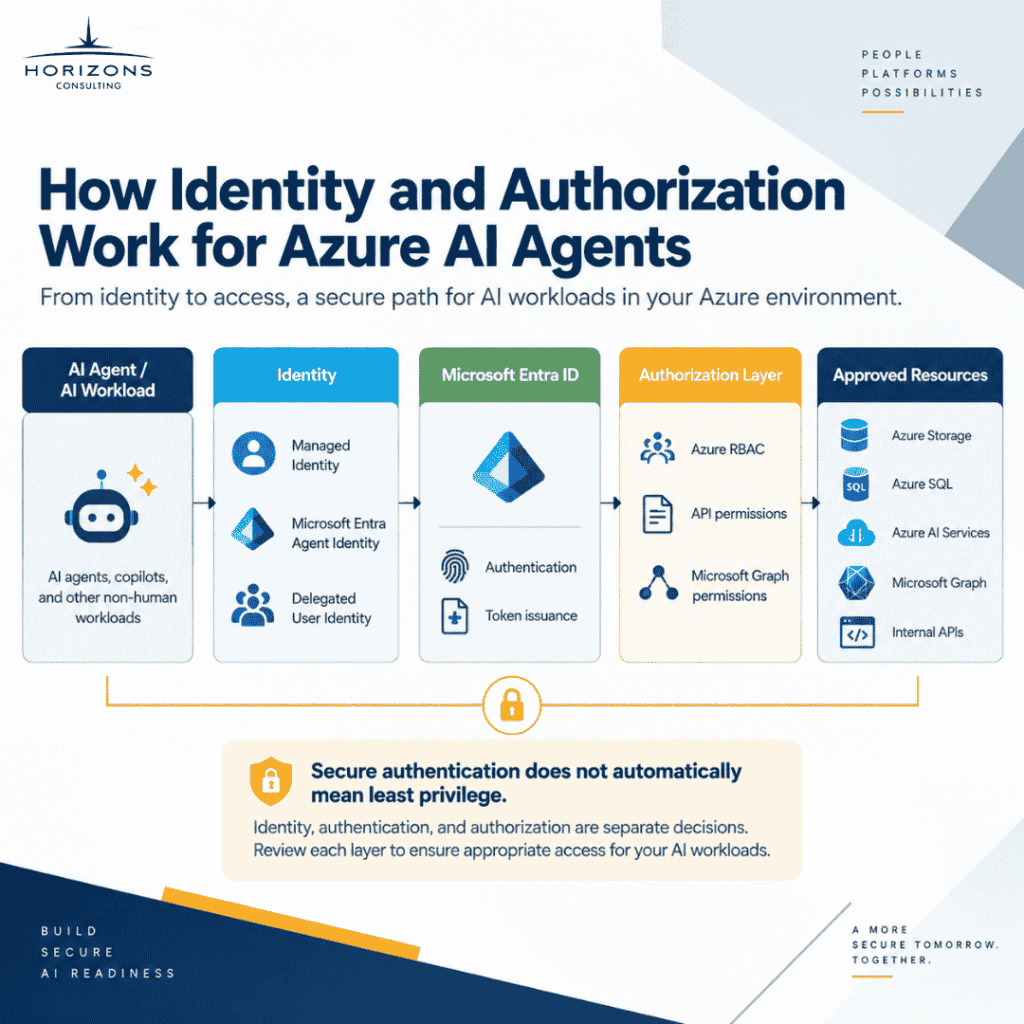
1. Identity: Who Is Making the Request?
The identity might represent:
- an Azure workload
- an application
- a published AI agent
- another non-human workload
- a user operating through delegated authorization
The correct answer depends on the architecture.
2. Authentication: How Is That Identity Verified?
Microsoft Entra ID issues tokens that allow supported workloads to authenticate without storing traditional credentials. Managed identity simplifies this step because the credential itself is managed by Azure.
3. Authorization: What Is the Identity Allowed to Do?
After authentication succeeds, the target resource still needs to determine what the identity can access. That might involve:
- Azure RBAC
- resource-specific roles
- API permissions
- application permissions
- delegated permissions
- Microsoft Graph authorization
This means an AI workload can use managed identity correctly and still have excessive access. Eliminating a client secret does little to reduce authorization risk if the identity holds permissions across an entire subscription when it only needs to read from one resource.
Credential-free does not mean permission-free.
How Much Access Should an AI Agent Have?
AI agent authorization should start with what the agent actually needs to accomplish, not with the permissions that are easiest to configure. A useful design process asks three questions.
What Resources Does the Agent Need?
Identify the actual downstream systems required for the workload. If an agent only needs one approved storage account, it does not automatically need access across every storage resource in the subscription. The same principle applies to databases, APIs, Key Vault resources, AI services, and other application dependencies.
What Actions Does the Agent Need to Perform?
Reading information requires a different permission boundary than changing or deleting it. Define whether the workload needs to:
- read
- query
- write
- execute
- update
- create
- delete
- administer
An agent that summarizes records may need a very different authorization model from an agent that can update those records.
At What Scope Should Access Be Granted?
Azure RBAC allows permissions to be assigned at different scopes. The fact that a broader scope is convenient does not make it appropriate.
IT teams should evaluate whether authorization can be restricted to the resource or resource group the workload requires, rather than granting subscription-wide access. This is where identity architecture becomes part of AI governance rather than just application configuration.
Microsoft Graph Permissions for AI Agents
Microsoft Graph deserves separate attention because Azure resource permissions and Microsoft Graph permissions are not the same thing.
An enterprise AI agent might need to interact with Microsoft 365 data or services through Microsoft Graph. Depending on the approved use case, an application could need to work with information from:
- Exchange
- SharePoint
- Teams
- users or groups
- other Microsoft 365 resources
Having an Azure managed identity does not automatically give a workload permission to access Microsoft Graph. The Graph authorization model still has to be deliberately designed.
One of the most important decisions is whether the scenario should use delegated permissions, where actions occur in user context, or application permissions, where the application acts as itself.
That distinction matters significantly for AI agents. If an agent only needs to perform an action that the signed-in user is permitted to perform, giving the workload broad application-level access unnecessarily expands its authority.
Where application permissions are required, IT teams should scope access as tightly as the service and use case allow, and establish an appropriate review process.
The practical rule is:
Establishing the workload’s identity is only the beginning. The systems that identity can reach and the actions it can perform must be governed separately.
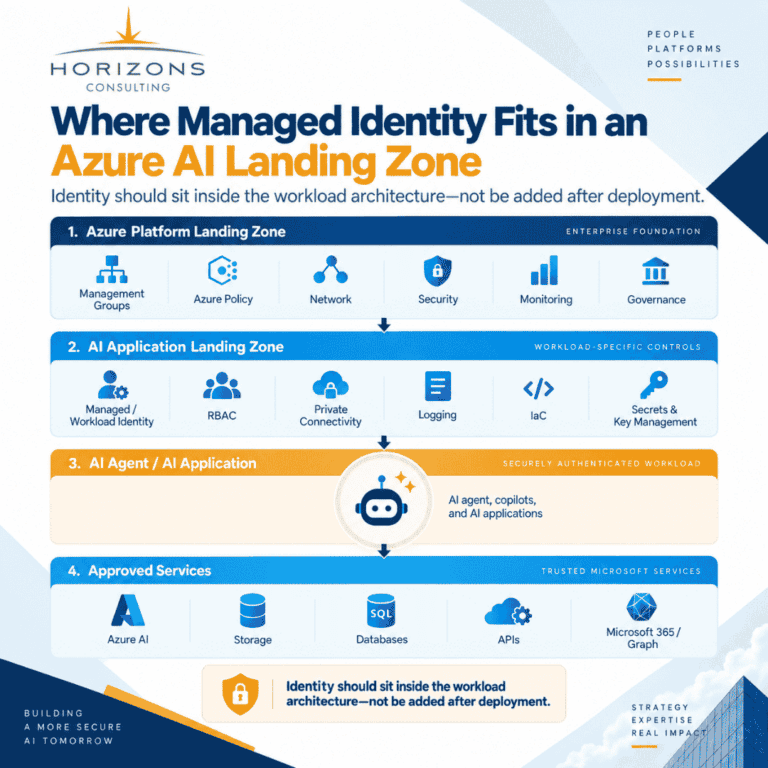
Where Managed Identity Fits in an Azure Landing Zone for AI
Identity should not be designed in isolation from the Azure environment where the AI workload runs.
Microsoft’s Cloud Adoption Framework positions Azure landing zones as the foundation that prepares an Azure environment for workloads, while the AI and agent adoption scenarios plug into that broader platform and operational model.
For production AI, that means identity belongs alongside decisions about:
- subscription and resource organization
- network architecture
- Azure Policy
- security controls
- role-based access
- monitoring and logging
- secrets and key management
- deployment standards
- workload isolation
- governance
The platform landing zone establishes shared Azure foundations. The AI workload then operates within an application landing zone that inherits the appropriate enterprise controls while implementing workload-specific requirements.
This is a better model than allowing each AI project to create its own identity, networking, permissions, and security practices independently.
Horizons already covers Azure landing zone planning as part of its Microsoft Azure infrastructure and cloud migration services, and this article is a natural technical extension of that work.
Managed Identity and Infrastructure as Code
Production identity architecture should also be repeatable.
If the workload infrastructure is deployed through Terraform, Bicep, or another approved Infrastructure as Code (IaC) process, identity and authorization should be part of that deployment model wherever the services support it. That can include:
- managed identity configuration
- resource creation
- RBAC assignments
- policies
- networking
- monitoring
- supporting Azure resources
The alternative often looks like this:
Deploy the application → discover what fails → manually add permissions → repeat until it works.
That approach makes it difficult to know exactly what production requires, why access was granted, and whether another environment has the same controls.
A stronger approach is:
Define workload requirements → select identity → define required authorization → deploy through controlled infrastructure → test access → monitor production use.
Microsoft supports managed identity operations through Azure Resource Manager, Azure CLI, PowerShell, REST APIs, and other deployment mechanisms, so identity fits naturally into infrastructure automation rather than portal-only configuration.
For organizations where internal IT will ultimately own the environment, IaC also improves handoff. The operating team receives a documented deployment model instead of an environment that can only be understood by reverse-engineering manual Azure configuration.
Common Azure Managed Identity Mistakes in AI Deployments
Managed identity removes one problem, credential management, but poor architecture can still create significant risk. These are the patterns that surface most often when Azure AI environments are reviewed before go-live.
Giving the Agent More Access Than It Needs
Broad permissions are convenient during development. They should not quietly become the production authorization model. Validate exactly which resources and actions the AI workload requires before deployment.
Treating Authentication and Authorization as the Same Thing
Successful authentication proves who or what is making the request. Authorization decides what that identity can do. Both need independent review.
Sharing One Identity Across Unrelated Workloads
User-assigned identities can be associated with multiple supported Azure resources. That capability should not become a reason to use the same identity everywhere. Shared identity means shared permission boundaries, and it makes accountability harder.
Ignoring User Context
Not every agent action should be performed using independent workload authority. If the agent is acting for a user, evaluate whether delegated authorization better preserves that user’s existing access boundary.
Managing Production Permissions Manually
If identity and role assignments are configured by hand while the rest of the infrastructure is managed through code, configuration drift becomes more likely. Where practical, include identity configuration and authorization in the same controlled deployment process.
Forgetting the Identity After Go-Live
Permissions should not be treated as permanent simply because they were appropriate on launch day. Workloads evolve. Agents gain tools. Integrations change. New data sources are connected.
Identity activity and role assignments therefore need ongoing visibility and review. Microsoft Entra provides sign-in activity for managed identities, and Azure activity logs help teams review management operations associated with those identities.
This broader governance need connects directly to Horizons’ guidance on why AI agents fail without proper governance, where weak identity controls, permission sprawl, monitoring gaps, and unmanaged lifecycle practices become reliability and security problems. For organizations governing agents at scale, Microsoft Agent 365 adds a control plane for agent inventory and policy on top of the identity foundation described here.
AI Agent Identity Checklist: What to Decide Before Production
Before approving an Azure AI agent or workload for production, infrastructure and security teams should be able to answer these questions clearly:
- What identity represents this workload or agent?
- Is it a managed identity, another Azure workload identity, or a Microsoft Entra agent identity, and why?
- Is it acting autonomously or on behalf of a user?
- Which Azure resources does it actually need to access?
- What actions does it need to perform on those resources?
- At what scope should RBAC be assigned?
- Does the workload require Microsoft Graph or another external API?
- Are Graph/API authorization decisions separate from Azure resource permissions?
- Can identity and access configuration be deployed through Infrastructure as Code?
- How will sign-ins, access, and changes be monitored?
- Who owns permission reviews after the environment is handed over to operations?
If those answers are unclear, the workload may not be ready for production even if the AI functionality itself works.
Build Identity Into the AI Foundation, Not After It
Enterprise AI infrastructure is not simply compute plus a model. Production AI workloads depend on identity, authorization, networking, policy, monitoring, data access, security, and lifecycle management working together.
Managed identity in Azure reduces credential-management risk for supported workloads. Newer Microsoft Entra agent identities provide more specific ways to represent and govern agents as the Microsoft ecosystem evolves. Both sit inside a broader Azure workload identity strategy that IT owns.
The goal for IT teams should not be to make every agent use the same identity pattern. The goal should be to give each workload an appropriate, governed identity and only the authorization required for its intended purpose.
That work is far easier to control when it begins at the architecture stage, before permissions accumulate around an application that has already reached production.
Horizons Consulting is a US-based Microsoft Solutions Partner for Cloud & AI Platforms that helps enterprise IT teams prepare Azure foundations for production AI workloads: landing zone architecture, identity and access design, permission scoping, Infrastructure as Code, documentation, and operational handoff. Learn more about our Azure AI agent development and integration and AI agent governance and security services.
Frequently Asked Questions
A managed identity in Azure is a workload identity in Microsoft Entra ID that supported Azure resources use to authenticate to services that accept Microsoft Entra authentication. Azure manages the underlying credentials, so developers do not need to store or rotate passwords, secrets, or certificates for that identity.
Workload identity is the broader category. In Microsoft Entra ID, workload identities include applications, service principals, and managed identities. A managed identity is a special type of service principal whose credential is created and rotated by Azure. In other words, every Azure managed identity is a workload identity, but a workload identity can also be an app registration with its own secret or certificate, or a federated identity for a workload running outside Azure.
Yes, where the hosting platform and downstream services support it. Managed identity can be part of the authentication architecture for Azure-hosted AI workloads and agent platforms. However, not every AI agent should automatically be given a managed identity. The correct model depends on whether the agent acts independently, represents a workload, or performs actions on behalf of a user. Microsoft Foundry’s current agent architecture also provisions dedicated Microsoft Entra agent identities, with managed identity participating in the credential-free authentication chain through federation.
An agent identity is a dedicated identity type in Microsoft Entra ID that Microsoft Foundry provisions for AI agents. It gives each agent its own identity and permissions so administrators can inventory agents, apply policies, and audit activity, and so the agent can authenticate to downstream systems without stored secrets. Managed identity, agent identity, and the downstream resource each carry their own least-privilege role assignments.
A system-assigned managed identity is tied to the lifecycle of one Azure resource; when that resource is deleted, the identity is deleted with it. A user-assigned managed identity exists as a separate Azure resource with its own lifecycle, and it can be associated with multiple supported Azure resources.
No. Managed identity provides an identity and a way for the workload to authenticate without managing credentials. Azure RBAC is one of the mechanisms that determines what that identity is authorized to do. A managed identity still needs the appropriate role assignments to access protected resources.
No. Having a managed identity does not grant access to Microsoft Graph by default. Graph authorization must be configured for the application’s requirements, and IT teams should decide whether the workload should use delegated user permissions, application permissions, or another supported model. Permissions should be limited to what the use case actually requires.