
Enterprise AI Infrastructure on Azure: What IT Teams Need Before AI Agents Reach Production
A practical guide to the Azure foundation, identity, access, security, governance, and deployment controls needed to move AI agents and applications from proof of concept to production.
Building an AI proof of concept is getting easier. Putting that AI into production inside an enterprise is a different problem.
Once an AI application connects to business data, calls APIs, uses Microsoft 365, performs actions, or operates as an agent, the surrounding infrastructure becomes just as important as the model itself. IT teams have to think about where the workload runs, how it connects to other systems, which identity it uses, what data it can access, how permissions are limited, how activity is monitored, and how the environment can be maintained over time.
That is where enterprise AI infrastructure becomes important.
In Azure, enterprise AI infrastructure is not simply the compute needed to run a model. It includes the cloud foundation, networking, identity, data access, security controls, governance, monitoring, and deployment practices required to operate AI applications and agents reliably in production.
For IT leaders moving beyond experiments, the question is no longer just:
Can we build the AI application?
It is also:
Can our Azure environment support that application securely once it becomes part of normal business operations?
Table Of Contents
- What enterprise AI infrastructure includes
- From AI proof of concept to production
- Core components of enterprise AI infrastructure on Azure
- Azure landing zones for AI workloads
- AI agent identity, permissions, and Microsoft Graph
- Infrastructure as Code, common mistakes, and secure adoption
Key Takeaways
- Enterprise AI infrastructure includes the compute, networking, data, identity, security, governance, monitoring, and deployment systems required to operate AI workloads at production scale.
- Moving from an AI proof of concept to production usually introduces new requirements around availability, identity, access control, monitoring, governance, and repeatable deployment.
- An Azure landing zone provides the governance and security foundation within which AI workloads can be deployed and operated.
- AI agents and applications need an appropriate identity model based on how they work, including whether they act autonomously or on behalf of a user.
- Least-privilege access is especially important when AI applications connect to Microsoft Graph, Microsoft 365, databases, APIs, and other enterprise systems.
- AI agent security extends beyond model security. Identity, permissions, network access, tools, enterprise data, secrets, and actions all need controls.
- Infrastructure as Code helps make Azure AI environments repeatable, reviewable, and easier to maintain.
- Monitoring should provide visibility into infrastructure health as well as authentication, permissions, data access, API activity, and important actions performed by AI workloads.
What Is Enterprise AI Infrastructure?
Enterprise AI infrastructure is the set of technology foundations required to build, deploy, secure, connect, monitor, and operate artificial intelligence workloads at production scale.
At a broad level, that includes:
- Compute and application services
- Networking
- Data platforms and storage
- AI and application services
- Identity and access management
- Security controls
- Governance
- Monitoring and observability
- Deployment automation
- Operational processes
That definition is broader than the infrastructure required to train an AI model.
For organizations building AI on Azure, the infrastructure may support a custom AI application, retrieval-augmented generation solution, model endpoint, workflow, or AI agent that connects to other enterprise systems.
In these environments, the important questions are often not related to raw processing power.
They are questions such as:
Which Azure environment should this workload live in?
How will the AI authenticate to other services?
Which users, mailboxes, applications, databases, or APIs should it be able to access?
Can it reach the public internet?
How are permissions granted and reviewed?
Can security teams see what the workload is doing?
Can the environment be recreated consistently?
These controls form part of the enterprise AI infrastructure just as much as compute and storage do.
Why AI Proofs of Concept Are Different From Production AI
A proof of concept is designed to answer a relatively narrow question:
Does this idea work?
A production environment has to answer a much larger set of questions:
Can this system operate reliably, securely, and repeatedly inside the business?
During an AI pilot, a development team might work with a small dataset, a limited number of users, temporary credentials, manually configured Azure resources, and a small number of integrations.
That may be enough to validate the use case.
The situation changes once the application reaches production.
The AI may now:
- Support hundreds or thousands of users
- Access live enterprise information
- Connect to internal applications
- Call external APIs
- Read or write Microsoft 365 data
- Trigger workflows
- Perform actions without constant human input
- Depend on multiple Azure services
- Require continuous availability
- Generate security and compliance obligations
A manually configured environment that was acceptable for a pilot can quickly become difficult to govern.
Permissions that were convenient during development can become a security concern. A shared credential can become an operational risk. A publicly accessible service can create unnecessary exposure. Missing logs can make troubleshooting or security investigation difficult.
Moving AI into production therefore requires a change in mindset.
The objective is no longer only to make the AI work.
The objective is to build an environment in which the AI can operate within defined technical and security boundaries.
Core Components of Enterprise AI Infrastructure on Azure
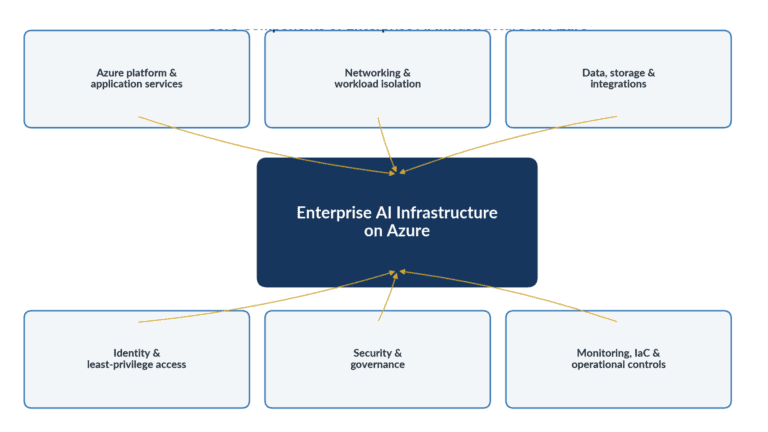
There is no single Azure architecture that fits every AI workload.
A customer-service assistant, internal knowledge agent, autonomous operations agent, document-processing system, and machine-learning platform may have very different requirements.
However, several infrastructure areas need to be considered across most enterprise deployments.
Core Components of Enterprise AI Infrastructure on Azure
Compute is one of the most visible parts of AI infrastructure, but it should be selected based on the workload rather than treated as the starting point for every architecture.
An enterprise AI solution might include:
- Azure-hosted AI models
- Microsoft Foundry services
- Azure OpenAI
- Containers
- Azure Kubernetes Service
- Azure Functions
- App Service
- APIs
- Databases
- Search services
- Storage
- Integration services
- Agent orchestration components
Some organizations need substantial model-training capacity. Others consume hosted models and spend most of their infrastructure effort on the application, data, integration, identity, and security layers surrounding those models.
This distinction matters.
A company building an AI agent that summarizes emails and updates business systems may have very different infrastructure priorities from a company training a large proprietary model.
For many enterprise IT teams, the practical infrastructure challenge is therefore less about building an “AI data center” and more about creating a secure application environment around AI services.
Networking and Workload Isolation
AI applications frequently communicate with more systems than traditional applications.
An agent may connect to:
- A model endpoint
- A vector store
- Internal databases
- SaaS applications
- Microsoft Graph
- Internal APIs
- External APIs
- Storage accounts
- Monitoring services
- Business applications
Each connection expands the environment that needs to be understood and controlled.
Networking decisions should therefore answer several basic questions.
Which services need public connectivity?
Which can use private connectivity?
What outbound destinations does the workload require?
Should internal AI workloads and externally accessible workloads be separated?
Which systems should be able to communicate with one another?
How will DNS, routing, firewalls, private endpoints, and network security controls be handled?
Microsoft’s current AI adoption guidance recommends using Azure landing zones as the starting point for AI workloads and notes that organizations can segment internal and internet-facing AI environments where appropriate.
The goal is not to make the environment complicated for its own sake.
It is to avoid a situation where an AI workload receives broader network access than it actually requires.
Data Access and Storage
AI systems are useful because they work with information.
That also makes data access one of the most important infrastructure design areas.
Enterprise AI applications may use information from:
- Azure Storage
- SQL databases
- Data lakes
- Search indexes
- SharePoint
- Exchange Online
- CRM systems
- ERP platforms
- Document repositories
- Internal APIs
- Third-party services
The architecture therefore needs to answer more than:
Where is the data stored?
It should also answer:
Which AI workload can access it?
What can the workload do with it?
Does it need read access, write access, or both?
Is access restricted to a specific dataset, mailbox, application, or business unit?
How is that access audited?
For retrieval-based AI systems, the quality of the retrieval architecture matters. But from an enterprise infrastructure perspective, authorization matters just as much.
An AI application should not gain access to sensitive information simply because that data exists somewhere the application can technically reach.
Identity for AI Agents and Applications
Identity is becoming one of the defining infrastructure issues for enterprise AI.
Traditional applications already need machine identities. AI agents add new considerations because they may make decisions, select tools, invoke APIs, and perform actions dynamically.
Microsoft defines a workload identity as an identity assigned to software such as an application, service, script, or container so that it can authenticate and access other resources. Within Microsoft Entra, workload identities include applications, service principals, and managed identities. Microsoft is also introducing dedicated agent identity capabilities for AI workloads. (Microsoft Learn)
The correct identity model depends on the way the AI operates.
An application performing a backend process may use a workload identity.
An Azure-hosted workload may be able to use a managed identity.
An agent acting autonomously may require its own governed agent or workload identity.
An assistant acting strictly on behalf of a signed-in employee may instead rely on delegated user access for certain operations.
These are different trust models.
The important point is that an organization should not automatically treat every AI agent as a user, nor should it give every AI system one shared service account with broad privileges.
Identity should tell security and operations teams what is acting and provide a foundation for deciding what that entity is allowed to do.
Permissions and Least-Privilege Access
Authentication answers:
Who or what is this?
Authorization answers:
What is it allowed to do?
Both matter.
An AI agent with a well-designed identity but excessive permissions still creates unnecessary risk.
Permissions can exist at several layers, including:
- Azure RBAC
- Microsoft Entra permissions
- Microsoft Graph permissions
- Application roles
- Database permissions
- API scopes
- Exchange permissions
- SaaS authorization
- Storage permissions
The objective should be to grant the minimum access required for the workload to perform its intended function.
Microsoft’s Microsoft Graph permissions guidance recommends requesting the least-privileged permissions needed by the application. . Microsoft Graph supports delegated access, where an application acts on behalf of a signed-in user, and application access, where the application operates using its own identity. (Microsoft Learn)
That distinction becomes especially important for AI agents.
An agent that needs to read one user’s calendar should not automatically receive access to every calendar in the tenant.
An application that analyzes documents from one repository should not automatically gain access to unrelated enterprise data.
Least privilege reduces the potential impact of a compromised application, incorrect configuration, faulty workflow, or unintended agent action.
Security and Governance
Enterprise AI security cannot be reduced to model safety.
The surrounding application and infrastructure can introduce just as much risk.
Security teams need to consider:
- Identity
- Permissions
- Secrets
- Network exposure
- API access
- Data access
- Privileged operations
- Logging
- Configuration
- Vulnerability management
- Policy enforcement
- Agent actions
AI agents make this especially important because they can behave differently from conventional software.
Traditional applications generally execute predefined paths. Agents may select tools and determine which actions to take based on context.
Microsoft’s identity guidance notes that AI agents create distinct security considerations because they can reason, make decisions, and take actions. Its emerging agent identity model is designed to distinguish agent activity from workforce and traditional workload activity while allowing organizations to apply right-sized access.
Governance should therefore define technical boundaries around the agent.
The agent may decide which permitted action is appropriate.
It should not decide which permissions it is allowed to have.
Those boundaries should remain under deterministic infrastructure, identity, and security controls.
Monitoring and Observability
A production AI workload needs more than uptime monitoring.
IT and security teams may need visibility into:
- Resource availability
- Application performance
- Model/API failures
- Authentication attempts
- Identity activity
- Permission failures
- API calls
- Network activity
- Data access
- Agent actions
- Security alerts
- Configuration changes
This becomes particularly important when agents perform actions rather than simply generate responses.
Suppose an AI assistant reads an email, checks a business system, creates a calendar event, and sends a message.
If something goes wrong, operations teams need enough evidence to reconstruct what happened.
Was the agent authenticated correctly?
Which identity did it use?
Which resource did it access?
Which API operation occurred?
Was the operation permitted?
Did an upstream system fail?
Were any policies triggered?
Observability therefore needs to cover the application path and the access path, not just CPU usage and response times.
Why Azure Landing Zones Matter for Enterprise AI
An Azure landing zone provides a structured environment for deploying Azure workloads with consistent governance, security, and operational controls.
Microsoft describes Azure landing zones as an architecture for governing, securing, and scaling Azure environments. The model separates the shared platform landing zone from application landing zones, where individual workloads are deployed and operated within centrally defined guardrails.
AI does not replace that model.
Microsoft’s current Cloud Adoption Framework guidance for AI workloads specifically recommends continuing to use Azure landing zones for AI workloads and deploying AI resources into application landing zones like other Azure workloads.
This matters because AI projects often begin outside established IT patterns.
A development team may create a new subscription, connect a model, deploy a few resources, and start experimenting.
As the project grows, that isolated environment can create issues around:
- Subscription organization
- Identity
- Policy
- Networking
- Logging
- Security
- Resource ownership
- Cost management
- Environment separation
An Azure AI landing zone approach brings the workload into an enterprise structure before those issues become harder to resolve.
A landing zone can establish the guardrails while still giving the AI application team enough flexibility to build and operate the workload.
That balance is important.
Platform teams should provide a secure foundation.
AI teams should still be able to move at the speed required by the application.
How AI Agent Infrastructure Changes the Risk Model
An AI application that answers a question and an AI agent that takes action are not the same operational problem.
Agents can interact with tools, systems, and APIs.
For example, an agent may:
- Search SharePoint
- Read an email
- Create a calendar event
- Update a CRM
- Query a database
- Generate a report
- Trigger a workflow
- Submit a request
- Call another agent
Each capability creates another authorization decision.
This changes the infrastructure conversation.
With a traditional chatbot, a security team might primarily ask:
What information can users send to the model?
With an agent, the team also needs to ask:
What can the agent do after receiving that information?
That requires clear boundaries around identity, authorization, APIs, tool access, and enterprise resources.
Agents should not gain broad standing permissions simply because broad permissions make development easier.
The more actions an agent can perform, the more important it becomes to separate:
reasoning from authorization.
The AI can determine what action appears useful.
The surrounding application and security architecture should determine whether that action is actually permitted.
Identity and Authorization for AI Agents Should Be Designed Before Go-Live
Identity problems become harder to fix once AI applications are already integrated with business systems.
Before production deployment, IT teams should understand exactly how each workload will authenticate.
Questions worth answering include:
Is the agent acting independently or for a signed-in user?
Does it require its own workload or agent identity?
Can a managed identity be used instead of stored credentials?
Which systems trust that identity?
Which permissions are assigned to it?
Who owns the identity?
How are privileges reviewed?
What happens when the agent is retired?
Microsoft’s current identity direction reflects the growing importance of this problem. Microsoft Entra now distinguishes agent identities from conventional workforce and workload identities so organizations can identify agent activity and manage access at scale.
Not every AI application will require a specialized agent identity.
But every production AI workload should have an intentional identity model.
“Whatever account worked during development” is not an identity architecture.
Microsoft Graph Permissions and Resource Scoping for AI Agents
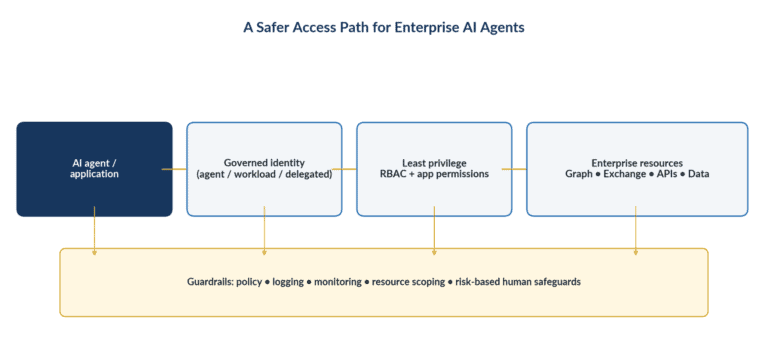
Microsoft Graph gives applications access to a wide range of Microsoft 365 and Entra data.
That makes it extremely useful for enterprise AI.
It also means permissions need careful attention.
An AI agent might use Microsoft Graph to work with:
- Calendars
- Users
- Groups
- Files
- Teams
- SharePoint
- Directory information
Microsoft Graph supports both delegated and application permissions.
With delegated permissions, an application acts on behalf of a signed-in user.
With application permissions, the application can operate without a user being present. Depending on the permission, that access can be broad.
This is where a convenient development decision can become an enterprise security problem.
Imagine an agent that only needs to process messages from a defined set of operational mailboxes.
Granting an application unrestricted mailbox access across the organization would create a much larger access boundary than the business requirement justifies.
Exchange Online provides Role Based Access Control for Applications for granular, resource-scoped application access. Microsoft describes this model as allowing administrators to assign application permissions together with a resource scope that determines which mailboxes the application can access.
For enterprise AI agents using Microsoft 365, the architecture should therefore consider both:
What Graph operation does the application need?
and:
Which resources should that operation apply to?
That second question is easy to miss and often just as important.
Infrastructure as Code Makes Enterprise AI Environments Repeatable
AI infrastructure will change.
New applications will be deployed. Networks will evolve. Security controls will be updated. Permissions will change. Development, testing, and production environments may need to be created repeatedly.
If the environment exists primarily as a collection of manual Azure portal configurations, maintaining consistency becomes difficult.
Infrastructure as Code addresses that problem by defining infrastructure in code that can be stored, reviewed, versioned, and deployed repeatedly.
Common Azure approaches include:
- Bicep
- Terraform
IaC can help teams:
- Standardize resource deployment
- Review changes before implementation
- Track configuration history
- Reduce environment drift
- Recreate infrastructure more consistently
- Apply repeatable security settings
- Support development, test, and production environments
- Transfer ownership more easily between teams
This is particularly useful for AI environments because experimentation often moves quickly.
Without deployment discipline, a temporary AI pilot can quietly become an important production system built on undocumented manual decisions.
Production infrastructure should be able to answer:
What is deployed?
Why is it configured that way?
How would we reproduce it?
IaC makes those questions much easier to answer.
Common Enterprise AI Infrastructure Mistakes
The technology involved in AI may be new, but many infrastructure failures come from familiar cloud architecture problems.
Treating a Proof of Concept as a Production Architecture
A successful demo proves that the use case can work.
It does not prove that the environment is secure, scalable, supportable, or governed.
Production review should happen before the pilot architecture becomes difficult to change.
Granting Broad Permissions for Convenience
Development teams often request broad permissions because they reduce friction.
Those permissions can remain long after the original requirement disappears.
Production AI should use the narrowest access that supports the business function.
Skipping Identity Design
Shared secrets, long-lived credentials, and poorly understood service principals make it difficult to determine who or what is performing an action.
Identity should be part of the architecture, not an implementation detail added later.
Giving AI Workloads Unnecessary Network Access
Not every AI service requires unrestricted inbound or outbound connectivity.
Network access should reflect actual dependencies.
Ignoring Microsoft 365 Resource Boundaries
A Graph permission may provide significantly more access than the application needs.
Where services support resource-scoped authorization, teams should evaluate whether narrower access is appropriate.
Building Everything Manually
Portal-only environments are difficult to reproduce and review.
Manual configuration also increases the risk that development, test, and production environments drift apart.
Monitoring Only Application Performance
Knowing that an AI application is responding does not tell you whether it is accessing the correct resources or performing authorized actions.
Identity, access, and security telemetry matter too.
Treating AI Security as Only a Model Problem
Prompt injection, model behavior, and output safety matter.
So do cloud configuration, identity, permissions, APIs, secrets, networking, and data access.
Enterprise AI security needs both perspectives.
How Enterprise AI Infrastructure Supports Secure AI Adoption
Strong infrastructure does not slow AI adoption.
Done well, it makes adoption easier to sustain.
When teams know where workloads should be deployed, how identities are created, how access is approved, how environments are monitored, and how infrastructure is provisioned, every project does not have to solve the same foundational problems again.
A consistent Azure AI infrastructure foundation can support:
Faster production deployment
Teams start with defined architecture patterns instead of designing basic controls from scratch for every workload.
Better access control
Identity and authorization models make it easier to determine which systems and data sources each AI workload should reach.
Stronger governance
Policies, logging, network standards, and deployment practices can be applied consistently.
Lower operational risk
Infrastructure that is documented and repeatable is easier to troubleshoot, maintain, and change.
Better security visibility
Centralized identity, access, and infrastructure telemetry helps security teams understand what AI applications are doing.
Easier scaling
New AI use cases can be added within an established Azure structure rather than creating isolated environments each time.
This is particularly important as organizations move from one or two AI experiments to multiple AI applications and agents operating across departments.
At that point, infrastructure stops being a project-specific concern.
It becomes an enterprise capability.
Planning to move AI applications or agents into production on Azure? Horizons can help design and build the Azure infrastructure, identity, access, and security foundation alongside your internal IT team, with documented architecture and Infrastructure as Code for long-term ownership.