
AI Agent Governance with Microsoft Entra Agent ID: What IT Leaders Need to Know
A year ago, most enterprise AI conversations were about chatbots and Copilot licenses. Now the questions coming from AI teams sound different. They ask whether the agent can read from a SharePoint library, whether it can update a record in the CRM, and whether it can call an internal API when a ticket comes in.
Those are access requests, and they usually land on the desks of the infrastructure and identity teams. Someone there has to work out what it means to give software that makes its own decisions a set of permissions in the production tenant.
That is the core of AI agent governance. It has less to do with how the model behaves and more to do with identity, permissions, ownership, monitoring, and lifecycle. Microsoft built Microsoft Entra Agent ID to handle a large part of that problem. This guide explains what it does, where it fits, and what to put in place before agents move from pilot to production.
In this article: What AI agent governance means · Why it’s becoming urgent · Where Entra Agent ID fits · How Agent ID works · Designing permissions · Conditional Access for agents · Lifecycle governance · Monitoring · A seven-control framework · Common mistakes · FAQs
Key Takeaways
- AI agent governance covers identity, access, ownership, monitoring and lifecycle, as well as model behavior.
- Every production agent needs a defined purpose, a named human sponsor, and access scoped to its job.
- Microsoft Entra Agent ID gives agents purpose-built identities. Blueprints let you apply the same controls across groups of related agents.
- Policies written for human users don’t automatically protect agents. Plan agent-specific Conditional Access from the start.
- Agent ID sits inside a broader Azure foundation of networking, RBAC, logging, and operational ownership, and it doesn’t replace any of it.
What is AI agent governance?
AI agent governance is the set of policies, technical controls and responsibilities an organization uses to manage AI agents from the day they’re built until the day they’re retired.
For an IT team, it comes down to a handful of questions you should be able to answer for any agent in your environment:
- Which agents are running, and what is each one supposed to do?
- Who is accountable for it?
- Which systems and data can it reach, and who approved that access?
- How is its activity monitored?
- When will its access be reviewed, and when will it be removed?
These questions matter more for agents than for a chatbot, because an agent does more than answer. It might pull a contract from SharePoint, query a database, update a ticket and trigger a downstream workflow, all within one task. Each of those steps depends on an identity and an authorization decision somewhere in your environment. Good governance puts clear boundaries around those decisions.
Why AI agent governance is becoming an IT priority
Early generative AI adoption was mostly people typing into a chat window. Agentic systems work differently. An agent receives a goal, chooses which tools to use, and works through several steps without anyone approving each action. That shift creates three problems that identity and infrastructure teams will recognize.
Non-human identities multiply. You already manage service accounts, app registrations, and automation identities. Agents add another category, and it grows quickly. If you don’t have a structured approach, you end up with agents nobody can inventory or match to an owner.
Permissions pile up. An agent starts with access to one document library. Six months later it also has access to a mailbox, two APIs and a data warehouse, because each new use case added a permission and none took one away. It’s the familiar over-privileged service account problem, but agents are created much faster than service accounts ever were.
Ownership fades. When the developer who built the agent moves to another team, it becomes unclear who approves new access, who reviews the agent, and who shuts it down.
For organizations in financial services, healthcare and legal, these gaps become audit findings quickly. An auditor will expect you to show which non-human identities can reach regulated data and who signed off on that access. Microsoft itself lists over-permissioned access, policy mismatches, and gaps in lifecycle and accountability among the main security concerns for agent identities.
Where Microsoft Entra Agent ID fits
Microsoft Entra Agent ID brings AI agents into the same identity and access model you already use for people and applications. Each agent gets its own identity, which it uses to authenticate in Microsoft Entra ID. Microsoft’s governance, protection, lifecycle and monitoring features then apply to those identities.
It’s important to be clear about the scope. Entra Agent ID covers the identity and access layer of AI governance, not all of it. You still need controls for data classification, application architecture, responsible AI, networking, security operations and compliance.
Identity is still the foundation for everything else, though. If you can’t reliably tell which agent did something, you can’t limit what it can reach or investigate it when something goes wrong.
If you’re already building on Azure AI Foundry, you may have seen this in practice. We covered how agent identities work alongside RBAC and on-behalf-of authentication in our article on building intelligent workflows with Azure agentic AI.
How Microsoft Entra Agent ID works
IT leaders need to understand three concepts.
Agent identity blueprints
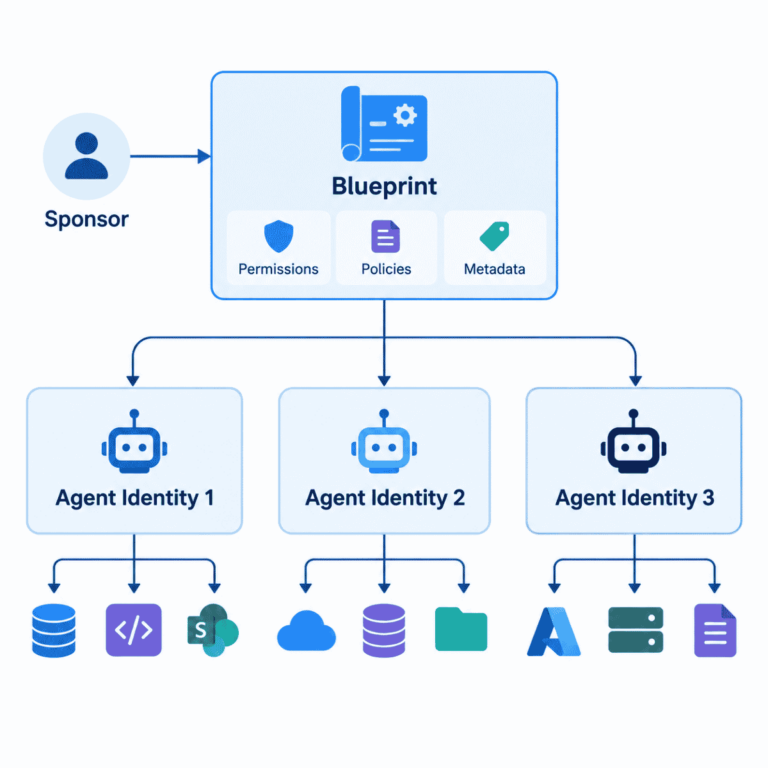
A blueprint is a reusable template for a family of related agents. You define the permissions, security settings, metadata, ownership, and governance requirements once. Every agent instance created from the blueprint then inherits them.
This becomes valuable once there are more than a few agents. Suppose the finance team wants 20 invoice-processing agents. You don’t want to design 20 sets of identity controls, and a blueprint lets you approve one pattern and apply it to all of them. Microsoft also recommends filling in the description, tags, and publisher fields on each blueprint so that it records the agent’s purpose, scope, and owning team. In practice, that metadata becomes the start of your agent inventory.
One identity per agent
Microsoft recommends giving every agent instance its own identity instead of letting several agents share one. The reason is traceability. If an agent behaves unexpectedly, your security team can see exactly which agent authenticated, review what it did, and disable it without affecting others.
This addresses a common problem with older setups. When agents authenticate as the hosting application, every agent on the same compute shares one identity. The logs then show only that “the app” did something, which doesn’t help an investigation.
Sponsors and owners
An identity by itself doesn’t make anyone accountable. Microsoft’s model assigns a sponsor, who is responsible for the agent’s business purpose and lifecycle, and owners, who handle technical administration. Microsoft Entra ID Governance can also keep sponsorship current when people change roles or leave, so agents aren’t left without an owner.
The rule to remember is simple: every production agent should have a named human who is accountable for it.
Designing what agents can access
Once an agent has an identity, you have to decide what that identity is allowed to do.
Start with least privilege
Take an agent that summarizes policy documents from one SharePoint site. It doesn’t need tenant-wide SharePoint access, anyone’s mailbox, or broad Microsoft Graph permissions. Granting wide access during development saves time, but if the agent, its credentials, or its workflow are compromised, the damage is much larger.
Microsoft’s Agent ID best practices are direct on this point. They say to grant only what each agent needs, not to hand out broad permissions for convenience, to limit access to specific scopes, APIs, or sites, and to review permissions regularly.
Know every layer where authorization happens
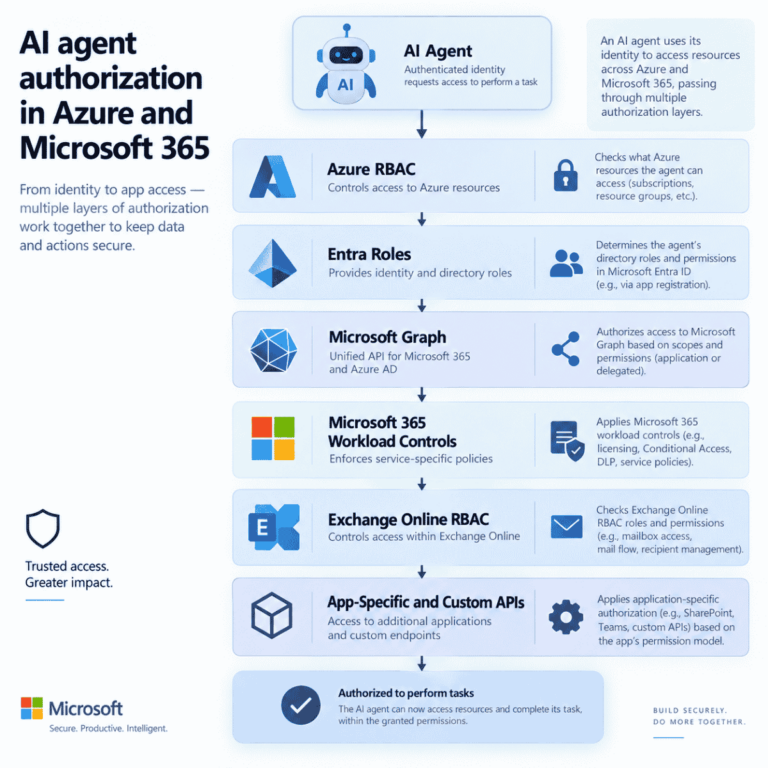
Depending on the architecture, a single agent can pass through several separate access-control systems:
- Azure RBAC
- Microsoft Entra roles
- Microsoft Graph permissions
- Microsoft 365 workload controls and Exchange Online RBAC
- Application-specific authorization
- Custom APIs and data platforms
These are not one permission system, and treating them as one is how agents end up over-privileged. Agent identities can hold both application permissions, for autonomous work, and delegated permissions, for acting on behalf of a user. They can also receive Azure RBAC roles and Entra built-in roles, just like standard service principals. You need to design the identity model and the authorization model together.
If your agents run on Azure, this connects directly to how you design your other workload identities.
Use agent-specific Conditional Access policies
A human user brings signals that Conditional Access relies on, such as an MFA prompt, a managed laptop, an interactive sign-in, and a location. An autonomous agent running in a container can’t provide any of these.
Microsoft therefore supports Conditional Access policies built specifically for agents. With Conditional Access for Agent ID, agents are treated as first-class identities: their access requests are evaluated the same way as those of users or workload identities, but with logic specific to agents. You can also combine this with Entra ID Protection for agents, which detects risky agent behavior such as reaching for unfamiliar resources or making an unusually high number of sign-in attempts. It can then respond automatically.
Two practical points for your planning:
- Audit your existing policies before agents go live. Microsoft recommends checking broad rules such as “all users must use MFA” so they don’t unintentionally block agent flows. It suggests excluding agent identities from those rules and creating dedicated agent policies, tested first in report-only mode.
- Check licensing early. Conditional Access for agents requires Microsoft Entra ID P1 or P2 and a Microsoft Agent 365 license for each user. Network controls also require Microsoft Entra Internet Access. It’s better to raise this during planning than to discover it after the agents are deployed.
Don’t assume your current identity policies already protect production agents. In most tenants, they don’t yet.
Govern the full AI agent lifecycle
Governance begins before deployment and ends only when the identity is deleted. A workable lifecycle looks like this:
Create → Approve → Grant access → Monitor → Review → Revoke → Retire
- Create: Document what the agent does and which systems it needs.
- Approve: Assign a sponsor and confirm the agent is suitable for production.
- Grant access: Give only the permissions the approved use case requires.
- Monitor: Capture authentication, access, risk, and operational activity.
- Review: Confirm that ownership, purpose, and permissions are still valid.
- Revoke: Remove access that’s no longer needed.
- Retire: Disable the identity and clean up any remaining access.
One step worth adopting is what Microsoft calls a production handshake. Before an agent goes live, an identity admin checks that the blueprint and sponsor are correct, the required permissions have been consented to, Conditional Access applies, and the agent is in the right groups or administrative units. Microsoft also recommends keeping blueprint definitions and permission configurations in source control, so agent setup is versioned like any other infrastructure.
Entra ID Governance supports these steps with access packages and sponsor management, which keep agent access from lasting longer than it should.
Monitor agent identity and access activity
Approval is not the end of governance. Security and operations teams need to keep watching, especially for signals like these:
- Failed token requests, repeated or in bursts
- Unexpected changes to permissions or roles
- Risk detections
- Attempts to reach resources the agent hasn’t been authorized for
- Changes of ownership or sponsor
- Identities that have gone quiet or been abandoned
This is where giving each agent its own identity pays off. When something looks wrong, your SOC is investigating a named identity it can trace, restrict or disable, rather than an anonymous process. Retain those logs according to your compliance requirements. For regulated organizations, that retention period is usually already defined.
One inventory tip: before the Agent ID platform existed, some Microsoft tools, including earlier versions of Copilot Studio and Azure AI Foundry, secured agents with standard application service principals. Those still appear alongside agent identities in the Entra admin center. Your first inventory should therefore include both.
A practical AI agent governance framework for Microsoft environments
You don’t need a large program to get started. Start with seven controls that your development, infrastructure, IAM, security and governance teams can all understand:
Governance area | The question IT should be able to answer |
Inventory | What agents are running in our environment? |
Ownership | Who is accountable for each one? |
Identity | Which governed identity does each agent use? |
Access | What resources and data can it reach? |
Policy | Which security controls apply to it? |
Monitoring | Can we investigate its activity and risk? |
Lifecycle | How is access reviewed, revoked and retired? |
If you can’t answer one of these today, that’s where to begin.
Agent governance has to fit your Azure foundation
Entra Agent ID shouldn’t be set up as a separate project. A production agent also depends on:
- Your Azure landing zone architecture
- Network segmentation and private connectivity to AI services
- Workload and managed identities
- Azure RBAC and Microsoft Graph permission design
- Logging, monitoring and security operations
- Secrets and key management where needed
- Infrastructure as Code, documentation and operational handoff
The aim is to extend the identity, networking, security and monitoring foundation you already have to cover AI workloads, not to build a separate governance setup for AI. Microsoft’s open-source AI Landing Zone reference architecture is a good place to see how these parts fit together. For most mid-sized organizations, the practical work is adapting a pattern like that to their existing tenant. This is why Azure Landing Zone Design & Implementation often has to happen before agents start connecting to enterprise data.
Common AI agent governance mistakes
Sharing one identity across several agents. It makes auditing harder, and a single compromised credential affects all of them.
Leaving development permissions in production. The broad access that made the pilot easy to build should not carry over into production.
Assuming user policies cover agents. Human and non-human identities behave differently, and agents need their own policies.
Launching agents without a sponsor. An agent without an owner is very hard to review, and even harder to retire.
Forgetting the end of the lifecycle. Every deployment plan should include how the identity will be disabled and its access removed.
Treating governance as a one-time sign-off. Agents, applications and data all change, so permissions have to be reviewed repeatedly.
Build governance before adoption accelerates
The hardest AI governance work tends to arrive after adoption has already taken off. By then you may be trying to find dozens of agents, work out who built them, and remove permissions that should never have been granted.
It’s much easier to set up the identity and governance model first. Microsoft Entra Agent ID gives Microsoft-focused organizations real tools for this. They work best when identity, permissions, Azure architecture, monitoring and ownership are designed together.
The goal for internal IT isn’t only to get an agent working. It’s to run an environment where every agent can be identified, controlled, monitored and supported by your own team after go-live.
Planning to move AI agents into production?
Horizons Consulting is a Microsoft Solutions Partner for Infrastructure (Azure) and Data & AI. We help IT, security and platform teams build the identity, permissions and landing zone foundation that production AI workloads need, and we work alongside your team so everything is documented and handed off. We don’t create an ongoing dependency.
Book a free 30-minute AI Infrastructure Review with a certified Azure architect. We’ll look at your current setup and show you what needs to be in place before your agents reach production.
Related:
AI Agent Governance, Security & ROI services ·
Azure AI Agent Development & Integration ·
Microsoft Copilot Deployment & Enablement
Frequently asked questions
It's the set of policies, technical controls, responsibilities and lifecycle processes that manage how AI agents operate. It usually covers identity, permissions, ownership, security policies, monitoring, access reviews and retirement.
It's Microsoft's identity and security framework for AI agents. It gives agents purpose-built identities and extends Entra authentication, authorization, protection, governance and lifecycle management to them.
For enterprise use, yes. Unique identities give you better traceability, tighter access control and cleaner lifecycle management. Microsoft recommends a unique identity for each agent instance instead of shared identities.
No, but they work together. A managed identity is a supported credential type on a blueprint, and it's the most secure option for agents running on Azure. It's a credential on the blueprint, though, not a replacement for the agent identity. The agent identity is what you govern, what receives permissions, and what appears in sign-in logs.
Agent ID currently supports agents built with Azure AI Foundry and Copilot Studio. Check Microsoft's documentation for updates, since support is expanding.
Yes. Conditional Access for Agent ID evaluates agent context and risk when deciding whether to allow access. Design agent-specific policies instead of relying on policies built for human users, and confirm your licensing first.
Inventory your existing agents, including older ones that may exist as ordinary service principals. Assign a sponsor to each, map the resources it needs, apply least privilege, add agent-specific Conditional Access, turn on monitoring, and schedule regular access reviews.