
Designing Azure Landing Zones to Accelerate IT Integration After a Merger
Clarify merger integration goals and constraints
Before you touch Azure, you need a clear, shared picture of what the landing zone must enable for the merged organization.
Key questions to answer with IT, security, and business leaders:
What must be integrated in the first 90–180 days?
- Identity (AD/Entra ID, HR systems, MDM)?
- Connectivity (MPLS, SD‑WAN, VPN, ExpressRoute)?
- Critical workloads (ERP, CRM, line‑of‑business apps)?
What is the integration model?
- Absorption (Org A’s platform becomes the standard and Org B is migrated)
- Best‑of‑both (converged new platform)
- Coexistence (parallel stacks with selective integration)
What is the risk posture?
- Are there strict compliance needs (e.g., PCI DSS, HIPAA, ISO 27001)?
- Are there regulated geos (EU, China, Gov clouds) that need separate architectures?
What is the Azure maturity level?
- One org already uses Azure landing zones vs. both are net‑new.
- Existing IaC (Terraform/Bicep) vs. mostly portal‑driven deployments.
Output: a short “Merger Cloud Integration Charter” that defines:
- Target Azure tenant model (single tenant vs. multi‑tenant coexistence)
- Target management‑group hierarchy and subscription strategy
- Compliance/residency constraints
- Timeline and priority workloads
This charter steers your landing zone design decisions and prevents scope creep later.
Understand Azure landing zone concepts and design areas
Azure landing zones are Microsoft’s recommended blueprint for building a secure, scalable, well‑governed Azure platform. For a merger, they give you a standard, repeatable foundation that both companies can adopt.
Core concepts from the Cloud Adoption Framework:
Platform landing zone (PLZ): The shared platform (“hub”) for identity, connectivity, and management services that all application landing zones depend on.
Application landing zones: The subscriptions or environments where workloads actually live, segmented by business unit, environment (dev/test/prod), or regulatory boundary.
Design areas (high‑level):
- Identity and access management
- Network topology and connectivity
- Resource organization (management groups and subscriptions)
- Security, governance, and policy.
- Management and monitoring
- Business continuity and disaster recovery
- Cost management
Microsoft’s design areas guidance gives you a checklist of topics to cover before deployment. In a merger, you use those same areas but add a “dual estate” lens: how each design choice affects both legacy environments and the path to convergence.
Example: If Company A has a flat subscription model and Company B has strict segregation by business unit, your new management group design needs to support both during transition.
Choose an implementation option aligned to the merger
Microsoft defines several ways to deploy and manage the platform landing zone. Your merger context and skills determine which to use.
Implementation options at a Glance
From the “Platform landing zone implementation options” guidance:
Infrastructure‑as‑Code (IaC) approach – recommended
- Azure landing zone IaC accelerator using Azure Verified Modules (AVM) with:
- Terraform modules for platform landing zones
- Bicep modules for platform landing zones
- You can also use AVMs independently outside the accelerator.
Portal‑based approach
- Azure platform landing zone portal accelerator for organizations that lack IaC skills or want a visual “Deploy to Azure” experience.
Why IaC is strongly preferred:
- Repeatability across business units and regions
- Ability to version, review, and roll back changes
- Faster, safer evolution of policies, networking, and shared services over the life of the merger
How to pick for a merger scenario
Use this quick decision guide:
Choose Terraform AVM + IaC accelerator if:
- At least one org already uses Terraform for cloud infra.
- You need cross‑cloud or hybrid consistency (e.g., some workloads in AWS or on‑prem with Terraform state).
Choose Bicep AVM + IaC accelerator if:
- You want Azure‑native tooling and the teams are familiar with ARM/Bicep.
- You want to lean into Azure’s roadmap and native experiences.
Choose portal accelerator only if:
- You must move fast and have no IaC skills yet.
- You treat this as a stepping‑stone and plan to adopt IaC later.
For a merger integration program, it is almost always worth investing in IaC up front because you will be iterating the platform continuously as you onboard business units and rationalize services.
Plan the IaC‑based platform landing zone deployment
Microsoft’s IaC accelerator for platform landing zones follows clear phases that map well to a merger integration roadmap.
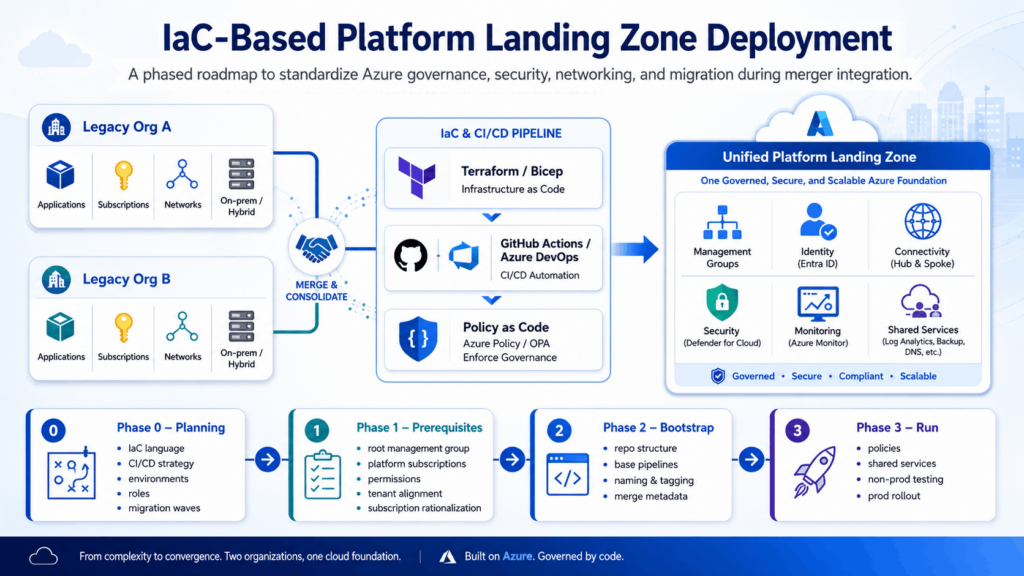
Phase 0 – Planning
Key planning tasks based on the implementation‑options article:
Select:
- IaC language (Terraform vs. Bicep)
- Version control system (Azure Repos, GitHub, GitLab, etc.)
Decide CI/CD strategy:
- GitHub Actions or Azure DevOps pipelines to deploy the platform landing zone.
Define environments:
- At minimum: non‑prod (integration testing), prod (central platform).
Map responsibilities:
- Platform engineering, security, networking, identity, and app teams’ roles in PR reviews and approvals.
In a merger, add:
- Migration waves: which subscriptions, networks, and workloads from each org will be onboarded to the new landing zone in each wave.
- Coexistence strategy: whether you will integrate legacy subscriptions into the new management‑group hierarchy or keep some as “legacy” under a separate group until retired.
Phase 1 – Prerequisites
The implementation‑options article describes Phase 1 as configuring credentials and subscriptions required for deployment. Tasks typically include:
Establishing:
- A root management group for the merged enterprise.
- Initial platform subscriptions (Management, Connectivity, Identity).
- Setting up appropriate Azure AD/Entra ID permissions and service principals for the IaC pipelines to deploy resources.
- Ensuring billing alignment and subscription ownership across the merged entities.
For mergers, you also need:
- Tenant alignment:
- If there are two Entra tenants, decide on consolidation vs. cross‑tenant management for an interim period.
Subscription rationalization:
- Decide which legacy subscriptions will be migrated into the new management‑group structure and which will remain isolated.
Phase 2 – Bootstrap
The accelerator uses a PowerShell module to bootstrap the Azure environment and version control system.
Bootstrapping typically:
- Configures repo structure for IaC (e.g., directories for management groups, policies, and networking).
- Sets up base pipelines that can deploy the platform landing zone code into Azure via CI/CD.
This is where you:
- Integrate your organizational naming and tagging standards.
- Add merge-specific metadata (e.g., “legacyOrg” tag) to help track which resources originated from which organization during the transition.
Phase 3 – Run (customize and deploy)
In this phase, you customize the IaC to reflect your organization’s requirements and trigger pipelines to deploy the platform landing zone.
Merger-specific considerations:
- Encode both organizations’ policies:
For example, one org enforces private endpoints everywhere, the other has a more relaxed stance. Decide the target policy and codify it in Azure Policy initiatives assigned at the management‑group scope.
- Include integration‑specific shared services:
Central Log Analytics workspaces, Azure Firewall or third‑party NVA, Azure Bastion, DNS zones, Key Vaults, and identity bridges that will be used to connect hybrid estates.
- Plan for incremental rollout:
Use feature branches to test new policies or network designs in a non‑prod platform subscription before promoting to prod.
Design the management group and subscription structure
Your management group structure is the backbone of governance and will heavily influence how cleanly you can integrate two IT estates.
Typical enterprise patternTypical enterprise pattern
A common CAF-aligned structure looks like:
- Root management group (e.g., “contoso‑corp” for the merged org)
- Under root:
- “Platform” (for Management, Connectivity, Identity subscriptions)
- “Landing‑Zones” (for app subscriptions)
- “Sandbox”
- “Decommissioned” or “Legacy”
You then assign policy sets at each level:
- At root: global guardrails (e.g., restrict regions, enforce tagging, require Defender for Cloud).
- At Platform: networking and shared‑services policies (deny public IPs, enforce NSGs, private endpoints).
- At Landing‑Zones: workload policies by environment and data classification.
Merger-specific approaches
You can structure landing‑zones to support both orgs during transition:
Option A: Separate trees under a single Landing‑Zones group
- “Landing‑Zones/OrgA”
- “Landing‑Zones/OrgB” Over time, new workloads go under a converged “Landing‑Zones/Shared” branch.
Option B: Straight to converged by business domain
- “Landing‑Zones/Finance”, “Landing‑Zones/Sales”, “Landing‑Zones/Industrial”, etc.
- Legacy subscriptions from both orgs are moved into the relevant domain groups.
Either way, ensure:
- Each app team gets dedicated subscriptions per environment (Dev, Test, Prod).
- Regulatory workloads get their own branches (e.g., “RegulatedEU”) with stricter policies.
Identity and access design for a merged landscape
Identity is often the most complex part of a merger, and your landing zone must accommodate hybrid identity reality.
Key decisions:
- Tenant consolidation:
Single Entra ID tenant vs. long-term multi‑tenant coexistence.
- Hybrid identity:
How existing on-prem Active Directory forests from each org will connect to Azure (AD Connect, Entra Connect cloud sync, Entra Domain Services).
- Role-based access control:
Standardized RBAC roles and PIM (Privileged Identity Management) for platform and workload teams across both organizations.
Platform landing zone considerations:
- Use a dedicated Identity subscription under the Platform management group to host identity‑related services like Entra Domain Services, domain controllers if needed, and privileged access workstations.
- Define role mappings for merged teams:
Platform admins, security admins, network engineers, workload owners, auditors.
- Centralize policies for MFA, conditional access, and just‑in‑time privilege.
For merger integration, plan transitional patterns:
- Cross‑tenant management using Entra cross‑tenant access and B2B if consolidation takes time.
- Temporary overlapping role models to avoid blocking operations while you standardize.
Network topology and connectivity for hybrid estates
Connectivity is the other critical pillar when merging IT estates. Your landing zone’s Connectivity subscription is where you standardize how both companies reach Azure and each other.
Platform‑level network design
Following enterprise landing zone patterns:
Create a Connectivity subscription under the Platform management group.
- Implement:
- Hub-and-spoke or Virtual WAN based on scale.
- Azure Firewall or NVA for centralized egress control.
- VPN gateways and/or ExpressRoute gateways for on‑prem connections.
- DNS private zones and resolver setup for cross‑environment name resolution.
Landing zone connectivity goals for mergers:
- Provide a single, predictable set of connectivity patterns to Azure for both organizations (e.g., standard route tables, DNS patterns, firewall rules).
- Support “dual‑connectivity” during transition:
- On‑prem A → Hub
- On‑prem B → Hub
- Optional: A↔B via Azure hub if you want to consolidate backhaul.
Onboarding existing networks and subscriptions
You may have:
- Legacy “flat” VNets are deployed directly in subscriptions.
- Overlapping address spaces between Org A and Org B.
Steps:
- Inventory all existing VNets, address spaces, and connectivity patterns from both organizations.
- Define the merged IP addressing strategy (avoid overlap in the new model).
- Create new regional hubs (if needed) and connect legacy VNets via peering or Virtual WAN.
- Gradually migrate workloads into standardized spoke VNets aligned to the landing zone network pattern.
Azure Policy at the Platform level can enforce the use of central DNS, deny creation of public IPs, and require NSGs and private endpoints to keep things consistent as teams onboard.
Governance, security, and policy in a merger context
Your platform landing zone should encode a unified, risk‑appropriate security and governance model so both organizations’ workloads inherit consistent controls
Policy and guardrails
Use Azure Policy and initiatives:
At root:
- Allowed locations
- Required tags (e.g., business unit, data classification, legacyOrg)
- Defender for Cloud is enabled for all subscriptions
At Platform:
- Deny public IPs on critical resources, require NSGs on subnets, and enforce private endpoints for PaaS services.
At Landing‑Zones:
- VM SKU restrictions for cost, required use of Key Vault for secrets, workload‑specific compliance initiatives (e.g., PCI, HIPAA).
Merger twist:
- Align divergent standards:
If Org A has stricter controls, treat them as the baseline and bring Org B up to that level.
- Use “Audit” effects initially:
Start with policies in audit‑only mode to surface non‑compliance without breaking workloads, then switch to “Deny” in phases.
Security operations and monitoring
Your Management subscription (part of the Platform landing zone) hosts shared management services:
- Log Analytics workspaces
- Azure Monitor (alerts, action groups)
- Microsoft Defender for Cloud plans
- Automation accounts, Update management
Design points:
- Use central Log Analytics workspaces and Defender plans applied at the management group level, so both orgs’ workloads report to common security tooling.
- Standardize log retention and diagnostic settings via policy for all new resources.
- Integrate with existing SIEM/SOAR platforms from one or both organizations or choose a new standard.
Operational model: Who owns what after the merger?
Landing zones fail in practice when ownership is unclear. Define a clear operating model alongside your design.
Core roles:
Platform engineering:
- Owns IaC, platform landing zone code, and CI/CD pipelines.
- Manages shared services, network hubs, and management tooling.
Security and compliance:
- Owns policies, security baselines, Defender configurations, and audits.
Workload teams:
- Own application landing zones, resource groups, and application‑level security.
FinOps / cost management:
- Owns budgets, chargeback/showback, and tagging compliance.
For a merger, you also need:
- Transition governance:
- Joint architecture board to approve major changes to the landing zone during integration.
Playbooks:
- “How to onboard a new business unit”
- “How to migrate a legacy subscription into the new hierarchy”
- “How to request platform changes”
Step‑by‑step rollout plan for the merger
This section stitches the previous pieces into a practical “do this next” sequence.
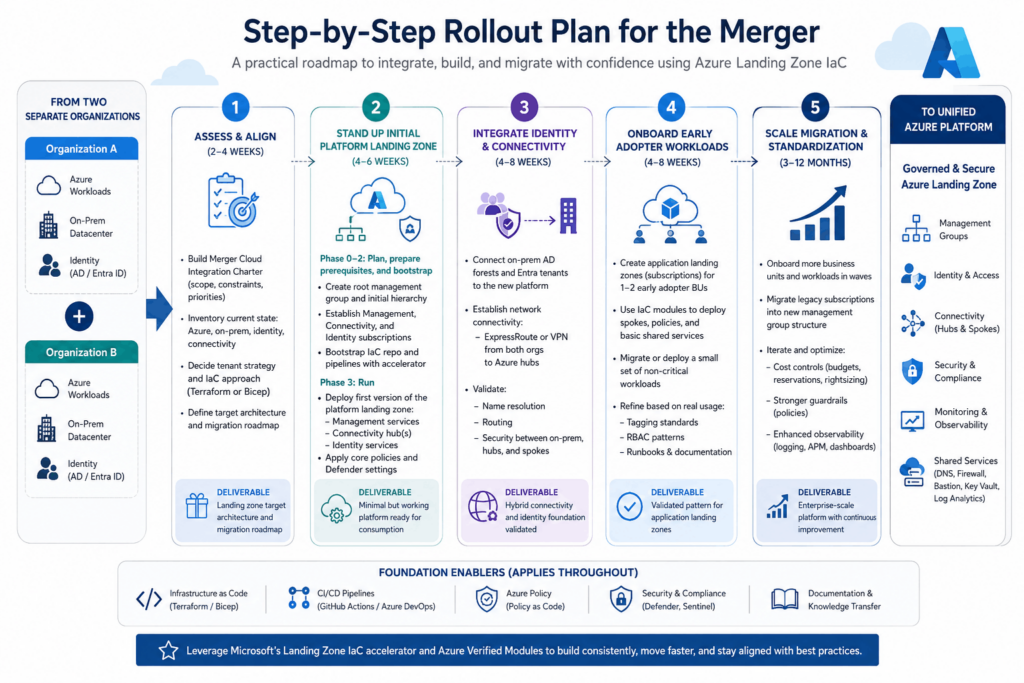
Step 1 – Assess and align (2–4 weeks)
Build the Merger Cloud Integration Charter (scope, constraints, priorities).
Inventory:
- Current Azure implementations, if any, from both orgs.
- On‑prem environments and connectivity into Azure.
- Identity and directory topology.
Decide:
- Target tenant strategy.
- Whether to use Terraform or Bicep with the Azure landing zone IaC accelerator.
Deliverable: Landing zone target architecture and migration roadmap.
Step 2 – Stand up the initial platform landing zone (4–6 weeks)
Using the IaC implementation options guidance:
Phase 0–2: Plan, prepare prerequisites, and bootstrap:
- Create root management group and initial hierarchy.
- Establish Management, Connectivity, and Identity subscriptions.
- Bootstrap IaC repo and pipelines with the accelerator.
Phase 3: Run:
- Deploy first version of the platform landing zone:
- Management services
- Connectivity hub(s)
- Identity services
- Apply core policies and Defender settings.
At this stage, you have a minimal but working platform that both orgs can begin consuming.
Step 3 – Integrate identity and connectivity (parallel, 4–8 weeks)
Connect on‑prem AD forests and Entra tenants to the new platform per your chosen model.
Establish network connectivity:
ExpressRoute or VPN from both orgs’ data centers to the new Azure hubs.
Validate:
- Name resolution across domains.
- Routing and security between on‑prem, Azure hubs, and test spokes.
Deliverable: Hybrid connectivity and identity foundation that can support workload migrations and shared services access.
Step 4 – Onboard early adopter workloads in new landing zones (4–8 weeks)
Create application landing zones (subscriptions) for 1–2 early adopter business units.
Use the IaC modules to deploy their spokes, policies, and basic shared services configuration.
Migrate or deploy a small set of non‑critical workloads into these landing zones.
Refine:
- Tagging standards
- RBAC patterns
- Runbooks and documentation based on real usage.
Deliverable: Validated pattern for app landing zones that you can scale across the enterprise.
Step 5 – Scale migration and standardization (3–12 months)
Onboard more business units and workloads in waves.
Migrate legacy subscriptions into the new management‑group structure, applying policies carefully to avoid outages.
Iterate:
- Optimize cost controls (budgets, reservations, rightsizing).
- Improve guardrails (stricter policies as teams mature).
- Enhance observability (more detailed logging, APM, dashboards).
Throughout these steps, continue to leverage the Azure landing zone IaC accelerator and AVMs to avoid custom one‑off code and to stay aligned with Microsoft’s best practices.
Using Azure Verified Modules and the IaC accelerator effectively
Azure Verified Modules (AVM) for platform landing zones are reusable building blocks that help you assemble a compliant landing zone architecture in a repeatable way.
Benefits in a merger:
- Architectural consistency:
All new regions and subscriptions use the same modules for management, connectivity, security, etc.
- Reduced maintenance:
You track module versions rather than maintaining large custom templates.
- Faster onboarding:
New app landing zones can be provisioned using the same patterns, with minor configuration changes.
Typical usage pattern:
Use the accelerator to scaffold:
- Management‑group hierarchy
- Policy assignments
- Management, Connectivity, Identity subscriptions
Use AVMs independently to:
- Add or expand logging, network resources, or security features as the merger evolves.
Special cases: sovereign, regulated, and multi‑cloud
Mergers often introduce extra complexity: sovereign cloud usage, strict regulatory domains, or existing non-Azure estates.
- Sovereign and cross‑cloud
The implementation options include references to enterprise‑scale landing zones for Azure Government and China regions. If either org uses these:
- Deploy separate platform landing zones following the appropriate reference implementation.
- Use a similar management group and subscription pattern but within the specific cloud boundary.
- Harmonize policy and security patterns as much as the regulations allow.
2. Highly regulated workloads
Use separate management group branches and landing zones for regulated workloads:
- Assign dedicated policy initiatives (e.g., PCI‑DSS, HIPAA, ISO 27001) at that branch level.
- Restrict resource types and enforce stricter network isolation (no internet‑facing endpoints, private endpoints only).
This helps you integrate the estate without compromising compliance while still benefiting from shared platform services where allowed
Practical tips and anti‑patterns to avoid
Based on field guidance and landing zone best practices:
Do:
- Start with the platform first:
Don’t migrate major workloads until you have a minimum viable platform landing zone in place.
- Make everything IaC:
Treat portal changes as exceptions and back‑port them into code.
- Use “Audit” before “Deny”:
Especially when onboarding legacy subscriptions from both orgs.
- Keep a small, empowered platform team:
Avoid every decision requiring a committee; use architecture guardrails and PR reviews instead.
Avoid:
- Building two separate platforms that never converge:
This defeats the purpose of an integrated merger strategy.
- Over‑engineering the first iteration:
You can expand to multi‑region, advanced DR, and complex network topologies later; start with a solid but simple design.
- Ignoring operational readiness:
Ensure runbooks, monitoring, and on‑call processes are in place before onboarding critical workloads.
Example: High-level sequence for a mid‑market merger
To make this concrete, here’s an illustrative sequence:
- Week 1–2:
Define the charter, pick Terraform with the AVM accelerator, design the management group structure, and design the network topology.
- Week 3–5:
Bootstrap the repo and pipelines and deploy the platform landing zone (Management, Connectivity, and Identity subscriptions).
- Week 5–8:
Connect on-prem networks, integrate Entra/AD, and deploy basic policies in audit mode.
- Week 8–12:
Onboard the first business unit from Org A and Org B into new app landing zones, migrate a few non‑critical workloads.
- Month 4–12:
Wave-based migration of remaining workloads, alignment of security standards, retirement of legacy patterns, and introduction of more advanced capabilities (multi‑region DR, additional regions).
Over time, the Azure landing zone becomes the standard integration backbone for all new initiatives, not just the merger.