
Microsoft AI Governance Framework: A Practical Guide for Enterprise IT Leaders
Most enterprises have stopped asking whether employees should be allowed to use AI. The copilots are already deployed, somebody in finance has built an agent, and a data science team has a workload running in Azure. The questions that matter now are harder and more specific.
Who owns that agent? What can it reach? Which identity does it authenticate as, and what is that identity allowed to do? Where does it run, what gets logged, and who reviews its access in six months? If it starts behaving oddly on a Friday afternoon, can anyone reconstruct what it did?
A Microsoft AI governance framework is what connects those answers. It is not another policy document, and it is not a product you can buy. It is the set of decisions you make once, apply consistently, and attach to an owner, so that each new AI project starts from an approved pattern instead of a blank page.
This guide maps the seven layers that framework needs to cover, what sits in each one, and which Microsoft control implements it. Where we have written a deeper technical guide on a layer, it is linked. Microsoft’s own Cloud Adoption Framework AI governance guidance takes the same lifecycle view: assess risk, document policy, enforce policy, monitor, and it maps onto the NIST AI Risk Management Framework if your auditors ask.
Why AI governance cannot be one product
The most common mistake is treating this as a tool-selection exercise. There is no single Microsoft console that answers every governance question, because the controls live in different places by design.
Entra handles identity and access. Purview covers data discovery, classification, and protection. Azure Policy enforces resource standards. Azure RBAC governs what an identity can do to Azure resources. Microsoft Graph permissions decide what an application or agent can reach across Microsoft 365. Agent 365 is the control plane and registry for agents themselves. Defender and Sentinel provide the security telemetry.
Governance is the system you build from those parts, plus the ownership and process that make them stick. Buy a product, and you have a capability. Design the control system, and you have governance.
The seven layers
1. Business ownership and use-case classification
Governance starts before anything reaches production, with two names: a business owner accountable for the outcome and a technical owner who operates the thing. Microsoft’s agent guidance is blunt about why this sits first: you cannot govern agents you do not know exist, and an unowned workload is one nobody will review, fund, or retire.
Classify by what the system can do rather than by whether it is called AI. A read-only assistant that summarises approved documents and an agent that can modify finance records are different risk propositions even if they share a model. A workable scale runs from read-only assistants, through systems that generate recommendations, to those that modify business data, to agents that initiate actions, to high-impact workflows that require approval. The higher the tier, the more ownership, testing and monitoring it earns.
2. Data: what it can reach
One fact shapes this entire layer. Microsoft Copilot only surfaces organizational data to which individual users have at least view permissions. AI does not grant new access. It makes existing access usable at conversational speed, which means your AI data governance is mostly a verdict on how well your SharePoint permissions have been maintained for the last decade.
So the work is finding what is already overshared before AI finds it for you. Purview DSPM data risk assessments scan for exactly this: the default assessment covers the top 100 SharePoint sites by usage weekly, and item-level scanning flags content shared by external or anonymous links alongside its sensitivity label and site owner, which makes remediation assignable. Where a site cannot be fixed quickly, SharePoint Restricted Content Discovery exempts it from Copilot while you work through the permissions underneath.
We go further into this in AI readiness starts with data governance, and the Copilot-specific version is in our Microsoft 365 Copilot security assessment guide.
3. Identity: what it authenticates as
Every AI workload touching enterprise resources needs an identity model, and the right one depends on what the workload does. A system acting genuinely on behalf of a person may use delegated user context. An autonomous workload needs its own governed non-human identity. Azure-hosted workloads should use managed identities where supported, which removes stored credentials from the equation.
Agents add a layer. Microsoft Entra Agent ID gives each agent a distinct identity with ownership, lifecycle controls, and Conditional Access, and agent identity blueprints let you approve one pattern and apply it across a family of related agents rather than configuring twenty separately. The question is never “can this authenticate?” It is which identity should represent this workload, and who governs it for the rest of its life.
Full treatment in Azure managed identity for AI agents and AI agent governance with Microsoft Entra Agent ID.
4. Authorization: what it is allowed to do
Authentication and authorization are separate decisions, and conflating them is how an agent ends up correctly identified and wildly over-permissioned. A managed identity with Contributor across a subscription is no safer than a service principal with Contributor across a subscription.
Review the layers separately, because they are separate systems: Azure RBAC for Azure resources, Microsoft Graph permissions for Microsoft 365, and whatever scoping the target application provides. In Graph, the distinction that matters operationally is application permissions, which act without a user, versus delegated permissions, which act as one. Scope to the specific sites, mailboxes, or resources required. Separate read from write, because a workload that retrieves information should not acquire the ability to change it by default.
Then test the denials. Confirming that permitted actions work is half the job; confirming that everything outside scope is refused is the half teams skip. Our write-up of the Storm-3168 attack is what happens when that scope is wrong: two compromised service principals enumerated a tenant for fifteen hours and destroyed a large part of it in seven minutes, using access that had already been granted to them.
5. Infrastructure: where it runs
AI workloads do not need their own architecture. Microsoft’s position is that they belong in application landing zones inside your existing Azure landing zone, with the platform landing zone providing shared governance and workload landing zones giving teams room to operate inside those guardrails.
The questions are the ones you already ask of any workload: which subscription, which management group policies apply, how network access is controlled, whether private endpoints are required, how logs are collected, how secrets are managed, how cost is tracked, and who owns it after go-live. One AI-specific refinement from Microsoft’s agent guidance is worth adopting: keep public-facing agents away from internal data by separating them at the management group level, the corp and online split most landing zones already have.
Detail in Azure landing zone architecture, and if you need it built, Azure Landing Zone Design & Implementation.
6. Security controls for production AI
Identity is foundational and not sufficient. Production AI brings risks that identity design does not address: prompt injection, unintended actions, sensitive data in outputs, excessive tool access, internet-facing endpoints, and uncontrolled model or configuration changes.
Tool access deserves specific attention now that agents reach external systems through MCP servers. Agent 365 provides a Tools page for allowing and blocking them, which turns “what can this agent call?” from a design assumption into an enforced setting. On the detection side, Microsoft’s guidance points to Defender for Cloud AI threat protection, adversarial testing before release using the AI Red Teaming Agent, input and output filtering, and routing alerts into Sentinel.
Keep human approval risk-based. Putting a person in front of every AI action is neither practical nor useful, and teams rubber-stamp what they cannot meaningfully review. Identify the actions where a wrong decision creates real financial, legal, security, or operational consequences, and gate those.
7. Monitoring, auditability and lifecycle
A framework fails at the first incident if nobody can reconstruct what happened. The uncomfortable detail is that no single log source tells the whole story. Sign-in logs explain authentication; they do not show what the identity then did across Azure resources, Microsoft 365, or a custom application. A workable picture usually needs identity logs, Azure activity logs, resource diagnostics, Microsoft 365 audit data, application telemetry, and agent execution logs stitched together, with retention set deliberately rather than left at default.
Monitoring also serves operations, not only security. Cost, availability, failed actions, dependency failures, permission changes and usage patterns are what tell you an agent has drifted from its purpose or quietly stopped being used.
Lifecycle is the layer most often skipped, and it is where governance debt accumulates. Proofs of concept get abandoned, agents change purpose, integrations get replaced, and the identities and permissions stay. Access reviews, documented ownership changes, and a retirement process that removes identities, role assignments, secrets, and integrations are what stop the estate from growing in one direction only.
The framework on one page
| Layer | The Question It Answers | Example Control |
|---|---|---|
| Business Ownership | Who owns this workload? | Named business and technical owners, risk tier assigned |
| Data | What can it reach? | Purview DSPM assessment, classification, Restricted Content Discovery |
| Identity | What does it authenticate as? | Managed identity, workload identity or Entra Agent ID with a blueprint |
| Authorization | What is it allowed to do? | Scoped Azure RBAC and Graph permissions, denials tested |
| Infrastructure | Where does it run? | Application landing zone inside the governed platform |
| Security | What prevents unacceptable actions? | Network isolation, MCP tool allow-list, red teaming, approval gates |
| Monitoring | Can we reconstruct activity? | Identity, resource, application and agent telemetry with set retention |
| Lifecycle | How is it reviewed and retired? | Access reviews, ownership records, decommissioning process |
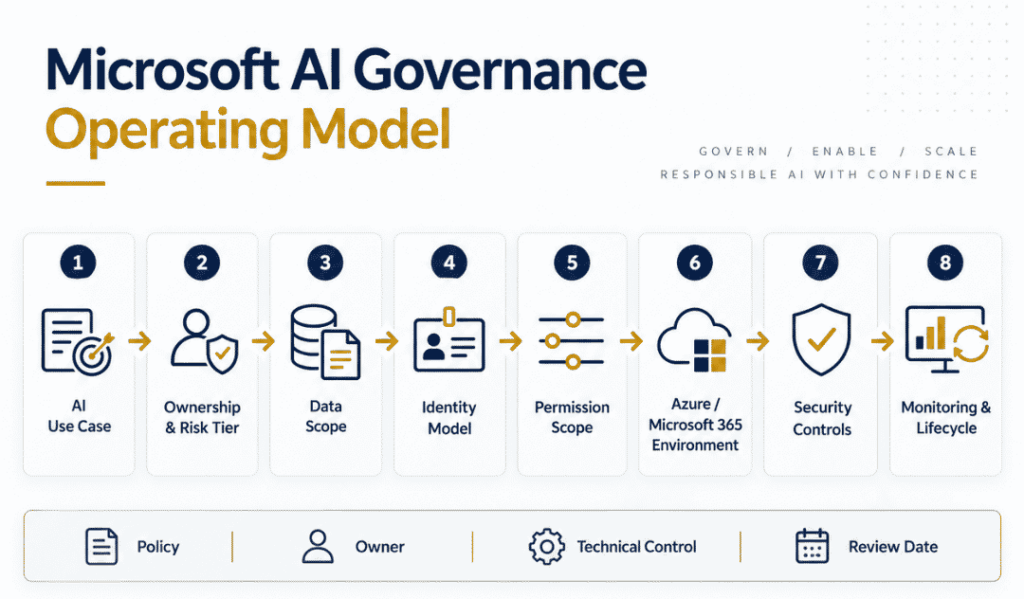
The table is not the deliverable. Each row only becomes governance when it has a named owner, a technical control that enforces it, a documented process and a review date. Without those four, it stays a policy document, and policy documents do not stop an over-permissioned agent.
Where agents need more than this
Agents combine access, reasoning, and action, which is why they get extra scrutiny. Microsoft’s Cloud Adoption Framework guidance on governing AI agents sets the baseline: one centralized, enforceable standard aligned to your existing identity, data, and security practices, rather than a parallel governance model run by whoever happens to be building agents.
In a Microsoft estate that resolves to two places. Microsoft Agent 365 is the control plane and registry of the inventory of what exists, who owns it, which platform built it, and what it can reach, including the MCP servers it is allowed to call. Entra Agent ID is the identity layer underneath, handling agent identities, blueprints, Conditional Access, and lifecycle. Microsoft has converged the registry experience into Agent 365 while Entra keeps identity, so the two portals answer different questions, and you need both.
One more surface that gets missed: most agent sprawl starts in Copilot Studio rather than in pro-code projects, where the controls are environment strategy and connector DLP policies. We cover that in Power Platform governance.
The mistakes that cost the most
Treating governance as policy alone. A document nobody enforces through a technical control protects nothing. Every requirement should land on identity, permissions, infrastructure, data or monitoring.
Deploying AI outside existing Azure governance. Standing up a separate environment to move faster bypasses the networking, identity, monitoring and policy controls you already run. It feels quick for one quarter and becomes the thing you unpick for the next four.
Reusing human identities for autonomous work. Fine when the workload genuinely acts for that person. A poor model for anything autonomous, which needs its own ownership, monitoring and retirement.
Assuming sign-in logs show what happened. Authentication and activity are different records. Decide early which additional resources, applications, and audit logs you need, because the time to discover the gap is not during an investigation.
Letting permissions outlive their purpose. AI projects change faster than access reviews. This is the single most common finding when we audit an environment, and our article on why AI agents fail covers the operational version of the same problem.
Before the next AI workload goes live
Run these questions against any AI workload heading for production. If several have no clear answer, the foundation needs attention before adoption widens rather than after.
| Area | Questions to Answer |
|---|---|
| Ownership | Is the use case documented? Named business and technical owners? Risk tier assigned? Higher-risk actions identified? |
| Data | Which sources can it reach? Has an oversharing assessment been run? Is sensitive content labelled and protected? |
| Identity | Is the identity model right for the workload? Is autonomous activity separated from human identity? Who sponsors it? |
| Permissions | Least privilege applied? Read and write separated? Graph permissions understood? Have denials been tested? |
| Infrastructure | Deployed inside the existing governance model? Network boundaries defined? Policy, monitoring and cost in place? |
| Security | Prompt injection considered? Tool and MCP access restricted? Secrets handled properly? Dev and production separated? |
| Monitoring | Can you trace authentication, resource activity and agent actions? Are retention and alerting defined? |
| Lifecycle | Are access and ownership reviewed on a schedule? Is there a retirement process for workloads, agents and identities? |
Build something IT can actually operate
The strongest governance model is not the one with the longest policy document. It is the one your team can run on a normal week without heroics.
That means the eight decisions above become part of the standard architecture and deployment process rather than a review triggered by a security concern. It also means they become repeatable. Once landing zones, identity patterns, permission models, monitoring, and handoff are established, each new AI project starts from an approved foundation and makes deliberate exceptions where the use case needs them, instead of redesigning governance from scratch and quietly getting it slightly wrong each time.
That is what a Microsoft AI governance framework is for: enough structure to keep control, not so much that nothing ships.
Review the foundation before scaling AI
Most organizations do not need another AI policy. They need to know whether their Microsoft environment can support AI safely and operationally: Azure architecture, data access, identity, Graph permissions, security, governance, monitoring, and operational ownership.
Horizons Consulting is a Microsoft Solutions Partner for Infrastructure (Azure) and Data & AI. We assess and build those foundations alongside your internal team, then document and hand over an environment your people can operate.
Book a free 30-minute AI Infrastructure Review with a certified Azure architect.