Power Platform Governance: 8 Areas IT Leaders Should Review Before Scaling Apps, Automation and AI
Microsoft Power Platform can move quickly from a productivity tool used by a few employees to a platform supporting important business applications, automated workflows, data connections, and AI-powered experiences.
That growth creates value, but it also changes what IT teams need to manage.
An app created to solve a departmental problem may later become part of an important business process. A Power Automate flow may connect several systems and move business data between them. Copilot Studio and AI agents can introduce another layer by allowing solutions to access information and perform actions on behalf of users.
Without a clear Power Platform governance model, organizations can lose visibility into what has been created, who owns it, where data is moving, and whether important solutions are being properly secured and supported.
Microsoft describes Power Platform governance as the policies, practices, and tools used to manage Power Platform securely, efficiently, and in line with organizational requirements. Microsoft guidance also emphasizes environment strategy, management at scale, governance controls, and management of the Default Environment as important parts of an effective governance program.
The objective should not be to stop employees from building solutions. The objective is to make sure innovation can scale without creating unnecessary security, data, compliance, or operational risk.
Table of Contents
- What Is Power Platform Governance?
- Do You Have a Clear Power Platform Environment Strategy?
- Do You Know Who Is Building Apps and Automation?
- Are Data and Connectors Properly Governed?
- Are App, Flow, and Automation Owners Clearly Defined?
- Are Security and Access Controls Appropriate for Business Risk?
- Do Business-Critical Solutions Have a Lifecycle Management Process?
- Are You Using Managed Governance Where It Adds Value?
- Does Your Governance Model Include Copilot Studio and AI Agents?
- How Mature Is Your Power Platform Governance?
- Power Platform Governance Review Checklist
- Frequently Asked Questions
Key Takeaways
- Power Platform governance should cover environments, makers, apps, flows, data, connectors, security, ownership, and lifecycle management.
- Organizations need a defined Power Platform environment strategy before adoption expands across departments.
- Data policies and connector controls are an important part of Power Platform data governance.
- Business-critical apps and flows need clear ownership and continuity planning.
- Security controls should reflect the sensitivity and business importance of each solution.
- Managed governance capabilities can give administrators more visibility and control as Power Platform adoption grows.
- Copilot Studio and AI agents should be included in the governance model rather than managed separately.
- Governance should mature as Power Platform moves from experimentation to business-critical operations.
What Is Power Platform Governance?
Power Platform governance is the combination of policies, roles, technical controls, monitoring practices, and operational processes used to manage how Microsoft Power Platform is adopted across an organization.
It can include governance for Power Apps, Power Automate, Dataverse, connectors, environments, makers, and AI-enabled capabilities.
Microsoft frames governance as a way to allow business teams to solve problems while still meeting IT and business compliance requirements. Its current guidance groups governance considerations around areas including architecture, security, monitoring, alerts, administrative controls, and environment management.
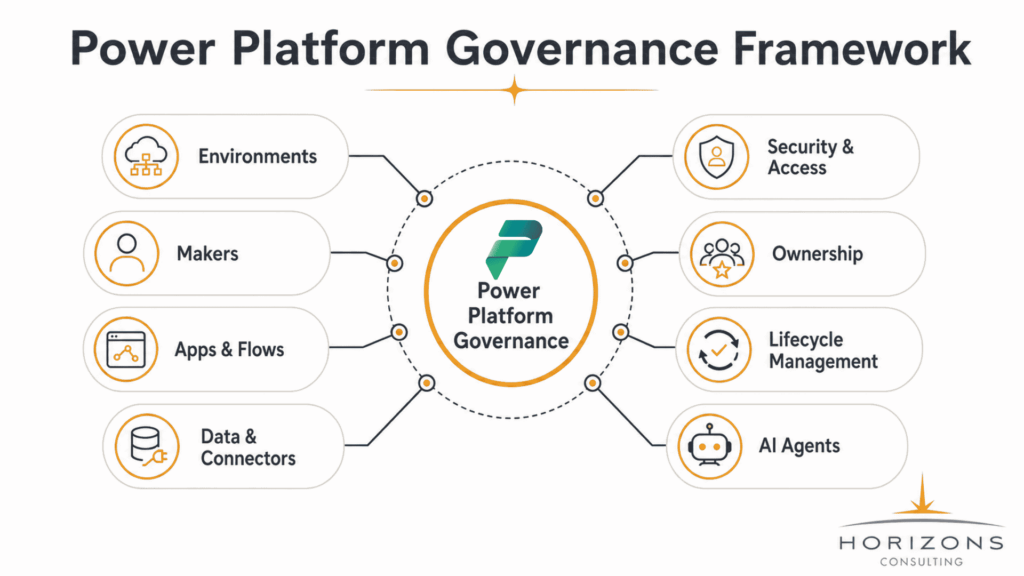
A practical governance model should help IT answer questions such as:
- What Power Platform environments exist?
- Who is creating apps and workflows?
- Which solutions have become business-critical?
- What data can those solutions access?
- Which connectors are being used?
- Who owns each app or flow?
- How are changes tested and deployed?
- Which solutions are inactive or no longer required?
- How are Copilot Studio agents being governed?
The answers become increasingly important as Power Platform adoption expands.
Power Platform Governance vs. Power Platform Administration
Governance and administration are closely related, but they are not the same.
Power Platform administration focuses on operating and configuring the platform. This may include managing environments, users, licenses, capacity, settings, and administrative access.
Power Platform governance goes further by establishing how the organization expects the platform to be used.
For example, an administrator can create a production environment. Governance determines when a production environment should be created, who should own it, which solutions belong there, how changes reach production, what data policies apply, and who reviews the environment over time.
Strong Microsoft Power Platform governance therefore requires both technical administration and clear business processes.
1. Do You Have a Clear Power Platform Environment Strategy?
Environments are one of the foundations of Power Platform governance.
Microsoft describes environments as containers for Power Apps, Power Automate, Dataverse, and related resources. Environments can be used for different audiences and purposes, including development, testing, and production.
Without a deliberate Power Platform environment strategy, solutions can grow in places that were never intended to support important business processes.
For example, a flow initially created as an experiment may later support a critical approval process. If it remains in an unmanaged environment without clear ownership or lifecycle controls, IT may not realize how important it has become.
A mature environment strategy may distinguish between:
- Personal development
- Departmental development
- Testing
- Production
- Business-critical applications
- Sandboxes
- Controlled AI or Copilot development
- Temporary or project-specific environments
The right structure depends on the organization’s size, risk profile, regulatory requirements, and Power Platform adoption model.
Questions IT Leaders Should Ask
- Who can create new environments?
- What is the purpose of each environment?
- Where should makers experiment?
- Where should production applications run?
- Are development, testing, and production appropriately separated?
- Who owns each environment?
- Which policies apply to different environment types?
- How are inactive environments identified and retired?
Microsoft specifically lists establishing an environment strategy and managing the Default Environment among its Power Platform governance best practices.
The goal is not to create unnecessary complexity. It is to give teams clear boundaries before adoption becomes difficult to manage.
2. Do You Know Who Is Building Apps and Automation?
Power Platform allows business users to solve problems without waiting for every solution to move through a traditional software-development process.
That is one of its strengths. It is also why citizen developer governance matters.
An organization may have professional developers, departmental makers, business analysts, administrators, and employees experimenting with Power Apps or Power Automate. Those groups do not necessarily need the same permissions, training, or support model.
Without visibility into who is creating solutions, IT can struggle to understand how quickly the platform is growing or which applications may require additional oversight.
Establish a Practical Maker Governance Model
Maker governance should help employees understand what they can build independently and when IT, security, compliance, or architecture teams need to become involved.
- Maker onboarding
- Training
- Development standards
- Acceptable-use guidance
- Approved data sources
- Documentation expectations
- Support responsibilities
- Escalation processes for business-critical applications
- Guidance for AI-enabled solutions
Microsoft’s managed governance capabilities include features intended to support more structured administration and governance at scale.
The objective should be governed enablement, not preventing innovation.
A business user building a small productivity solution may need lightweight controls. A maker developing an application that handles sensitive customer information or supports a critical workflow should face a higher level of review.
3. Are Data and Connectors Properly Governed?
Power Platform becomes more valuable when it connects business systems. Those connections also make Power Platform data governance essential.
Power Apps and Power Automate can interact with Microsoft services and other connected systems through connectors. That means IT leaders need visibility not only into the apps being created, but also into how those apps and flows interact with organizational data.
Important questions include:
- Which data sources are being accessed?
- Which connectors are approved?
- Which connectors introduce additional risk?
- Can sensitive data move into external services?
- Are policies consistent across environments?
- Are exceptions documented and reviewed?
Microsoft identifies data policies as an important governance mechanism for controlling how connectors can be combined. Administrators can classify connectors and define policies that apply across environments.
Review Power Platform DLP and Data Policies
Power Platform data policies, historically commonly referred to as Power Platform DLP policies, help organizations place boundaries around how connectors can be used together.
For example, an organization may want business data to remain within an approved group of enterprise services rather than be combined with a consumer or unapproved external connector.
Microsoft explains that data policies can classify connectors into groups and restrict which connectors can be used together within an application or flow. Certain connectors can also be blocked where supported.
However, creating a DLP policy once is not enough.
Organizations should review policies as:
- New connectors become available
- Business applications change
- New environments are created
- Data-classification requirements evolve
- Departments introduce new solutions
- AI and automation use cases expand
Power Platform data governance should be treated as an ongoing process rather than a one-time configuration exercise.
4. Are App, Flow, and Automation Owners Clearly Defined?
Some of the biggest Power Platform risks are operational rather than technical.
Consider a Power Automate flow that manages an important approval process. One employee created it. Their account owns the connections. The workflow runs successfully for months, and eventually the business begins depending on it.
Then that employee changes roles or leaves the company. Suddenly, a workflow IT did not realize was business-critical may require urgent attention.
This is why Power Apps governance and Power Automate governance need to include ownership and continuity.
Organizations should identify:
- Solution owner
- Business owner
- Technical owner
- Data owner where applicable
- Support responsibility
- Critical dependencies
- Backup or secondary ownership
- Documentation requirements
Ownership should also be reviewed when employees change roles or leave the organization.
Treat Business-Critical Automation Like a Business System
An application does not need to be developed by a traditional software team to become important.
If employees depend on a Power App to perform a core task, or if a Power Automate flow moves information between critical systems, that solution deserves an appropriate level of operational oversight.
This may include documentation, monitoring, change controls, support planning, and recovery procedures.
Governance should therefore focus on business impact, not simply on who created the solution.
5. Are Security and Access Controls Appropriate for Business Risk?
Security should be built into Power Platform governance rather than treated as a separate concern.
Microsoft documents multiple layers involved in Power Platform access, including environments, environment roles, resource permissions, Microsoft Entra ID, Dataverse security roles, and data policies.
That means a security review should consider more than whether a user can open an application.
IT teams should understand:
- Who can access the environment?
- Who can create or modify resources?
- Who can use the application?
- What underlying data can users access?
- What permissions are provided through Dataverse?
- Which connections and connectors are involved?
- Is access still appropriate when users change roles?
Governance Should Reflect Application Criticality
Not every Power Platform solution requires the same level of control.
A simple internal app used by a small team to organize non-sensitive information has a different risk profile from an application that supports financial approvals, healthcare information, legal workflows, customer data, or regulated business processes.
Power Platform security best practices should therefore be applied based on factors such as:
- Data sensitivity
- Number of users
- External access
- Regulatory obligations
- Business criticality
- Connected systems
- Automation privileges
- Potential impact of failure
This risk-based approach allows organizations to maintain strong security without forcing every low-code solution through the same level of review.
6. Do Business-Critical Solutions Have a Lifecycle Management Process?
Power Platform solutions can begin informally and become important very quickly. That makes lifecycle management another important part of Power Platform governance best practices.
Organizations should consider how solutions move through Development → Testing → Approval → Production → Change → Retirement.
Without lifecycle standards, makers may develop directly in production, make changes without adequate testing, or leave obsolete solutions running long after they are needed.
Avoid Treating Production Like a Development Workspace
When a Power Platform solution supports an important business function, changes should be controlled enough to reduce avoidable disruption.
Organizations may need standards for:
- Development environments
- Testing
- Solution packaging
- Deployment
- Version control
- Change approval
- Rollback planning
- Documentation
- Production support
- Solution retirement
The level of process should reflect the importance of the solution. A departmental productivity app may need a lightweight lifecycle. A Power Platform solution integrated with finance, customer operations, or another critical process may require much stronger controls.
Plan for Retirement Too
Governance is not only about creating new solutions. IT should also determine when apps, flows, environments, connections, and other resources are no longer needed.
Inactive resources can increase administrative complexity and make it more difficult to distinguish valuable solutions from abandoned experiments.
A mature governance program therefore manages the full lifecycle, including decommissioning.
7. Are You Using Managed Governance Where It Adds Value?
As Power Platform adoption increases, manual governance becomes harder.
Microsoft’s managed governance capabilities are designed to help organizations manage environments at scale, apply governance rules more consistently, improve visibility, and respond to governance issues.
Current capabilities described by Microsoft include areas such as:
- Environment groups
- Governed settings
- Delegated administration
- Environment routing
- Governance recommendations
- Inventory visibility
- Environment visibility
- Capacity management
These capabilities can be particularly useful for organizations with many environments, business units, makers, and production solutions.
Managed Environments Are Not a Complete Governance Strategy
Tools can enforce controls, but they cannot define the organization’s operating model.
Before applying additional governance capabilities, organizations still need to decide:
- Who owns Power Platform governance?
- Which environments require stronger controls?
- What standards should makers follow?
- What applications are considered business-critical?
- Which data sources are acceptable?
- How often should governance be reviewed?
- Who responds when a governance issue is identified?
Technology should support those decisions rather than replace them. This is an important consideration when organizations evaluate Managed Environments in Power Platform as part of a broader governance strategy.
8. Does Your Governance Model Include Copilot Studio and AI Agents?
Power Platform governance is expanding beyond traditional low-code apps and flows.
As organizations adopt Copilot Studio and AI agents, governance must account for solutions that can retrieve information, interact with systems, trigger automation, and potentially perform actions.
Microsoft’s managed governance guidance explicitly connects Power Platform governance with the growing use of AI and emphasizes responsible management of data, environments, security, compliance, and resources.
For IT leaders, this means Copilot Studio governance should not sit outside the existing Power Platform governance model.
AI Introduces Additional Governance Questions
Before AI-powered agents scale across the organization, IT and security teams should understand:
- What information can the agent access?
- Which users can interact with it?
- Which connectors can it use?
- What actions can it initiate?
- Who created it?
- Who owns the business outcome?
- How are changes reviewed?
- How is activity monitored?
- What happens if the owner leaves?
- How are agents retired when no longer needed?
These are closely related to the same questions organizations already ask about Power Apps and Power Automate. The difference is that AI can increase the scale and autonomy of those interactions.
For organizations already working on AI readiness or data governance, Power Platform should therefore be part of that broader review.
AI readiness, data governance, Power Platform governance, and AI agent governance increasingly intersect.
How Mature Is Your Power Platform Governance?
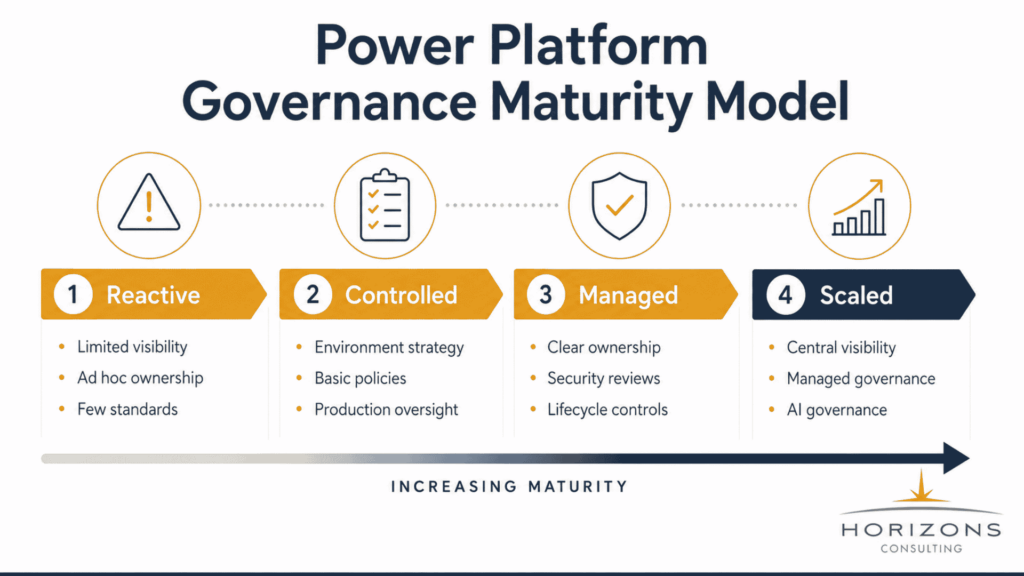
Organizations do not need to implement every governance control on day one. Governance should mature as usage, business importance, data sensitivity, and organizational risk increase.
A simple maturity model can help IT leaders understand where they currently stand.
Stage | Typical State | What It Looks Like |
Stage 1 – Reactive | Decentralized | Limited inventory; individual ownership; few documented policies; IT responds after problems occur. |
Stage 2 – Controlled | Basic standards | Environment strategy; administrators identified; data policies; maker guidance; important solutions tracked. |
Stage 3 – Managed | Operational governance | Clear ownership; development/production processes; monitoring; security reviews; lifecycle practices. |
Stage 4 – Scaled | Enterprise governance | Central visibility; consistent policies; managed governance; continuous improvement; AI and agent governance. |
Image alt text: Power Platform governance maturity model from reactive to scaled governance.
The objective is not maximum restriction. It is predictable, secure, and scalable adoption.
Power Platform Governance Review Checklist
IT leaders reviewing their environment should be able to answer the following questions:
- Do we know which Power Platform environments exist?
- Does each environment have a defined purpose?
- Are development, testing, and production appropriately separated?
- Do we understand who is creating apps, flows, and agents?
- Are makers given appropriate guidance and training?
- Do we know which apps and flows are business-critical?
- Does every important solution have clear ownership?
- Are Power Platform data policies reviewed regularly?
- Do we understand which connectors are being used?
- Are sensitive data sources appropriately protected?
- Are security permissions based on business need?
- Do we have a lifecycle process for critical solutions?
- Can we identify abandoned or inactive resources?
- Do we have a process for ownership changes when employees leave?
- Are Managed Environments or managed governance capabilities appropriate for our scale?
- Does our governance model include Copilot Studio and AI agents?
If several of these questions cannot be answered confidently, the organization may benefit from a broader governance review before Power Platform adoption expands further.
What This Means for IT Leaders
Power Platform can create substantial business value because employees can solve problems, automate repetitive processes, and build solutions much faster than traditional development models allow.
But the platform changes as adoption grows.
What begins as a collection of simple apps and workflows can eventually support sensitive data, departmental processes, integrations, customer operations, and AI agents.
At that point, IT leaders need visibility across environments, makers, apps, flows, data, connectors, identities, and AI agents.
The central governance question is no longer simply “Are people using Power Platform?” It becomes: “Do we understand what has been created, who owns it, what data it can access, how it is secured, and what happens when the business begins depending on it?”
Organizations that answer those questions early are better positioned to scale Power Platform without having to introduce governance only after operational or security problems appear.
Next Step: Review Governance Before Scaling Further
Organizations expanding Power Platform, Microsoft Copilot, automation, and AI should review governance alongside their broader AI readiness and data governance strategy.
A structured review can help identify gaps across environment management, data access, connector policies, ownership, security, application lifecycle, monitoring, and AI and agent governance.
The objective is not to slow adoption. It is to give teams a clearer foundation for scaling apps, automation, and AI responsibly.
Understand where governance gaps may exist across Power Platform environments, data, security, automation, and AI before expanding adoption across the organization.
Frequently Asked Questions
Power Platform governance is the framework an organization uses to manage how Power Apps, Power Automate, Dataverse, connectors, environments, and related capabilities are created and used.
It usually combines administrative controls with policies around environments, security, data access, maker responsibilities, application ownership, monitoring, lifecycle management, and compliance.
Microsoft describes governance as a way to help organizations use Power Platform efficiently and securely while maintaining control and meeting organizational standards.
Effective governance should not simply restrict makers. It should give employees clear boundaries so they can build solutions while IT maintains visibility over business risk.
The right governance model varies by organization, but several practices are especially important.
Organizations should establish an environment strategy, identify responsible administrators, manage the Default Environment, implement data policies, understand maker activity, document ownership for business-critical solutions, establish security standards, monitor usage, and create processes for application lifecycle management.
Microsoft’s governance guidance emphasizes dedicated administration, management at scale, environment strategy, governance controls, and Default Environment management.
Organizations adopting Copilot Studio or AI-enabled automation should also extend these governance practices to agents.
Power Platform data policies commonly associated with DLP help administrators govern how connectors can be used together.
This is important because Power Apps and Power Automate may connect to multiple data sources and services. Without appropriate policies, business information could potentially be combined with services that do not meet the organization’s intended governance requirements.
DLP should therefore be part of a broader Power Platform data governance strategy that also considers identity, permissions, environment boundaries, data sensitivity, and monitoring.
Managed governance capabilities in Power Platform are intended to help administrators manage environments more consistently and at greater scale.
Microsoft describes capabilities including environment groups, governed settings, delegated administration, environment routing, governance recommendations, inventory visibility, environment visibility, and capacity management.
These capabilities can help organizations improve administrative consistency, but they do not eliminate the need for policies, ownership, lifecycle processes, and security decisions. A strong governance strategy combines platform controls with a clear operating model.
Many of the fundamental governance requirements remain the same: organizations still need to understand ownership, permissions, data access, environments, connectors, security, and monitoring.
However, AI agents can introduce additional considerations because they may retrieve information, interact with services, trigger workflows, or perform actions.
Organizations should therefore understand what an agent can access, what it is allowed to do, who owns it, how changes are reviewed, and how activity is monitored.
For this reason, Copilot Studio governance and AI agent governance should be integrated into the organization’s wider Power Platform, data governance, and AI readiness strategy.