
Microsoft Ignite 2026: What Enterprise IT Teams Need to Know About AI Agent Visibility and Governance
AI agents are becoming part of everyday business operations. They can retrieve information, update records, interact with applications and complete tasks with limited human involvement. As organizations add more of them, IT teams face a growing question: which agents are running, what can they access, and who is responsible for what they do?
At Microsoft Ignite 2026, Microsoft announced new capabilities across Agent 365, Entra, Defender and Purview aimed at that question. The updates cover agent discovery, activity monitoring, access controls and risk management. For enterprise IT leaders, the question is no longer just how to deploy AI agents. It’s how to keep visibility and control as their use grows.
The short answer
At Microsoft Ignite 2026, Microsoft announced new Agent 365, Entra, Defender and Purview capabilities for finding, monitoring, securing and retiring AI agents. Local agent discovery in Defender and the Tools Registry are generally available. Shadow agent discovery, Dynamic Agent Risk and Purview DLP for local agents are in preview, so plan around what you can use today.
What's new in Microsoft Agent 365 at Ignite 2026?
Microsoft Agent 365 gives organizations a central place to register, observe and govern supported AI agents, including agents built on Microsoft platforms and connected third-party platforms. Microsoft made its Ignite announcements on November 17. Their availability differs, so the table shows which are generally available and which are still in preview.
Announcement | What it means | Availability |
Local agent discovery | Helps find supported local agents, and the MCP servers they use, on managed devices through Microsoft Defender. Microsoft says it covers more than 60 agent types. | Generally available |
Shadow AI agent discovery | Surfaces previously unmanaged agents in the Agent registry for review | Preview |
Dynamic Agent Risk | Combines runtime signals into one continuously updated risk assessment for each agent | Preview |
Multi-tenant agent management | Supports managing agents across multiple tenants from a central experience | Public preview |
Agent 365 Business Analytics | Shows agent usage, spending and business value | Frontier preview |
Tools Registry | Brings plugins, skills, MCP servers and connectors together in one place | Generally available |
Action Center | Surfaces inactive and ownerless agents for review and cleanup | Expected in private preview in December |
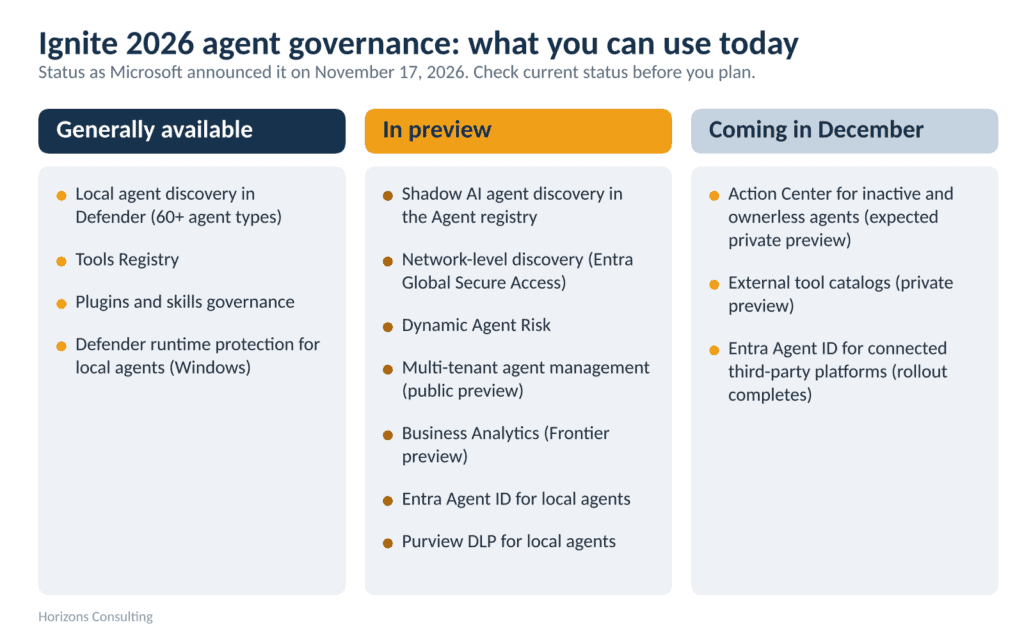
Microsoft also expanded governance for agent tools. Plugins and skills governance is generally available, while governance for MCP servers through Azure AI Gateway and LiteLLM is in preview.
These capabilities address different parts of one problem. An organization needs to know which agents exist, understand what they do, control their access and notice when their behavior needs attention. But most of the new controls are not generally available, and licensing varies. Microsoft says Business Analytics insights for Microsoft services need at least one Microsoft 365 Copilot license, insights for other services need an Agent 365 license, and Defender runtime protection for local agents needs Defender for Endpoint Plan 2. Check licensing, supported platforms and availability before you build these controls into production plans.
How can IT teams find AI agents they don't know about?
An organization may have approved agents running in Microsoft 365 or Azure while employees and development teams use other AI tools outside the approval process. Some agents run locally on managed devices. Others connect to cloud services or use tools to reach internal systems. That creates a visibility gap.
Consider an employee who uses a local AI coding agent. The agent may connect to internal repositories, development environments or business systems through an MCP server. Even if the employee’s access is legitimate, IT still needs to know what the agent can do with it.
Microsoft’s Ignite announcements expand discovery across Defender, Entra Global Secure Access and the Agent 365 registry. Local agent discovery in Defender is generally available. Network-level discovery and shadow AI discovery in the registry are in preview. Together they can help administrators identify supported local and shadow agents and examine their connections.
What should IT teams verify after discovery?
Discovery should lead to practical questions:
- Is the agent approved for business use?
- Who owns it and is responsible for its configuration?
- Which internal resources and external services can it reach?
- Does it use delegated user access or another supported identity model?
- Should its access be restricted until a security review is complete?
Finding an agent doesn’t make it safe. Coverage also depends on the supported platform, the deployed controls and the available telemetry, so agents outside that coverage still need other inventory and security processes. The point of discovery is to inform access and governance decisions.
How do you see what AI agents did after deployment?
An inventory shows what exists. It doesn’t necessarily explain what an agent did, and that matters once agents act across business applications. Say an agent is authorized to read from SharePoint and update records in another system. If a record is changed incorrectly, the operations team needs enough evidence to investigate: the agent involved, the tool it called, the operation it attempted, the timestamps and the outcome.
Agent 365 provides observability for supported agents, and integrations with Microsoft security and monitoring services help teams investigate activity. Microsoft also published new Azure Monitor and Foundry updates for investigating agent execution, evaluating results and finding operational issues. These can improve what administrators see, but they don’t guarantee a complete record of every agent action.
The practical requirement is to verify which events are actually captured and where teams can investigate them.
Review telemetry configuration, log access, retention and the monitoring coverage of each agent platform. For higher-impact workflows, monitoring should support incident investigation and give evidence of important actions and failures.
How do you control what AI agents can access?
Visibility alone isn’t enough. An agent can be registered, monitored and assigned an owner and still hold permissions that exceed its business purpose.
Agent identities and permissions
Microsoft Entra provides identity and access capabilities for supported AI agents. At Ignite, Microsoft announced that Entra Agent ID will automatically assign identities to supported local agents found by Defender or Entra Global Secure Access, starting with GitHub Copilot CLI and Claude Code, in preview. Support for governing agents from connected third-party platforms is also rolling out, and Microsoft says it completes in December.
Identity reviews should distinguish between an agent acting on behalf of a signed-in user and an agent operating with its own authorized identity, because the permission boundaries can differ. An agent that only summarizes documents shouldn’t automatically be able to modify records, send communications or administer resources. Where supported, use appropriately scoped permissions, review effective access and test that unauthorized operations are denied.
For more detail, see Horizons’ guide to AI agent governance with Microsoft Entra Agent ID.
MCP servers, plugins and connected tools
MCP servers and other integrations let agents interact with external tools and enterprise systems. Microsoft’s Tools Registry, generally available as of the Ignite announcement, brings plugins, skills, MCP servers and connectors together so administrators can see these connections, including which agents use which tools. That matters because an agent’s effective authority depends on both its identity permissions and the capabilities its connected tools expose.

A useful review identifies:
- Approved MCP servers, plugins and connectors.
- The actions each integration permits.
- Which agents and users can invoke those actions.
- Whether sensitive or high-impact operations need additional approval.
Registering a tool isn’t proof that every operation it allows is safe.
Sensitive data protection
Microsoft Purview also protects enterprise information that agents use. At Ignite, Microsoft announced Purview data loss prevention for Microsoft and key local agents, along with more flexible policy scoping, in preview in the Purview portal. These controls can extend data protection policies to more AI interactions, subject to product support and configuration. IT teams should still review existing data permissions, sensitivity labels, sharing settings and protection policies. An AI governance program shouldn’t rely on a single product control.
How do you manage AI agent risk over its lifecycle?
An agent’s risk doesn’t stay the same after deployment. Its permissions may change, new tools may be connected, and it may start handling more sensitive information or working in a different business process.
Microsoft’s Dynamic Agent Risk, in preview at Ignite 2026, combines runtime signals into one continuously updated risk assessment. It appears in the Microsoft 365 admin center, Defender, Entra, Intune and Purview, and can help security teams spot agents that deserve closer attention.
But a risk score is only one part of governance. You still need a process for reviewing changes and deciding what to do. If an agent approved to retrieve information is later given permission to update financial records, that change should trigger a review of its access, monitoring and approval requirements.
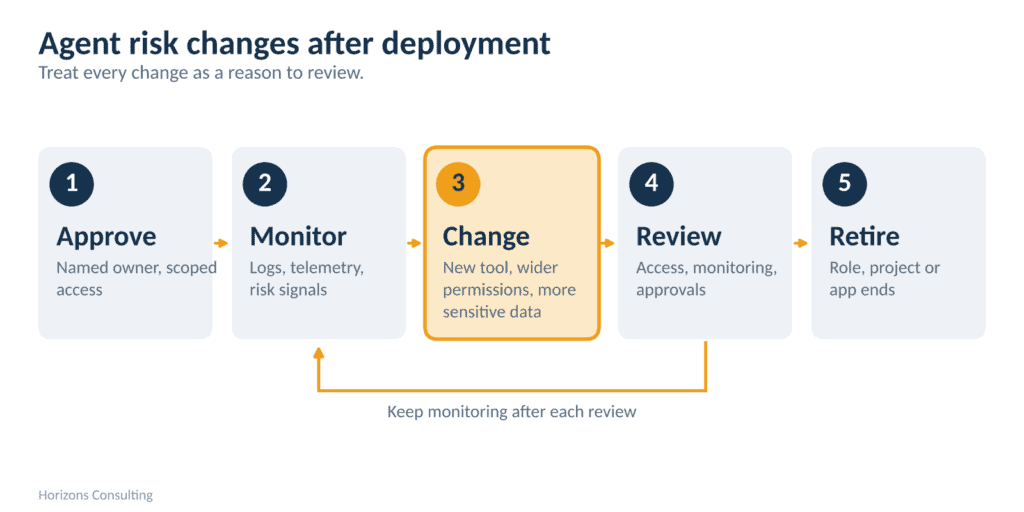
Lifecycle matters too. When an employee changes roles, a project ends or an application is retired, the agents and connections around it may no longer be needed. Administrators should be able to find inactive or ownerless agents, review their permissions and retire them. Microsoft expects its new Action Center for inactive and ownerless agents to enter private preview in December. These capabilities can support the work, but clear internal responsibility remains essential.
What six AI agent governance checks can IT teams run now?
You don’t have to wait for every Ignite feature to reach general availability. These six checks are a practical starting point.
Governance area | What IT teams should review |
1. Agent inventory | Identify approved agents and the discovery coverage available for local, cloud and third-party agents. |
2. Ownership | Confirm each approved agent has a named technical owner and an accountable business owner. |
3. Identity and permissions | Review how agents authenticate, which permissions they hold and whether access matches their intended tasks. |
4. Tools and connections | Document APIs, MCP servers, plugins and other integrations. Review their permitted operations and resource scope. |
5. Monitoring and investigation | Confirm which agent activities are recorded, where telemetry is available and whether important actions can be investigated. |
6. Lifecycle management | Set up reviews for permission changes, inactive agents, missing owners and agent retirement. |

Apply the checks according to risk. A read-only internal knowledge assistant and an agent that can change financial or customer records don’t need identical safeguards. Higher-impact actions may call for stronger access limits, more monitoring, human approval and more frequent reviews. Test your controls too. A documented policy is useful, but an access-denial test is stronger evidence that an agent can’t perform an unauthorized action.
What does Microsoft Ignite 2026 mean for enterprise AI governance?
Ignite 2026 shows a growing focus on managing AI agents after they’re deployed. New discovery, monitoring, identity and risk capabilities can help IT teams answer operational questions that matter more as agent use grows. But technology alone doesn’t create governance. Organizations still need to define who approves agents, who owns their access, how activity is reviewed and what happens when an agent behaves unexpectedly.
A sensible next step is to review your current AI deployments against those responsibilities, find the gaps and decide which new Microsoft capabilities fit your environment.
Horizons Consulting helps enterprise IT teams assess the identity, security, infrastructure and data governance controls behind Microsoft AI environments.
The short answer
At Microsoft Ignite 2026, Microsoft announced new Agent 365, Entra, Defender and Purview capabilities for finding, monitoring, securing and retiring AI agents. Local agent discovery in Defender and the Tools Registry are generally available. Shadow agent discovery, Dynamic Agent Risk and Purview DLP for local agents are in preview, so plan around what you can use today.
Related reading: our explainer on Microsoft Agent 365 as the control plane for AI agents and our guide to AI readiness and Zero Trust security.
Frequently asked questions about AI agent governance at Ignite 2026
Microsoft announced new discovery, monitoring, identity, data protection and risk capabilities across Agent 365, Entra, Defender and Purview. They include local agent discovery, shadow AI discovery, Dynamic Agent Risk, a Tools Registry and Purview DLP for local agents, each with its own availability status.
Microsoft lists local agent discovery in Defender, the Tools Registry, plugins and skills governance, and Defender runtime protection for local agents on Windows as generally available. Shadow AI discovery, Dynamic Agent Risk and Entra Agent ID for local agents are in preview.
Dynamic Agent Risk is a preview capability that combines runtime signals into a continuously updated risk assessment for each agent. It appears in the Microsoft 365 admin center, Defender, Entra, Intune and Purview, and helps security teams decide which agents need closer review.
No. Discovery shows that an agent exists and what it connects to. IT still needs to confirm an owner, review its permissions and tool access, check that its activity is logged, and decide whether to restrict access until a security review is complete.