
Microsoft Tenant Consolidation After M&A: Integration, Coexistence, or Separation?
A practical guide for IT leaders evaluating Microsoft 365, Microsoft Entra ID, Azure, security, and migration strategy after a merger or acquisition
Table of Contents
- Why Microsoft tenant strategy should be decided early
- Start with the business operating model
- Build a reliable picture of both environments
- Compare consolidation, coexistence, and separation
- Make identity the foundation of integration
- Plan Microsoft 365 workload migration
- Treat Azure consolidation as a separate workstream
- Address security, licensing, and technical debt
- Build a phased post-M&A integration roadmap
- What IT leaders should decide before consolidation
Key Takeaways
- Tenant consolidation should follow the future operating model of the combined business, not a blanket goal of reducing tenant count.
- Identity and access decisions should be resolved early because Microsoft 365, Azure, applications, devices, and security all depend on them.
- Coexistence can support Day 1 collaboration, but temporary architecture needs defined ownership, milestones, and exit criteria.
- Microsoft 365 workloads and Azure resources have different migration dependencies, so they should not automatically move on the same schedule.
- The strongest M&A programs use discovery to remove technical debt, not simply copy stale accounts, groups, sites, permissions, and cloud resources into the target environment.
Why Microsoft Tenant Strategy Should Be Decided Early
A merger or acquisition may be completed on paper in a matter of weeks, but integrating the technology environments behind the two organizations can take considerably longer. Even when both companies rely heavily on Microsoft technologies, their environments may differ in identity architecture, security maturity, cloud governance, licensing, application dependencies, and business processes.
The acquiring company may operate one Microsoft 365 tenant with standardized Microsoft Entra ID policies, structured Azure landing zones, mature endpoint controls, and a defined security baseline. The acquired company may have a separate tenant, legacy Active Directory forests, different authentication standards, inconsistent governance, and workloads that were never designed to become part of a larger enterprise environment.
Microsoft treats tenant-to-tenant migration as a dedicated architecture scenario for mergers, acquisitions, divestitures, consolidations, and reorganizations. Its current guidance on Microsoft 365 tenant-to-tenant migration emphasizes that organizations should choose an approach based on business context, identity, workload dependencies, coexistence requirements, and migration planning.
For IT leaders, the first decision is therefore not which migration tool to deploy. It is what the Microsoft environment should look like after the transaction. That decision shapes nearly every major workstream that follows, including identity, Exchange Online, Teams, SharePoint, OneDrive, Azure, endpoints, security, applications, and compliance.
The goal is a future-state Microsoft operating model
A strong integration program defines the destination before large-scale migration begins. Without that future-state view, teams can end up moving workloads simply because they exist, recreating outdated permissions, or building temporary cross-tenant access that quietly becomes permanent.
A useful early discussion should answer several questions:
- Which Microsoft tenant will be strategic long term?
- Which identities and domains will become authoritative?
- What must work on Day 1, and what can wait?
- Which applications depend on the acquired tenant or Active Directory environment?
- Which security issues need immediate remediation?
- Which workloads should migrate, be rebuilt, be retired, or stay separate?
- Are there regulatory, contractual, or divestiture reasons to preserve separation?
- What is the target date and exit plan for temporary coexistence?
Horizons addresses these questions as part of its broader Microsoft M&A integration services for organizations managing tenant, identity, Microsoft 365, Azure, security, and infrastructure decisions after a deal.
Start With the Business Operating Model, Not the Migration Tool
Technical teams understandably focus on migration mechanics: how to move Exchange mailboxes, how to migrate SharePoint, or which cross-tenant capability to use. Those questions matter, but they should come after the business has defined how the two organizations will operate.
Scenario 1: Full operational integration
If the acquired company will become part of the parent organization, employees will eventually share common identities, policies, collaboration services, security controls, support processes, and corporate systems. In this model, long-term tenant consolidation often provides the cleanest operating structure.
That does not mean every workload should move immediately. The strategic destination can be one tenant while the transition still happens in phases. The organization may first stabilize identity and access, enable collaboration, remediate high-risk permissions, and only then migrate complex applications and cloud workloads.
Scenario 2: Independent subsidiary
If the acquired organization keeps its own management, brand, business processes, and technology operations, a multitenant model may remain appropriate. The parent company may still need central security oversight, reporting, or selective collaboration without fully absorbing the subsidiary into the primary tenant.
Microsoft Entra supports multitenant organization patterns for these situations. The Microsoft Entra multitenant organization overview describes capabilities such as B2B collaboration, cross-tenant access settings, and cross-tenant synchronization that can support collaboration across distinct tenants.
Scenario 3: Integration with a possible future divestiture
Some acquisitions are operationally integrated but may later be sold, spun off, or restructured. In that situation, very aggressive consolidation can create future separation cost. IT leaders should consider whether key workloads, domains, applications, or data boundaries need to remain separable even while employees collaborate more closely.
Scenario 4: Regulatory or geographic separation
Regulated workloads, data residency requirements, contractual commitments, geographic constraints, or internal control models may require parts of the acquired environment to stay separate. A controlled multitenant architecture can be a deliberate design choice rather than a temporary compromise.
Build a Reliable Picture of Both Microsoft Environments
The integration strategy is only as good as the discovery behind it. Organizations frequently underestimate acquired environments because basic services appear to be working. Users can still sign in, mail still flows, applications still launch, and Azure resources still run. That does not mean the environment is ready to become part of the future state.
A structured M&A due diligence review for Microsoft environments can help identify inherited risk across tenants, identity, Azure, Microsoft 365, endpoints, security, licensing, and legacy dependencies before major consolidation decisions are made.
Microsoft 365 workload discovery
Microsoft 365 discovery should go beyond user counts. The migration team needs to understand how each workload is used, who owns it, how it is secured, and what other services depend on it.
- Exchange Online: mailboxes, shared mailboxes, domains, distribution groups, mail flow, retention, legal holds, and third-party integrations.
- Microsoft Teams: teams, channels, private and shared channels, apps, bots, guest users, meeting policies, and connected SharePoint sites.
- SharePoint: site ownership, permissions, external sharing, workflows, customizations, sensitive data, inactive sites, and retention.
- OneDrive: storage volumes, shared content, external links, former employee data, and business-critical files stored in personal locations.
- Microsoft 365 Groups and Purview: group ownership, collaboration boundaries, sensitivity labels, retention, DLP, and audit requirements.
Identity and access discovery
Identity is the control plane that connects users to Microsoft 365, Azure, devices, and business applications. It should be mapped early enough that migration teams understand which identities, groups, roles, and authentication dependencies will survive the integration.
- Microsoft Entra tenants and verified domains
- On-premises Active Directory forests, domains, and trusts
- Hybrid identity and synchronization architecture
- User Principal Names and duplicate identity patterns
- MFA and Conditional Access policies
- Privileged roles and break-glass accounts
- Guest users and external collaboration
- Service accounts, managed identities, and application authentication
- Security groups, Microsoft 365 Groups, and legacy nested groups
For a deeper treatment of this workstream, see Horizons’ Identity & Access Integration After M&A service page.
Azure environment discovery
Azure should be inventoried as an independent workstream rather than assumed to follow Microsoft 365. An acquired tenant may contain subscriptions, management groups, networking, production applications, DevOps integrations, and security controls that are tightly coupled to the current directory.
- Subscriptions and management groups
- Resource groups and landing-zone structure
- RBAC and privileged access
- Managed identities, service principals, and application registrations
- Networks, private endpoints, DNS, and connectivity
- Key Vault, certificates, and secrets
- Monitoring, backup, Defender, Policy, and cost-management structures
- Application and automation dependencies
Applications and hidden dependencies
Applications are often where a “simple” tenant consolidation becomes complex. A user can be moved to a new identity more easily than an application that expects a specific tenant ID, domain, certificate, service principal, security group, or legacy Active Directory authentication path.
Dependency mapping should identify SaaS platforms, enterprise applications, SSO, APIs, service accounts, certificates, Power Platform solutions, automation, third-party security tools, backup platforms, and custom integrations. The migration schedule should then follow those dependencies rather than treating every workload as independent.
Security and compliance discovery
Compare the two organizations across security controls and governance expectations. Differences that look small on paper can create uneven risk when users begin collaborating across tenants.
- MFA and authentication methods
- Conditional Access and device-compliance rules
- Privileged access and administrator sprawl
- Endpoint management and security baselines
- External sharing and guest lifecycle controls
- Sensitivity labels, DLP, retention, and audit
- Threat monitoring and incident-response practices
- Regulatory, contractual, and data-residency obligations
Compare the Three Main Post-M&A Tenant Strategies
Most Microsoft tenant decisions fall into three broad models. A hybrid model is also common, especially when Microsoft 365 can be consolidated faster than Azure applications or legacy identity dependencies.
Strategy | What it means | Best aligned with | Main planning challenge |
Consolidation | Users and selected workloads move into a strategic target tenant. | A fully integrated company with one long-term operating model. | Sequencing migrations without breaking identity, applications, data, or user productivity. |
Coexistence | Both tenants stay active while identities and services collaborate across boundaries. | Phased integration where Day 1 collaboration is needed before full migration. | Avoiding a temporary architecture that becomes permanent by default. |
Separation | Tenants remain distinct with controlled connections and shared governance where needed. | Independent subsidiaries, regulatory boundaries, or likely future divestiture. | Maintaining secure collaboration and centralized oversight without collapsing boundaries. |
Option 1: Consolidate into one Microsoft tenant
Full consolidation is usually the clearest long-term operating model when the acquired organization is becoming part of the parent company. The value is not simply having fewer tenants. It is the ability to establish one identity standard, a common security baseline, more consistent Microsoft 365 governance, centralized administration, and a simpler collaboration experience.
The critical distinction is between the strategic destination and the immediate sequence. An organization can decide that one tenant is the future state while still operating a controlled coexistence model for several months. This gives IT time to map dependencies, reduce technical debt, remediate high-risk access, and prepare complex workloads rather than forcing every service into the same cutover window.
A consolidation example
Consider a 1,500-user professional-services acquisition. Leadership wants the acquired employees on the corporate email domain quickly. Discovery shows that several line-of-business applications use the acquired tenant for SSO, a legacy Active Directory forest supports billing, hundreds of SharePoint sites contain client data, and Azure applications rely on existing service principals. Moving mailboxes may be technically possible, but a mailbox move alone does not create a safe future state. The better strategy is to establish identity, application, and security dependencies first, then migrate workloads in a coordinated sequence.
Option 2: Use coexistence as a transition model
Coexistence can help the business integrate faster than the technology. Users may need to collaborate on Day 1 even though identity, applications, data, and Azure workloads cannot yet be consolidated. Cross-tenant identity and collaboration capabilities can provide a controlled bridge during that period.
Microsoft’s cross-tenant synchronization guidance explains how organizations can automate the creation, update, and removal of B2B collaboration users across tenants. That can support access to Microsoft and non-Microsoft applications while the long-term identity strategy is completed.
Coexistence can support mail routing, calendar visibility, Teams collaboration, SharePoint access, guest access, user synchronization, and selected application access. However, the architecture should have an owner and an exit plan from the beginning.
Coexistence governance rule
Document why coexistence exists, what remains temporary, which services will eventually move, what conditions trigger cutover, and who owns the decision to retire the source environment.
Option 3: Keep tenants separate intentionally
Some acquisitions should not end with one Microsoft tenant. Long-term separation can be appropriate when the acquired business remains independent, regulatory requirements differ, data boundaries must stay distinct, or a future divestiture is realistic. In these cases, the objective is not to eliminate tenant boundaries but to govern them deliberately.
IT still needs clear rules for cross-tenant access, identity synchronization, security monitoring, administrative ownership, incident response, external collaboration, and shared applications. “Separate” should describe the architecture, not the quality of governance.
How to Choose the Right Strategy
The most useful decision model combines business, risk, complexity, and user impact. No single technical metric should determine the answer.
Decision factor: Business integration
If the acquired company will use the same operating processes, security standards, applications, and collaboration patterns, indefinite tenant separation may create unnecessary friction. If the company remains independent, the value of consolidation may be lower.
Business model review
What to validate
- Future brand and domain model
- Shared corporate systems
- Degree of daily collaboration
- Centralization of IT operations
- Likelihood of future sale or carve-out
Why it matters
Tenant design should reduce friction for the intended business model rather than force the business to adapt to an arbitrary technical structure.
Decision factor: Security posture
Compare the strength of both environments before expanding trust. If the acquired tenant has weak MFA coverage, excessive privileged roles, unmanaged devices, stale guests, or unsupported authentication patterns, broader integration can extend those risks into the combined organization.
Decision factor: Technology complexity
User count is a poor proxy for migration difficulty. A 500-user company with highly customized SharePoint, hybrid Active Directory, regulated workloads, and complex Azure applications may require more planning than a 3,000-user cloud-native organization with standardized services.
Decision factor: Compliance and data boundaries
Legal, compliance, and data-governance teams should participate early enough to influence architecture. Certain data, workloads, or identities may need to remain isolated even when other services are consolidated.
Decision factor: Business disruption tolerance
Migration can change sign-in identities, Outlook profiles, Teams behavior, device enrollment, SharePoint links, application authentication, and help-desk demand. A technically efficient cutover can still fail operationally if users cannot work effectively afterward.
Make Identity the Foundation of Microsoft M&A Integration
Identity should be resolved before large-scale workload migration because it defines who users are, how they authenticate, what groups they belong to, which applications they can access, and what roles they hold across Microsoft 365 and Azure.
Common post-deal identity issues include duplicate usernames, conflicting domains, multiple Active Directory forests, stale accounts, inconsistent MFA, different Conditional Access policies, guest-user sprawl, excessive privileged roles, unknown service accounts, and hybrid authentication dependencies.
Choose the authoritative identity model
The integration team should define which directory becomes authoritative, which domains users keep, how source identities map to target identities, how hybrid users are handled, and which groups or roles should survive. This is also an opportunity to simplify access rather than migrate every legacy group and privilege into the future tenant.
Secure privileged access before broader integration
Acquisitions often reveal standing administrative access that has accumulated over years. Global Administrators, Domain Admins, Azure Owners, service accounts, break-glass accounts, and privileged groups should be reviewed before their access is recreated or extended into the target environment.
For example, if the acquired company has dozens of highly privileged administrators, the goal should not be to mirror that structure in the target tenant. The integration program should determine who actually needs administrative access, which roles are appropriate, and where stronger just-in-time or approval-based controls can be introduced.
Plan Microsoft 365 Workload Migration by Dependency
Microsoft 365 is one platform from the user’s perspective, but its workloads have different migration behaviors and dependencies. Exchange, Teams, SharePoint, OneDrive, and groups should be planned as connected workstreams rather than isolated moves.
Exchange Online
Email is often an early integration priority because it is highly visible to employees and leadership. The organization may want a common corporate domain, shared address lists, and easier calendar collaboration. The migration plan still needs to address shared mailboxes, distribution groups, mail flow, delegated access, mobile devices, legal holds, retention, and applications that send email.
Identity mapping, domain timing, coexistence, and cutover communications should be established before mailbox migration begins.
Microsoft Teams
Teams migration is more than moving collaboration spaces. Teams relies on Microsoft 365 Groups, Exchange, SharePoint, OneDrive, membership, apps, bots, and meeting policies. The migration team should understand which teams are active, which can be retired, where files live, how guests are managed, and which apps require reconfiguration.
SharePoint
SharePoint often contains years of organizational knowledge and hidden governance complexity. Before migration, identify site owners, active and inactive sites, external sharing, sensitive information, custom workflows, retention requirements, and duplicate or obsolete content.
M&A is an opportunity to rationalize content. Moving every site into the target tenant may preserve technical debt that the organization should instead archive or retire.
OneDrive
OneDrive is tied closely to the user lifecycle. Review storage volumes, external links, departed employee data, business-critical files, and content that should move into governed SharePoint locations instead of remaining in individual storage.
Horizons’ Microsoft 365 & Security Integration After M&A page provides additional context on collaboration, devices, data protection, and security controls after a deal closes.
Treat Azure Consolidation as a Separate Workstream
Azure resources should not automatically follow the Microsoft 365 migration schedule. Production applications may depend on Microsoft Entra identities, RBAC, managed identities, service principals, Key Vault, networking, DNS, monitoring, DevOps pipelines, and automation that are tightly coupled to the current directory.
Microsoft documents the impact of changing the directory associated with an Azure subscription in its guidance on transferring Azure subscriptions between Microsoft Entra directories including the need to plan for role assignments and identity-dependent services.
That means an organization can reasonably consolidate Microsoft 365 users first while leaving complex Azure workloads in the source environment temporarily. Identity and access can be aligned, controlled connectivity can be established, and the Azure future state can be designed before high-risk applications move.
A practical Azure sequencing example
- Standardize identity and privileged access for the users who need to manage or consume the workload.
- Establish controlled cross-tenant or target-tenant access where appropriate.
- Map application, network, certificate, secret, and managed-identity dependencies.
- Design the future landing zone, subscription, policy, logging, and cost-management model.
- Migrate or re-home the workload when the operational and security risk is acceptable.
- For more on this workstream, see Horizons’ Azure Integration After M&A guidance and service scope.
Do Not Migrate Security Problems Into the Target Environment
M&A programs move quickly, but speed should not turn inherited security weaknesses into part of the future standard. Before recreating accounts, roles, policies, and collaboration settings in the target tenant, compare the environments and decide which controls should become the combined-company baseline.
- MFA coverage and authentication methods
- Conditional Access and device trust
- Privileged roles and standing administrative access
- Guest-user and external-sharing governance
- Endpoint management and compliance
- Sensitivity labels, DLP, retention, and audit
- Logging, threat monitoring, and incident response
Some issues should be remediated before migration. Others may be easier to correct by moving users and workloads into a stronger target environment. The sequencing should be based on risk, not on a blanket rule.
Licensing Can Influence Migration Sequencing
Licensing is often treated as a cleanup task after the technical work, but it can affect the migration design itself. Review Microsoft 365 subscriptions, security licensing, Azure commitments, CSP or enterprise agreements, third-party migration tools, backup platforms, endpoint tools, and contract renewal dates.
A duplicated security platform that will be retired may change the order of integration. A contract renewal may create a deadline to consolidate users. Native cross-tenant capabilities may also have specific licensing or eligibility requirements, so assumptions should be validated before the migration schedule is approved.
Avoid Moving Technical Debt Just Because It Already Exists
A merger or acquisition is one of the few times an organization has a strong business reason to simplify technology at scale. The acquired environment may contain dormant accounts, obsolete groups, abandoned Teams, ownerless SharePoint sites, stale guests, unused Azure resources, unsupported applications, or duplicate licenses.
The better question is not “How do we migrate everything?” It is “What belongs in the future environment?” Assets that have no future business purpose may be better candidates for retirement, archival, or redesign.
Build a Phased Post-M&A Integration Roadmap
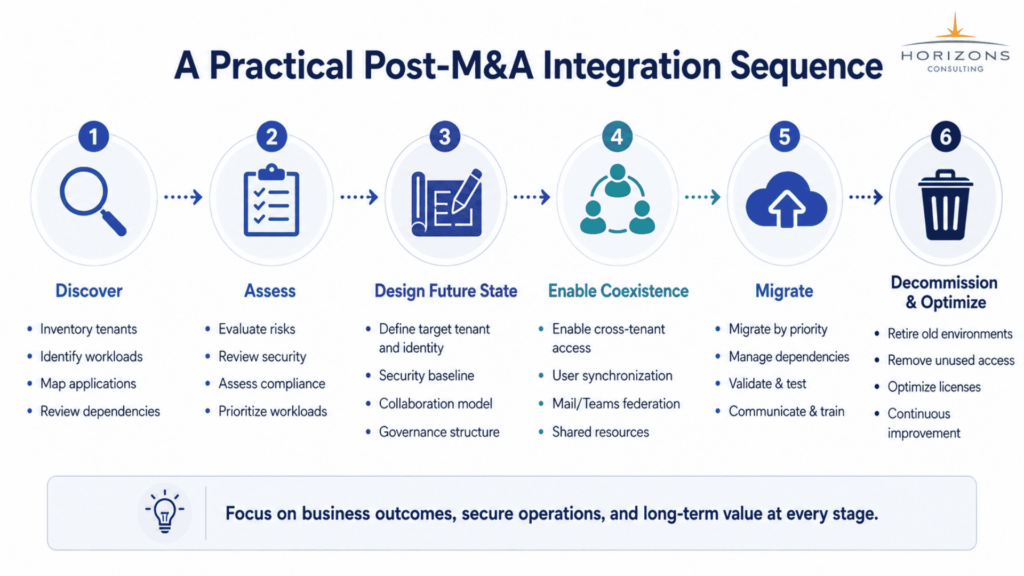
A strong tenant consolidation program is a sequence of decisions and controlled transitions, not one large cutover. A phased model gives IT teams enough structure to reduce unknowns while keeping the business moving.
Phase 1: Establish visibility
Build a reliable current-state inventory of tenants, domains, users, groups, applications, Microsoft 365 workloads, Azure subscriptions, identity architecture, security controls, licensing, and technical dependencies. The purpose is not to create endless documentation. It is to prevent unknown dependencies from becoming production incidents.
Phase 2: Assess risk and business importance
Classify findings based on security risk, business criticality, migration complexity, user impact, compliance, and technical debt. Critical identity or regulatory issues should receive different treatment from low-value obsolete content.
Phase 3: Define the future state
Decide the strategic tenant, identity architecture, domain model, Microsoft 365 collaboration model, Azure governance structure, security baseline, and long-term treatment of the source environment. Major migration work should not start while those decisions are still changing frequently.
Phase 4: Enable safe coexistence where needed
If business collaboration must begin before full migration, use controlled cross-tenant access, B2B collaboration, synchronization, federation, or workload-specific coexistence. Keep scope narrow enough that temporary access does not become ungoverned permanent architecture.
Phase 5: Migrate by dependency
Sequence workloads according to business priority and dependency. Identity and security usually need attention early. Collaboration workloads can often follow. Complex Azure applications and legacy systems may need longer preparation. A single migration calendar should not force unrelated workloads into the same risk window.
Phase 6: Decommission and optimize
Migration is not complete when the last user changes tenants. The source environment may still contain active accounts, service identities, subscriptions, licenses, applications, administrator roles, and temporary exceptions. Decommissioning should be an explicit project phase with business and security sign-off.
How to Prioritize Migration Workloads
Priority window | Typical focus | Why it matters |
Day 1 | Identity, secure access, email routing, executive collaboration | Keeps the business operating without opening access too broadly. |
Early integration | Exchange, Teams, priority SharePoint, high-value collaboration | Improves employee productivity and reduces cross-company friction. |
Operational integration | Devices, applications, business systems, governance | Standardizes day-to-day operations. |
Complex migration | Azure applications, legacy infrastructure, specialized platforms | Requires deeper dependency and cutover planning. |
Closure | Old tenants, subscriptions, duplicate licenses, temporary access | Removes ongoing cost, risk, and administrative complexity. |
Coexistence Needs an Expiration Date
Coexistence is valuable when it creates time for safe migration. It becomes a problem when it creates inertia. Every temporary architecture should define measurable exit criteria before it goes live.
Examples of exit criteria may include completion of identity mapping, migration of priority mailboxes and SharePoint sites, remediation of business-critical application dependencies, standardization of security controls, removal of legacy access, and approval from workload owners.
A stronger integration statement
“We will consolidate later” is not an exit plan. Define the owner, milestones, dependencies, target state, and conditions that allow the source tenant or temporary collaboration model to be retired.
Microsoft Integration and Divestiture Require Different Thinking
Tenant-to-tenant migration also supports divestitures and spin-offs, where the goal is separation rather than combination. A carve-out may require new identity boundaries, domain transfer, mailbox migration, SharePoint separation, Azure subscription changes, new security controls, and Transitional Service Agreement planning.
This matters during acquisitions because today’s architecture can affect tomorrow’s separation cost. When future divestiture is plausible, leaders should consider whether tightly combining every workload creates more long-term risk than value.
What Should a Microsoft M&A Integration Assessment Deliver?
A useful assessment should not end with an inventory spreadsheet. It should convert discovery into decisions that business and IT leaders can act on.
1. A clear current-state picture
Leadership should understand which tenants, identity systems, domains, workloads, Azure subscriptions, applications, security gaps, licensing obligations, and dependencies the organization is inheriting.
2. A recommended future-state architecture
The assessment should explain whether full consolidation, temporary coexistence, long-term separation, or a hybrid model is the best fit. The recommendation should be tied to the operating model, risk, compliance, and technical dependencies.
3. A dependency-aware roadmap
The roadmap should show what moves first, what stays temporarily, what must be remediated, what can be retired, and which technical dependencies must be resolved before each migration stage.
4. Clear risk ownership
Each material finding should have a business impact, technical impact, risk level, owner, recommended action, and target stage. Without ownership, assessment findings can become documentation rather than integration progress.
Questions IT Leaders Should Answer Before Approving Tenant Consolidation
- Which Microsoft tenant will be strategic long term?
- Which identity and domain model will become authoritative?
- What must work on Day 1, and what can be phased?
- Does every workload actually need to migrate?
- Which applications depend on the source tenant or legacy Active Directory?
- Which security gaps need remediation before broader access is enabled?
- Are there legal, regulatory, data-residency, or contractual reasons to maintain separation?
- How long will coexistence last, and what are its exit criteria?
- What is the future Azure governance model?
- What does “migration complete” mean, including decommissioning and licensing cleanup?
What This Means for CIOs and M&A Integration Leaders
Microsoft tenant consolidation is ultimately a business architecture decision. The objective is not simply to reduce the number of tenants. It is to create a Microsoft environment that supports secure collaboration, consistent governance, operational efficiency, business continuity, and future change.
For some organizations, one tenant is the best way to achieve that outcome. For others, a controlled multitenant model is the better fit. The architecture should follow the business and the risk profile, not the assumption that every acquisition must end with immediate technical consolidation.
Final Thoughts
There is no universal rule that every acquired Microsoft environment should immediately move into the buyer’s tenant. Full consolidation can create a simpler long-term operating model, but moving too quickly can disrupt applications, identities, collaboration, and security. Coexistence can provide valuable time, but only when it is governed and temporary by design. Long-term separation can be appropriate when business or regulatory boundaries are intentional.
The strongest M&A integration programs start with discovery, define a future-state architecture, secure identity and privileged access, map application dependencies, and then migrate workloads according to business value and risk. This turns tenant consolidation from a series of technical moves into a controlled integration strategy.
Planning Microsoft Integration After an Acquisition?
Horizons helps enterprise IT teams assess Microsoft 365, Microsoft Entra ID, Active Directory, Azure, security, and workload dependencies after mergers, acquisitions, divestitures, and carve-outs. The goal is to identify inherited risk, define the right tenant strategy, and build a practical roadmap for consolidation, coexistence, or separation.