AI Copilots vs. Agentic AI: What Enterprises Need to Know
Artificial intelligence has moved beyond experimentation in the enterprise. For many organizations, AI is no longer a “future initiative” or a pilot running in isolation. It is increasingly embedded into everyday work, often through tools employees already use.
Table of Contents
- AI Copilots vs. Agentic AI: Why the Difference Matters
- What Is an AI Copilot in an Enterprise Environment?
- The Role of the Microsoft Copilot UI
- What Is Agentic AI and How Does It Work?
- AI Copilots vs. Agentic AI: Key Differences Explained
- How Enterprises Experience Agentic AI Through Copilot UI
- Why User Experience Drives AI Adoption
- Governance Considerations for Copilots and Agentic AI
- A Practical Adoption Path for Enterprises
- Common Mistakes Enterprises Make
AI Copilots vs. Agentic AI: Why the Difference Matters
Microsoft Copilot is one of the clearest examples of this shift. It brings AI into Microsoft 365, Windows, and enterprise workflows through a familiar interface. At the same time, enterprises are hearing more about agentic AI systems that can act autonomously, make decisions, and execute multi-step tasks.
This has created confusion.
- Some leaders assume Copilot is agentic AI.
- Others think agentic AI will replace copilots altogether.
- Many struggle to understand how these concepts fit together in real-world enterprise environments.
The truth is simpler and more practical
AI copilots and agentic AI serve different roles, and enterprises experience both through a common interface, the Microsoft Copilot UI.
This article explains the difference in clear, non-technical terms, shows how they work together, and explains why the Copilot UI for AI is the key to adoption, trust, and scale.
Why Enterprises Need to Understand This Difference Now
Enterprise AI adoption is accelerating, but expectations are often misaligned with reality.
Organizations are
- Purchasing Copilot licenses
- Exploring AI agents and automation
- Being asked by leadership to show measurable ROI
At the same time, they face real constraints
- Security and compliance requirements
- Complex data environments
- Change management challenges
- User skepticism toward “black box” AI
When enterprises fail to distinguish between assistive AI and autonomous AI, they often
- Overestimate what Copilot can do on day one
- Introduce automation before governance is ready
- Create confusing user experiences
- Lose trust among employees and security teams
Understanding the roles of copilots, agentic AI, and the UI that connects them helps enterprises make better technical and organizational decisions.
What Is an AI Copilot?
An AI copilot is an assistive system designed to support human work rather than replace it.
In an enterprise setting, a copilot:
- Waits for user input
- Responds to prompts or actions
- Provides suggestions, drafts, summaries, or explanations
- Operates within clearly defined boundaries
Microsoft Copilot fits this model by design.

How AI Copilots Behave in Daily Work
In practice, copilots help employees
- Draft and refine emails
- Summarize meetings or conversations
- Create documents and presentations
- Analyze data with natural language questions
- Find information faster
What they do not do
- Make decisions on behalf of the user
- Execute actions without confirmation
- Operate independently of user intent
This human-in-the-loop model is intentional. It keeps employees in control and makes copilots easier to trust and govern.
The Role of the Microsoft Copilot UI
The success of an AI copilot depends heavily on how people interact with it.
Microsoft recognized early that introducing AI as a standalone tool would slow adoption. Instead, Copilot was designed to appear directly within existing workflows.
The Microsoft Copilot UI is the experience layer that makes AI usable in enterprise environments.
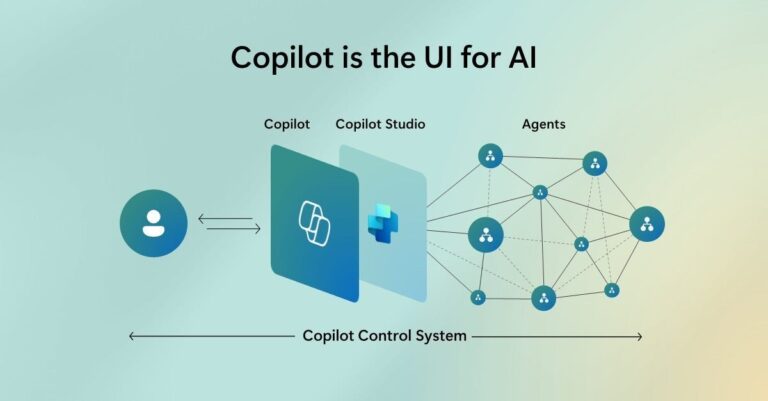
Employees encounter Copilot
- Inside Microsoft 365 apps like Outlook, Teams, Word, Excel, and PowerPoint
- Through Copilot Chat for work-related questions
- Via Windows Copilot for quick assistance across applications
From a user’s perspective, Copilot feels like a natural extension of the tools they already know. There is no new system to learn, no separate login, and no dramatic workflow change.
This UI-first approach is one of the main reasons Copilot adoption has moved faster than previous enterprise AI initiatives.
What Is Agentic AI?
While copilots assist users, agentic AI systems are designed to act with a degree of autonomy.
Agentic AI refers to AI systems that can:
- Understand a goal
- Plan steps to achieve it
- Execute actions across systems
- Adjust behavior based on outcomes
Instead of waiting for instructions at every step, agentic AI can move workflows forward on its own within defined constraints.
How Agentic AI Differs Conceptually
Agentic AI is not focused on individual productivity. It is focused on process execution.
Typical characteristics include:
- Multi-step task orchestration
- Decision-making within policy boundaries
- Integration with multiple systems
- Continuous or event-driven operation
Because of this autonomy, agentic AI introduces new governance, security, and oversight requirements.
AI Copilots vs. Agentic AI: A Clear Comparison
Although both rely on advanced AI models, copilots and agentic AI play very different roles.
Autonomy
- AI Copilots: Reactive. They respond when prompted.
- Agentic AI: Proactive. They can initiate and complete tasks.
Human Involvement
- AI Copilots: Human remains in control at all times.
- Agentic AI: Human defines goals and limits; the system executes.
Scope of Work
- AI Copilots: Individual tasks and knowledge work.
- Agentic AI: End-to-end workflows and operational processes.
Risk and Governance
- AI Copilots: Lower risk, easier to govern.
- Agentic AI: Higher risk, requires stronger oversight.
User Visibility
- AI Copilots: Highly visible through UI.
- Agentic AI: Often invisible, surfaced through outcomes.
Understanding these differences helps enterprises decide where each approach fits.
Why This Is Not an “Either / Or” Decision
Many organizations assume they must choose between copilots and agentic AI. In reality, successful enterprises use both.
- Copilots improve how individuals work
- Agentic AI improves how organizations operate
The challenge is not choosing one, it is designing how they work together without overwhelming users or introducing risk.
This is where the Copilot UI for AI becomes essential.
- How Enterprises Experience Agentic AI Through Copilot UI
- Most employees will never interact directly with an agentic AI system.
- Instead, they experience agentic behavior through Copilot UI.
A typical flow looks like this
- An employee interacts with Copilot through chat or an in-app experience
- Copilot interprets the request
- Behind the scenes, an agentic system may:
- Retrieve data from multiple sources
- Trigger workflows
- Perform checks or validations
- Execute actions across systems
- The result is returned to the user through the same Copilot UI
From the user’s perspective, this feels like a single interaction. The complexity remains hidden.
This separation is deliberate. Microsoft keeps the UI simple so employees can trust and adopt AI without needing to understand its internal mechanics.
Why User Experience Determines AI Adoption
Many AI initiatives fail not because the technology is weak, but because the experience is confusing or unpredictable.
Employees care about:
- Clarity
- Consistency
- Trust
The Microsoft Copilot UI plays a critical role in all three.
A well-designed UI:
- Sets clear expectations
- Signals security and boundaries
- Makes AI feel reliable
When agentic AI is introduced without a clear UI strategy, users often feel disconnected from the system. They see results but don’t understand how or why they happened.
Copilot UI solves this by acting as the single point of interaction.
Governance Considerations: Copilots vs. Agentic AI
Governance requirements differ significantly between assistive and autonomous AI.
Governing AI Copilots
Key focus areas include:
- Data access and permissions
- Identity and authentication
- User training and guidance
- Responsible usage policies
Governing Agentic AI
Additional requirements include:
- Workflow approvals
- Action limits
- Monitoring and alerting
- Audit trails
- Rollback mechanisms
By routing agentic actions through the Copilot UI for AI, enterprises can maintain visibility and control without exposing users to complexity.
A Practical Adoption Path for Enterprises
Organizations that succeed with AI usually follow a phased approach:
- Introduce Copilot UI for assistive use cases
- Build trust among users and security teams
- Identify repeatable, high-value workflows
- Introduce agentic AI gradually behind the scenes
- Keep the user experience consistent
This approach reduces risk and increases long-term value.
Common Mistakes Enterprises Make
Despite good intentions, many organizations struggle with AI adoption due to avoidable mistakes:
- Deploying Copilot without user guidance
- Expecting agentic AI to deliver instant ROI
- Introducing automation before governance is ready
- Treating AI as a standalone initiative
- Ignoring the importance of UI consistency
Understanding the relationship between copilots, agentic AI, and the Microsoft Copilot UI helps avoid these pitfalls.
Final Thoughts: Designing AI for Real Enterprise Work
AI copilots and agentic AI are not competing ideas. They are complementary layers of a modern enterprise AI strategy.
- Copilots provide a trusted interface
- Agentic AI delivers scalable execution
- Copilot UI connects the two in a way people can actually use
For enterprises, success does not come from deploying the most advanced AI models. It comes from designing AI experiences that align with how people work, how systems operate, and how risk is managed.
Understanding how Copilot UI for AI brings agentic intelligence into everyday work is a critical step toward responsible, scalable AI adoption.
Key Takeaways
- AI copilots and agentic AI serve different but complementary roles in the enterprise.
- Copilots focus on assistive, human-guided work, while agentic AI enables autonomous, multi-step execution.
- Most employees experience agentic AI through the Microsoft Copilot UI, not directly.
- A clear and consistent Copilot UI is critical for trust, adoption, and governance.
- Enterprises that start with UI clarity and gradually introduce agentic AI see better outcomes and lower risk.
Frequently Asked Questions (FAQs)
What is the main difference between AI copilots and agentic AI?
AI copilots assist users by responding to prompts and helping with specific tasks. Agentic AI operates with more autonomy, executing multi-step workflows within defined boundaries.
Is Microsoft Copilot considered agentic AI?
Microsoft Copilot itself is primarily an AI copilot. However, it can surface results from agentic AI systems behind the scenes, all through the same Copilot UI.
How do employees interact with agentic AI in Microsoft environments?
Employees typically interact through the Microsoft Copilot UI. The agentic AI performs actions in the background, while results are presented through Copilot chat or in-app experiences.
Does agentic AI increase security risk for enterprises?
Agentic AI introduces additional governance considerations, but when designed properly and surfaced through Copilot UI, it can operate within existing security and compliance controls.
Why is Copilot UI important for agentic AI adoption?
Copilot UI provides a familiar, trusted interface that hides complexity. Without a clear UI, agentic systems can feel unpredictable and reduce user trust.
Should enterprises deploy agentic AI before Copilot?
In most cases, no. Enterprises benefit from first establishing Copilot UI adoption and governance, then gradually introducing agentic AI for high-value workflows.
Can Copilot UI behave differently for different users?
Yes. Copilot UI behavior is influenced by user roles, permissions, and access rights, which means different users may see different results from the same request.
How should enterprises evaluate readiness for agentic AI?
They should review data governance, permissions, workflow maturity, and how Copilot UI is currently used before introducing autonomous agents.