Zombie Applications in Active Directory: The Post-Merger Security Risk
Most post‑merger identity conversations focus on forest trusts, consolidation projects, and “Day 1 access.” Very few boards or CIOs are asking the quieter question: what about all the zombie applications still wired into Active Directory?
Those forgotten apps and services, the ones nobody owns but everyone is afraid to touch, are quietly keeping your newly merged environment fragile, over‑privileged, and permanently stuck in “just don’t break it” mode. In a world of ransomware, data exfiltration, and relentless audit pressure, that is a serious problem.
Key Takeaways
- Post‑merger Active Directory environments quietly accumulate “zombie applications” and legacy systems still bound to AD in ways nobody fully understands, but everyone is afraid to change.
- These zombie apps rely on stale, over‑privileged, or orphaned accounts and insecure protocols, creating a wide, largely unmonitored attack surface and making the merged environment fragile.
- They directly undermine compliance and audits because ownership, justification, and lifecycle controls for their service accounts, AD groups, and trusts are either unclear or missing.
- Zombie applications also block modernization: they force you to keep old domains, protocols, and settings alive, preventing full consolidation, hybrid identity maturity, and safe decommissioning of legacy AD.
- The only sustainable fix is to make them visible and owned mapping AD‑integrated apps, triaging risk, assigning business owners, shrinking their blast radius, and treating decommissioning as a structured project baked into the M&A playbook.
What we really mean by “zombie applications” in active directory
When identity teams talk about zombies in AD, they usually mean stale or orphaned accounts, identities nobody uses anymore, but that still exist. Zombie applications are the next layer up: the systems and services still clinging to AD in ways your current team no longer fully understands.
In a typical post-merger environment, zombie applications show up as:
- Legacy line-of-business apps that still use LDAP simple bind or NTLM against an old domain controller nobody wants to decommission.
- Old file servers, print servers, or SharePoint farms tied to deeply nested AD groups that no one dares clean up.
- “Temporary” integration services (ETL jobs, batch scripts, middleware) running under ancient service accounts with broad rights.
- Forgotten VPN, Wi-Fi, or RDS/terminal servers still authenticating directly to AD with outdated policies and weak controls.
Like zombie user accounts, zombie applications are a lifecycle problem. At some point, they were important, then replaced, half‑migrated, or abandoned, but nobody closed the loop: decommissioned the app, removed the service accounts, cleaned up the groups, and updated the documentation.
The result is a directory that contains not just living business‑critical systems, but layers of history, and every layer comes with credentials, permissions, and trust relationships that still work.
Why mergers and acquisitions create perfect conditions for zombie apps
M&A takes your existing AD mess and crossbreeds it with someone else’s. That is fertile ground for zombies.
Several things happen almost every time:
Speed over hygiene
The integration plan focuses on “keeping the lights on” payroll, CRM, email not on cleaning up 15 years of identity debt. Old apps get quick‑and‑dirty trusts, firewall exceptions, or sync jobs so they “just keep working.”
Duplicate everything
You now have two HR systems, two ERPs, three CRMs, and half a dozen “critical” custom apps from both sides. Some are supposed to be temporary, but rarely is there a hard kill date with a cleanup plan.
Shadow access and orphaned identities
Users keep their accounts in both directories “for a while,” service accounts get recreated with new names but old rights, and contractors get re-onboarded without turning off previous identities. The app layer keeps pointing to all of it.
No one truly owns the old stack
The engineering teams who built the acquired company’s applications either left, or they’re busy on new integration and product work. Few people want to risk touching an obscure app wired deeply into AD when there is no clear owner and no test environment.
From a distance, AD becomes the easiest integration lever: “We’ll just trust their forest, sync some groups, and migrate users later.” Up close, that means you’ve now extended the blast radius of dozens of half‑retired applications you still don’t fully understand.
The hidden risks nobody wants to own
Zombie applications are not just an aesthetic problem. They show up in three uncomfortable conversations: security incidents, failed audits, and stalled modernization.
A wide, dark attack surface
Zombie apps almost always rely on stale, overprivileged, or unmanaged accounts.
- Old service accounts with “domain admins” from the acquired company that still work because nobody wants the outage risk of rotating them.
- Legacy apps that only support insecure protocols like LDAP simple bind over cleartext or NTLM, forcing you to keep weak settings enabled at the domain level.
- Orphaned app‑specific admin groups that still grant powerful rights to data stores, file shares, or management consoles long after the original project ended.
Attackers love these conditions. Unmonitored accounts, outdated protocols, and forgotten servers are ideal footholds. Once an attacker gets access to one of these accounts, they can move laterally, escalate privileges, and hide behind the fact that “this is how that old app has worked for years.”
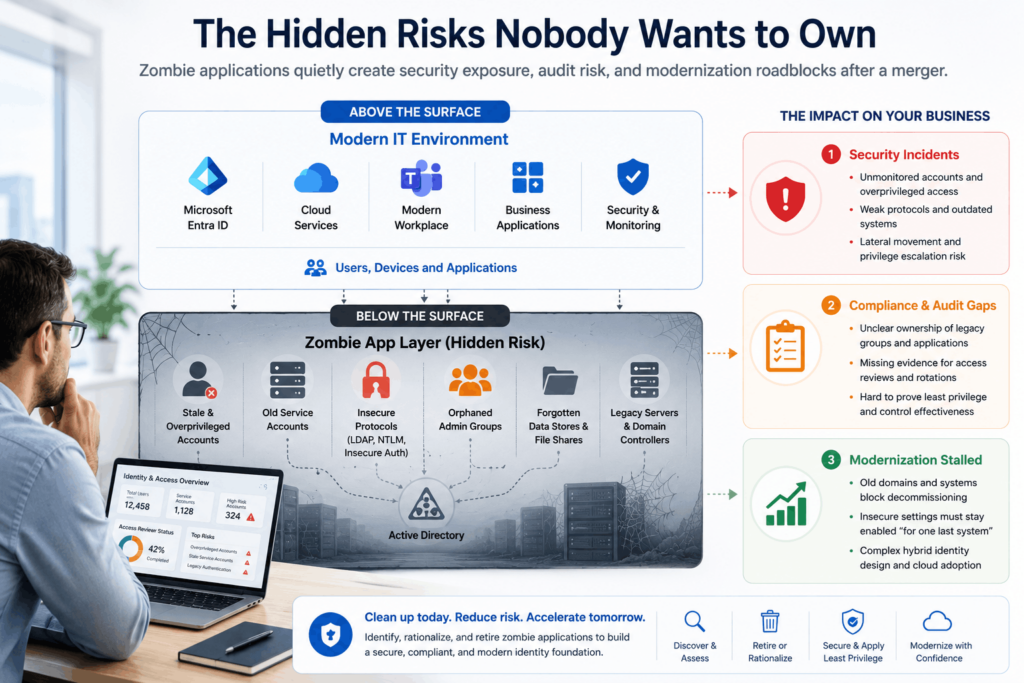
Compliance and audit gaps
Auditors increasingly look past “does authentication succeed?” and into “who owns this access, and why does it still exist?”
Zombie apps undermine that effort:
- You cannot clearly show ownership for old AD groups tied to legacy applications.
- You lack evidence that service accounts are rotated regularly, use constrained delegation, or follow least privilege.
- Access reviews become performative: managers rubber-stamp massive, inherited entitlements because they have no idea which zombie systems still rely on them.
For frameworks like SOC 2, ISO 27001, HIPAA, or SOX, the story matters as much as the control: if you cannot explain how and why a permission exists, “it’s complicated” is no longer acceptable.
Modernization that never quite finishes
Every modernization program has the same pattern: big effort, lots of progress, and then a stubborn 10–20% of legacy systems nobody wants to touch.
Those last few are often zombie apps with deep AD dependencies. They:
- Block you from turning off old domain controllers or entire child domains.
- Force you to keep insecure settings in place “for one last system.”
- Complicated hybrid identity design and Entra ID adoption because you must keep convoluted on‑premise assumptions indefinitely.
This is how organizations end up running “temporary” dual‑directory setups for years after a merger. The business assumes integration is done because email and SSO work. Underneath, a long tail of zombie AD workloads keeps the merged environment fragile and expensive.
How to recognize zombie applications in your post-merger AD
If you walk into a merged or acquiring environment and want to know whether you have a zombie problem, you do not start with pretty diagrams. You start with symptoms.
Here are some of the easiest signs.
Behavioral red flags
- AD changes are always risky:
Any attempt to tighten password policies, deprecate NTLM, or change group nesting is greeted with “something will break.” That “something” is usually a zombie app nobody fully understands. - No one can list all: AD‑integrated applications.
You might have CMDB entries and some diagrams, but when you ask “which apps authenticate directly against AD, and from which domains?” the answers are partial and uncertain. - Dual accounts linger forever:
Months or years after the merger, many users still have two (or more) AD accounts because the old system needs them.’
Technical indicators
You can get more concrete by correlating logs, configuration, and directory data.
- Authentication analytics
Domain controller logs and security tools can show which applications and hosts are still using legacy auth methods, where they authenticate from, and which accounts and groups they rely on. - Stale or orphaned service accounts
Directory scans and identity governance tools can surface accounts that have not changed passwords in years, still have privileged rights, or do not map to a current owner. - Long‑tail domain or forest trusts
Trusts that were supposed to be temporary still exist between your main environment and small acquired forests, solely so a handful of old apps can function.
A simple reality check table
You can use a quick self‑assessment like this with your team,
| Question | Honest Answer Options |
|---|---|
| Can we produce a list of all AD-integrated apps within a week? | Yes / Partially / No |
| Do we know the owner for each service account with elevated rights? | Yes / Some / No |
| Can we safely disable NTLM and simple bind for all but documented cases? | Yes / In theory / Definitely not |
| Are all M&A-era forests and domains there for a documented reason? | Yes / Some / "They just are" |
If your answers cluster around “partially” and “definitely not,” you have zombie applications, whether anyone calls them that or not.
A practical playbook to deal with zombie applications
The hard part of zombie cleanup is cultural: getting people to admit that “we don’t really know how this works anymore.” The technical work is systematic once you accept that truth.
Here is a pragmatic playbook you can adjust to your reality.
Start with visibility, not heroics
You cannot fix what you cannot see. Begin with a light‑touch mapping exercise:
- Map AD‑integrated apps from the infrastructure side
Use domain controller logs, network telemetry, and existing CMDB data to build a list of systems that authenticate directly to AD or rely on AD groups for authorization. - Classify by business criticality
Group them into “mission‑critical,” “important but replaceable,” and “unknown/legacy.” Zombie apps tend to live in the last two categories. - Tag M&A lineage
Mark, which apps originated from which side of each merger? This helps when you later negotiate ownership and decommissioning plans with acquired business units.
The goal in this phase is not perfect accuracy but enough visibility to have honest conversations.
Triage risk instead of chasing perfection
You will not fix everything at once, especially in a heavily acquired environment. Focus on where zombie behavior intersects real risk.
High‑priority candidates typically include:
- Apps that require highly privileged service accounts or broad AD rights.
- Systems using insecure protocols or outdated encryption that force weak domain-level settings.
- Applications that still depend on accounts for ex-employees, contractors, or vendors are classic orphaned identities.
Create a short list of “zombie incidents waiting to happen.” Those are your first transformation projects.
Pair each zombie with an owner and a story
A zombie app is dangerous because no one owns it. Fixing that comes before technical change.
For each target application:
- Identify the business owner
Someone in a business unit depends on the reports, workflows, or data this app produces. That is your champion and decision‑maker. - Write down the current story
Describe in plain language: what it does, who uses it, which AD accounts and groups it relies on, and what would break if it stopped working. Even a one‑page sketch is more than most orgs have. - Agree on a future story
Decide whether the app will be modernized, retired, or wrapped (e.g., moved behind a proxy, moved to Entra ID‑based authentication, or ring‑fenced on its own domain).
This step turns an invisible risk into a visible, owned project. That alone reduces fragility.
Shrink the blast radius before you modernize
You may not be able to replace a zombie app in the next quarter. You can still make it safer.
Pragmatic containment moves include:
- Restricting where it can authenticate from (network segmentation, tiered admin, jump hosts).
- Reducing permissions of its service accounts to the minimum necessary, and enforcing password rotation.
- Moving its objects (servers, service accounts, groups) into clearly labeled OUs with specific GPOs and monitoring so they are not invisible anymore.
- Disabling unnecessary legacy protocols in the wider domain and only allowing them within a tightly controlled exception zone if absolutely required.
Think of this as putting a crumbling building behind a fence with warning signs, rather than leaving it open on the main street.
Plan decommissioning like a migration, not a Friday change
Retiring a zombie app is often harder than standing up a new one. The risk is less about the app and more about the invisible dependencies tied to AD.
Treat decommissioning as a project:
- Baseline usage
Log who is using the app, when, and for what. Look for reports or integrations that still feed other systems. - Communicate timelines and alternatives
Give business users a clear schedule, replacement options, and a way to raise blockers. - Implement a “soft off” phase
Disable some permissions, move the app to read‑only, or perform a staged shutdown where you monitor for breakage before full removal. - Clean AD as part of the cutover
Remove or disable the associated service accounts, groups, and ACL entries as a tracked part of the decommission checklist, not an optional “we’ll clean this later” item.
Only when the app is fully gone should you finally remove any M&A‑era trusts or child domains that existed solely for its sake.
Building zombie awareness into your M&A playbook
The best time to deal with zombie applications is not five years after the merger, when you are trying to close a painful audit finding. It is during the integration planning itself.
A more mature M&A identity playbook bakes in a few habits:
- AD‑first due diligence
During pre‑deal or early discovery, ask specifically about AD‑integrated apps, legacy protocols, and orphaned identities, not just about “SSO” at a high level. - Joiner‑mover‑leaver rigor from day one
Ensure that people, contractors, and service accounts from the acquired entity follow your standard lifecycle processes immediately, rather than running “in parallel for a while.” - Temporary with teeth
When you grant trusts, create dual accounts, or stand up interim integration services, attach explicit review and end dates. Temporary, untracked exceptions are where zombies are born. - Shared metrics that mention zombies
Track things like “number of apps using NTLM,” “count of privileged service accounts older than X days,” or “M&A‑era domains still in use.” These numbers keep the conversation alive beyond Day 1 integration.
The goal is not to shame teams for carrying legacy forward. It is to make that legacy visible, owned, and steadily shrinking.
Bringing it back to people, not just systems
Zombie applications in Active Directory are not really about technology. They are about human behavior in large organizations.
- We prioritize speed over closure when deals happen.
- We avoid touching things we do not fully understand, especially if someone once said they were “business critical.”
- We accept low-grade, chronic risk because it does not scream as loudly as a new project deadline.
That is why this risk “nobody talks about” persists. But you can change the story by framing zombie apps not as an embarrassing mess but as an opportunity:
- An opportunity to learn how your merged business actually runs, not just how it is supposed to run on paper.
- An opportunity to reduce alert fatigue and audit pain by removing the weird outliers that trip everything up.
- An opportunity to give your teams the psychological safety to say, “we don’t fully understand this yet,” and then go figure it out together.
If your post‑merger AD feels haunted, you are not alone. Every large organization has ghosts in its directory. The difference between those who keep getting surprised and those who quietly sleep better at night is simple: one group treats zombie applications as a permanent, manageable reality and builds them into their identity strategy. The other keeps hoping that if they do not say the word “zombie,” nothing will crawl out of their legacy domains.
You cannot exorcise every last ghost in one project. But you can start with one application, one service account, and one forgotten trust, and make it the last time that particular piece of history gets to scare you.
Ready to build a cleaner, more secure post-merger environment? Check out our deep dive into Azure Landing Zone design for M&A scenarios to see how to properly structure your cloud architecture after an acquisition.
Frequently Asked Questions (FAQ)
What are “zombie applications” in Active Directory?
Zombie applications are legacy or semi‑abandoned systems that still rely on Active Directory for authentication or authorization, but no one clearly owns or understands them anymore. They often run on old servers, use outdated protocols like NTLM or LDAP simple bind, and depend on long‑forgotten service accounts and nested AD groups. In many cases, the original team that deployed them has moved on, documentation is stale or missing, and the business impact of turning them off is unclear. Yet these apps continue to authenticate against AD every day, carrying powerful permissions and broad access. In merged environments, zombie applications are especially common because they come from both sides of the deal and are kept alive “temporarily” during integration, only to become permanent ghosts in the directory.
Why do mergers and acquisitions make zombie applications worse?
M&A creates exactly the conditions that zombies thrive in: speed, duplication, and incomplete integration. During a merger, IT and security teams are under pressure to keep business operations running, payroll, email, CRM, ERP, so they prioritize quick connectivity over hygiene. That often means creating forest trusts, copying groups, or leaving old domains in place “just for now” to keep legacy apps running. At the same time, you inherit another organization’s history: old line‑of‑business tools, one‑off integrations, and custom apps that nobody on your side has ever seen. Documentation is rarely complete, and the original owners may no longer be around. Instead of being rationalized, many of these applications are simply wired into your AD and forgotten, which doubles or triples the zombie population across the merged environment.
How do zombie applications increase security risk?
Zombie applications are dangerous because they combine three risk factors: high privilege, low visibility, and weak controls. They often run under long‑lived service accounts that have broad rights in AD, sometimes even domain admin or powerful delegated permissions. Their passwords may not have been rotated in years, and they may be excluded from normal identity governance or conditional access rules. Many rely on insecure protocols or legacy encryption standards that you would otherwise disable, forcing you to keep weak settings enabled at the domain level. Since nobody owns them, they rarely show up in regular access reviews or change processes. This makes them ideal targets for attackers: compromise a forgotten service account or server, move laterally using excessive rights, and hide behind “this old system that must not be touched” while evading scrutiny.
How do zombie applications affect compliance and audits?
From a compliance perspective, zombie applications are a nightmare because they sit exactly where auditors increasingly focus: ownership, justification, and lifecycle control of access. When an auditor asks who owns a certain powerful group or service account, zombie apps often produce awkward answers like “we think it’s used by an old reporting system” or “nobody is quite sure, but we’re afraid to disable it.” That undermines evidence for least privilege, periodic access reviews, and strong change management. It becomes difficult to prove that service accounts are rotated, monitored, and constrained. Orphaned groups and legacy trusts left over from M&A also raise questions about data protection and segregation of duties. Even if no incident has occurred, the inability to explain and control these dependencies can turn into audit findings, remediation plans, and ongoing scrutiny from regulators and customers.
How can I tell if my post-merger AD has a zombie application problem?
You can usually feel zombie applications before you can list them. If any proposed AD change, tightening password policies, disabling NTLM, cleaning up old groups, immediately triggers fear that “something critical might break,” that’s a sign. Another indicator is that no one can produce a reliable list of AD‑integrated applications within a reasonable time; you rely on tribal knowledge, old spreadsheets, or partial CMDB entries. Dual or multiple accounts left active long after the merger, solely to keep certain legacy apps working, are another red flag. From a technical angle, domain controller logs and network telemetry will show authentication traffic from obscure servers and service accounts using outdated methods. Long‑standing forest or domain trusts that exist “because of some old system” are often there for zombies. Put together, these symptoms point to a directory whose application dependencies are not fully known or governed.or cleaning up old groups
Practical first step to deal with zombie applications?
The first step is not to rip anything out; it’s to see clearly. Start by building a simple, pragmatic inventory of AD‑integrated applications. Use domain controller logs, existing CMDB data, firewall rules, and team interviews to identify which systems authenticate directly to AD or depend on AD groups. Don’t aim for perfect completeness on day one; aim for enough coverage to have honest conversations. Classify each app by business criticality (mission‑critical, important, unknown/legacy) and tag which side of each merger it came from. Then focus on behavior: flag apps that use insecure protocols, privileged service accounts, or orphaned groups. This mapping exercise transforms zombie apps from vague fears into concrete objects with names, dependencies, and owners you can start to identify. Only once you have that baseline does it make sense to prioritize remediation.
How should organizations prioritize which zombie applications to fix first?
Not all zombies are equal; some are more like minor ghosts, while others are open doors. Prioritization should combine security risk and business impact. High on the list are applications that rely on highly privileged service accounts, especially those with domain‑wide rights or broad delegation. Also prioritize systems that force you to keep insecure protocols or legacy encryption turned on for entire domains. Apps that still depend on accounts belonging to ex‑employees, contractors, or vendors are equally urgent. After that, look at how many users and systems each app touches and whether it sits close to sensitive data like financials, customer information, or intellectual property. From this view, you can create a short list of high‑value targets, then plan containment (reducing permissions, segmenting access, tightening monitoring) and, where feasible, replacement or retirement. This focused approach is far more achievable than trying to clean everything at once.
How can we bake zombie application cleanup into our M&A and modernization plans?
To avoid fighting zombie applications forever, they need to be part of the standard playbook, not an afterthought. In M&A, that starts with asking explicit identity questions during due diligence: which apps integrate with AD, what protocols they use, and how service accounts are managed. During integration, treat trusts, dual accounts, and “temporary” integration services as time‑boxed exceptions with clear owners, review dates, and decommission plans. In modernization programs, don’t just measure cloud migration or SSO adoption, track metrics like the number of apps still using legacy protocols, privileged service accounts older than a threshold, and the count of M&A‑era domains that still exist only for old systems. Finally, give teams support and psychological safety to admit they do not fully understand certain dependencies. When people can safely say “this part is still a black box,” you can plan to open it up, reduce its blast radius, and eventually retire it, instead of letting it haunt your merged directory indefinitely.