Microsoft 365 Copilot Readiness Assessment: Avoid Risk Before Scaling AI
Table of Content
- Why Copilot Readiness Matters
- What Is a Microsoft 365 Copilot Readiness Assessment?
- Business Risks of Deploying Copilot Too Fast
- Key Areas to Review Before Copilot Deployment
- When to Run a Copilot Readiness Assessment
- What a Readiness Report Should Include
- Microsoft 365 Copilot Readiness Checklist
- FAQs
Key Takeaways
- A Microsoft 365 Copilot readiness assessment helps businesses prepare before rolling out Copilot at scale.
- Copilot uses company data that users already have permission to access, so weak permissions can create business risk.
- Readiness is not only an IT task. It also affects data security, compliance, employee adoption, and ROI.
- Key areas to review include SharePoint, OneDrive, Teams, user access, sensitive data, compliance controls, and training.
- The best time to assess readiness is before a full Microsoft Copilot Deployment, not after users start finding issues.
Microsoft 365 Copilot is quickly becoming part of the enterprise productivity conversation. Many organizations see it as a way to help employees work faster, summarize information, create content, find answers, and reduce manual effort across Microsoft 365 apps.
But before moving ahead with a full rollout, there is one important question every organization should ask:
Is our Microsoft 365 environment actually ready for Copilot?
This is where a Microsoft 365 Copilot readiness assessment becomes important. It helps organizations review their data, permissions, security, compliance, licensing, and user readiness before Copilot is deployed at scale.
Copilot does not work in isolation. It uses Microsoft 365 data and respects the permissions already assigned to users. Microsoft also notes that when organizational data is well governed, current, and properly shared, Copilot can provide more accurate, relevant, and secure responses.
That means Copilot readiness is not just a technical checklist. It is a business risk, data governance, and adoption question.
What Is a Microsoft 365 Copilot Readiness Assessment?
A Microsoft 365 Copilot readiness assessment is a structured review of an organization’s Microsoft 365 environment before Copilot is deployed or expanded.
The goal is simple: find gaps before Copilot starts working with business data.
A typical assessment reviews areas such as:
- Microsoft 365 licensing
- Microsoft Entra ID readiness
- SharePoint and OneDrive permissions
- Teams governance
- Data security controls
- Microsoft Purview policies
- Compliance settings
- Content quality
- User adoption planning
Microsoft 365 Copilot has specific requirements across licensing, identity, mailboxes, apps, browsers, and network access. For example, Microsoft states that users need Microsoft Entra ID accounts, eligible Microsoft 365 licensing, and supported Microsoft 365 apps before using Copilot.
A readiness assessment helps confirm whether these basics are in place before licenses are assigned broadly.
Why Is a Copilot Readiness Assessment Important?
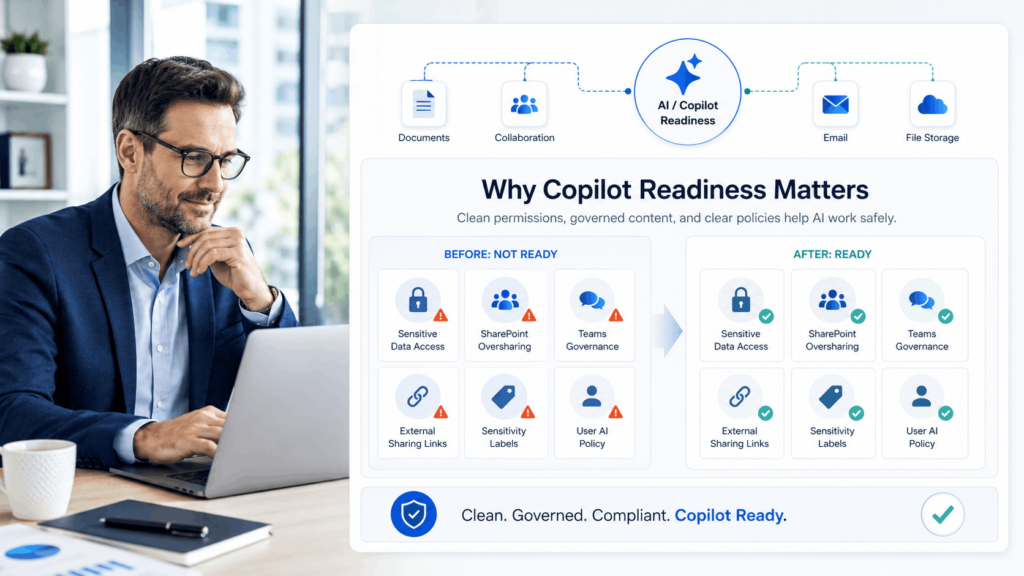
The main importance of a Copilot Readiness Assessment is that it helps organizations prepare before AI becomes part of daily work.
Copilot can make it easier for users to find, summarize, and use information across Microsoft 365. That is useful when data is properly managed. But if the environment has overshared files, weak permissions, outdated documents, or poor governance, Copilot can make those existing issues more visible.
For example, if a user already has access to a sensitive SharePoint file, Copilot may be able to use that file in its response. Microsoft explains that Copilot uses organizational data that the user already has permission to access.
So, the risk is not that Copilot ignores permissions. The risk is that existing permissions may not be clean.
A readiness assessment helps organizations answer questions such as:
- Who can access sensitive data?
- Are SharePoint sites overshared?
- Are old Teams still active?
- Are external sharing links controlled?
- Are sensitive files labeled?
- Are users prepared to use Copilot responsibly?
Without these answers, Microsoft Copilot Deployment can become reactive. IT and security teams may end up fixing permission and data issues after users have already started using Copilot.
Why Copilot Readiness Is Different from Normal Microsoft 365 Readiness
Many organizations already use Microsoft 365 every day. Employees work in Outlook, Teams, SharePoint, OneDrive, Word, Excel, and PowerPoint without major issues.
But Copilot changes how people interact with information.
Before Copilot, users often had to manually search through folders, chats, emails, and documents. With Copilot, they can ask a question and receive summarized answers from different Microsoft 365 sources.
That shift makes readiness more important.
Copilot can make information easier to find. This is helpful when the content is accurate and permissions are correct. But it can also expose problems that were previously hidden inside complex folder structures, old Teams, forgotten SharePoint sites, or broad access groups.
A standard Microsoft 365 environment may look stable from the outside. But for Copilot, the deeper questions are:
- Is the data current?
- Is it properly classified?
- Is it shared with the right people?
- Are old files still searchable?
- Are sensitive documents protected?
- Are users trained to check Copilot responses before using them?
This is why a copilot readiness assessment should happen before scaling Copilot across the organization.
Key Areas Covered in a Microsoft 365 Copilot Readiness Assessment
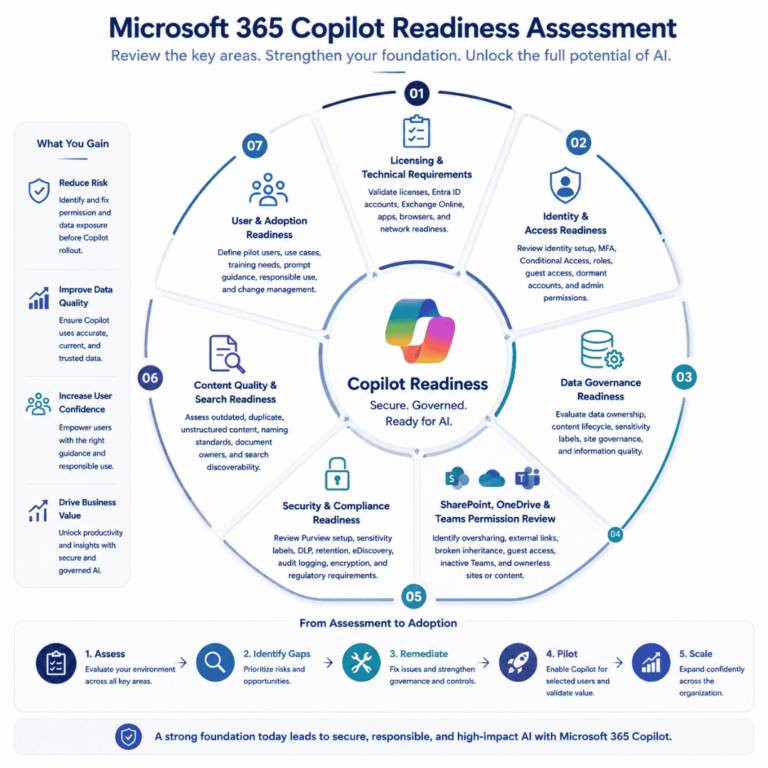
A good readiness assessment should look at both technical and business readiness. Below are the main areas organizations should review.
1. Licensing and Technical Requirements
The first step is to check whether the organization meets the basic requirements for Microsoft 365 Copilot.
This includes:
- Eligible Microsoft 365 licenses
- Microsoft Entra ID user accounts
- Exchange Online mailboxes
- Supported Microsoft 365 apps
- Supported browsers
- Network access requirements
- Teams, Outlook, Word, Excel, and PowerPoint readiness
Microsoft states that Microsoft 365 Copilot has app and network requirements, including Microsoft 365 licensing, Entra ID accounts, and Exchange Online primary mailboxes.
This step helps avoid a common rollout issue: buying or assigning licenses before the tenant, apps, or users are ready.
2. Identity and Access Readiness
Identity is one of the most important parts of Copilot readiness.
Copilot works within the access model already present in Microsoft 365. If users have access to too much information, Copilot may make that access easier to use.
An assessment should review:
- Microsoft Entra ID setup
- Multi-factor authentication
- Conditional Access policies
- Privileged accounts
- Guest users
- External users
- Dormant accounts
- Role-based access controls
- Admin permissions
The goal is not only to check whether users can sign in. The goal is to confirm that access is controlled, current, and aligned with each user’s role.
For enterprises, this is especially important across departments such as finance, HR, legal, leadership, operations, and security.
3. Data Governance Readiness
Copilot depends heavily on business data. If that data is clean and well managed, Copilot can provide better responses. If the data is outdated, duplicated, or poorly organized, the output may be less useful.
Microsoft’s guidance says that well-governed, current, and properly shared data helps Copilot deliver accurate and secure responses. (Microsoft Learn)
A data governance review should check:
- Where important business data is stored
- Whether content has clear owners
- Whether old files are still active
- Whether duplicate documents exist
- Whether sensitive content is labeled
- Whether Teams and SharePoint sites are still needed
- Whether personal OneDrive files contain business-critical content
This step improves both security and response quality.
Copilot readiness is not only about preventing risk. It is also about helping employees get answers from reliable information.
4. SharePoint, OneDrive, and Teams Permission Review
This is often one of the most important parts of a Microsoft 365 Copilot readiness assessment.
SharePoint, OneDrive, and Teams are common places where enterprise data is stored and shared. Over time, permissions can become messy. Users change roles. Projects end. External sharing links remain active. Old Teams stay open. Files move from private to shared spaces without proper review.
A permission review should check:
- Overshared SharePoint sites
- “Anyone with the link” sharing
- Organization-wide access
- Broken permission inheritance
- External sharing settings
- Guest access
- Sensitive files in open locations
- Ownerless sites
- Inactive Teams
- Old project folders
Microsoft has published guidance for securing and governing data for Copilot, including reducing oversharing and applying proper guardrails before deployment.
This matters because Copilot can make information easier to retrieve. If permissions are too broad, sensitive content may become easier for users to find.
5. Security and Compliance Readiness
Security and compliance readiness helps organizations use Copilot without losing control over sensitive information.
Microsoft states that Microsoft 365 Copilot includes protections related to data, privacy, and security, and it works with Microsoft 365 security and compliance controls.
Before deployment, organizations should review:
- Microsoft Purview configuration
- Sensitivity labels
- Data Loss Prevention policies
- Retention policies
- eDiscovery readiness
- Audit logging
- Encryption
- Insider risk controls
- Regulatory requirements
- Sensitive information types
This is important for industries with strict compliance needs, such as financial services, healthcare, legal, manufacturing, and government-related organizations.
A readiness assessment helps confirm whether the right controls are already active or whether they need improvement before rollout.
6. Content Quality and Search Readiness
Copilot can only work with the content available to it. If the content is old, inaccurate, duplicated, or poorly structured, Copilot responses may not be helpful.
This is why content quality should be part of every copilot readiness assessment.
Organizations should review:
- Outdated policies
- Old project files
- Duplicate documents
- Poor file naming
- Missing document owners
- Conflicting versions
- Unstructured knowledge repositories
- Archived content still visible in search
- Important files stored in personal locations
For example, if a company has five versions of the same HR policy stored in different SharePoint folders, Copilot may not always know which one is the most reliable.
Good content hygiene improves user trust. Employees are more likely to use Copilot when the answers are relevant, current, and easy to verify.
7. User and Adoption Readiness
Even if the technical environment is ready, Copilot may not create value if users do not know how to use it.
Microsoft provides adoption resources and guidance to help organizations plan Copilot rollout, support users, and improve value over time.
A readiness assessment should include adoption planning areas such as:
- Which users should join the pilot
- Which departments have strong use cases
- What training users need
- How prompts should be written
- What responsible use means
- How feedback will be collected
- How success will be measured
This step is often missed because organizations focus only on licensing and technical setup.
But Copilot is not just another software tool. It changes how people search, write, summarize, and make decisions. Users need guidance to use it well.
Common Risks Found During a Copilot Readiness Assessment
Below are some common issues organizations may find during a readiness review.
| Readiness Risk | Why It Matters |
|---|---|
| Overshared SharePoint sites | Users may access more information than their role requires |
| Old Teams with active files | Outdated or sensitive content may remain searchable |
| External sharing links | Files may be accessible outside the organization |
| Dormant user accounts | Old accounts can increase access risk |
| No sensitivity labels | Sensitive content may not be properly protected |
| Weak DLP policies | Confidential data may not have enough control |
| Poor file ownership | No one is responsible for cleaning or updating content |
| Duplicate documents | Copilot may use outdated or conflicting information |
| No pilot group | Rollout may become difficult to measure |
| No training plan | Users may not understand how to use Copilot correctly |
What Happens If You Deploy Copilot Without Readiness?
Organizations can deploy Copilot without a detailed readiness assessment. But doing so may create avoidable issues.
Some common problems include:
- Users finding sensitive information faster
- Copilot using outdated files in responses
- IT teams fixing permissions after rollout
- Security teams facing more governance pressure
- Employees not knowing how to use Copilot properly
- Low adoption after the first few weeks
- Difficulty measuring business value
The goal of readiness is not to slow down Microsoft Copilot Deployment. The goal is to make deployment safer, cleaner, and more useful.
A readiness assessment gives IT, security, compliance, and business leaders a clearer picture of what needs attention before Copilot reaches more users.
When Should Organizations Run a Copilot Readiness Assessment?
The best time to run a Microsoft 365 Copilot readiness assessment is before Copilot is deployed at scale.
It is especially useful:
- Before buying large volumes of Copilot licenses
- Before assigning licenses to many users
- Before starting a pilot
- Before rolling out Copilot to finance, HR, legal, or leadership teams
- Before expanding from pilot to full deployment
- After a merger, acquisition, or tenant migration
- After major Microsoft 365 restructuring
- When SharePoint or Teams governance is unclear
A readiness assessment can also be useful after an initial Copilot pilot. It can help organizations understand what worked, what failed, and what needs to be fixed before the next phase.
Microsoft 365 Copilot Readiness Checklist
Here is a simple checklist organizations can use before deployment:
- Are target users eligible for Microsoft 365 Copilot?
- Are Microsoft 365 apps updated and supported?
- Are all target users in Microsoft Entra ID?
- Are Exchange Online mailboxes ready?
- Are SharePoint permissions reviewed?
- Are OneDrive sharing settings controlled?
- Are Teams owners and members reviewed?
- Are external users and guests checked?
- Are sensitive files labeled?
- Are DLP policies active?
- Are retention policies configured?
- Are audit logs enabled?
- Are old sites and Teams reviewed?
- Are duplicate and outdated files cleaned up?
- Are pilot users selected?
- Is user training planned?
- Are success metrics defined?
This checklist does not replace a full assessment, but it gives a practical starting point.
Conclusion: Readiness Helps Copilot Scale with Less Risk
Microsoft 365 Copilot can help employees work with information in a faster and more natural way. But its success depends on the Microsoft 365 environment behind it.
A Microsoft 365 Copilot readiness assessment helps organizations review data, permissions, security, compliance, licensing, and adoption before scaling AI across the business.
The biggest value of readiness is clarity. It shows what is ready, what needs attention, and what should be fixed before Copilot becomes widely available.
Before moving from pilot to full Microsoft Copilot Deployment, organizations should understand what Copilot can access, how permissions are managed, whether sensitive data is protected, and whether users are ready to work with it responsibly.
Readiness does not delay Copilot. It helps make Copilot safer, cleaner, and more useful from the start.
FAQs
What is a Microsoft 365 Copilot readiness assessment?
A Microsoft 365 Copilot readiness assessment is a review of an organization’s Microsoft 365 environment before Copilot deployment. It checks licensing, identity, permissions, data governance, security, compliance, and user adoption readiness.
Why is a Copilot Readiness Assessment important?
The importance of a Copilot Readiness Assessment is that it helps organizations find data, permission, security, and compliance gaps before Copilot is used at scale.
What should be checked before Microsoft Copilot Deployment?
Before Microsoft Copilot Deployment, organizations should check licensing, Microsoft Entra ID, Microsoft 365 apps, Exchange Online mailboxes, SharePoint permissions, OneDrive sharing, Teams governance, Microsoft Purview controls, and user training plans.
Can Microsoft 365 Copilot expose sensitive data?
Copilot works within existing Microsoft 365 permissions. If users already have access to sensitive or overshared files, Copilot may make that information easier to find and summarize.
Is Copilot readiness only a technical check?
No. Copilot readiness includes technical readiness, data governance, security, compliance, permissions, content quality, and user adoption planning.