Building Hybrid Azure Architectures to Support Overlapping IT During Mergers and Carve-Outs
Mergers and carve‑outs used to be about balance sheets, brands, and org charts. Today, they are just as much about something far more fragile and far harder to untangle: overlapping IT. For a period of months (sometimes years), two or more companies must behave like one business while still running on different directories, networks, security models, and clouds. Deals are announced in boardrooms, but they live or die in VPN tunnels, firewall rules, and identity stores.
This is where hybrid Azure architectures stop being an abstract “cloud strategy” and become the connective tissue of the new organization. Done well, hybrid gives you a controlled way to stitch together datacenters, SaaS, and multiple Azure tenants without sacrificing security or compliance. Done poorly, it leaves you with a brittle maze of point-to-point links, custom scripts, and emergency exceptions that nobody wants to own, but everyone depends on.
This guide looks at hybrid Azure design through the specific lens of M&A and carve‑outs: the messy middle where nothing is fully migrated, nothing is fully retired, and “temporary” solutions quietly become mission critical. You’ll walk through how to use Azure as an integration hub during the overlap period, how to unify identity and networking across estates, and how to use services like Azure Arc and Azure Stack to create a consistent control plane over wildly inconsistent infrastructure.
Before diving in, pause and think about your last (or next) deal: where is the real friction, networks, identity, or application access and how might a deliberately designed hybrid layer turn that from a constraint into a lever you can pull on your own terms?
Clarify the M&A / Carve Out Scenario
Before touching architecture, you need clarity on the business and technical constraints. In hybrid terms, you’re choosing which “worlds” must coexist and for how long.
Key dimensions to clarify:
- Deal type and direction of travel
- Full merger with eventual tenant and datacenter consolidation.
- Carve‑out where some assets move to a new tenant, and others stay put.
- Transitional Services Agreement (TSA), where systems must interoperate for a defined period.
- Overlap duration
- 3–6 months (short, more tactical).
- 1–3 years (needs robust, repeatable hybrid design and standardization).
- Regulatory and data residency
- Workloads that must remain on‑premises or in a specific country.
- Workloads that can move to Azure or to another cloud.
- Current technology baselines
- On‑premises: AD forests, VMware/Hyper‑V, legacy apps, firewalls.
- Cloud: Number of Azure tenants, existing VNets, ExpressRoute or VPNs, use of Azure Arc, and existing governance setup.
Deliverable from this step: a simple matrix of “source environments” (Acquirer On‑Prem, Target On‑Prem, Tenant A, Tenant B, Other Cloud, Edge) versus “must communicate with” and “regulatory notes”. This becomes the scope boundary for your hybrid design.
Question for you: In your typical client scenarios, is the primary pain point tenant consolidation, network integration, or identity/endpoint integration?
Choose an Overall Hybrid Strategy
Once scope is clear, you choose how Azure will act across those estates: as primary landing zone, as a neutral “overlay” layer, or as one of several peers in a multicloud hybrid.
Understand Azure hybrid patterns
Azure’s hybrid options can be grouped into three broad patterns:
- Hybrid cloud
Mix of on‑premises infrastructure and Azure services with consistent connectivity, identity, and management.
Typical for data residency, low‑latency, or “cannot yet migrate” workloads. - Edge / near‑edge
Azure capabilities deployed closer to data sources or plants (for example, Azure Stack Edge, Azure IoT Edge, Azure Local / Azure Stack Hub).
Useful when the carved‑out entity retains factories or OT/ICS sites that cannot be centralized quickly. - Multicloud / multi‑tenant
Azure as a unified control plane (Azure Arc) for resources running in other clouds or in multiple tenants.
Strategy options in M&A and carve outs
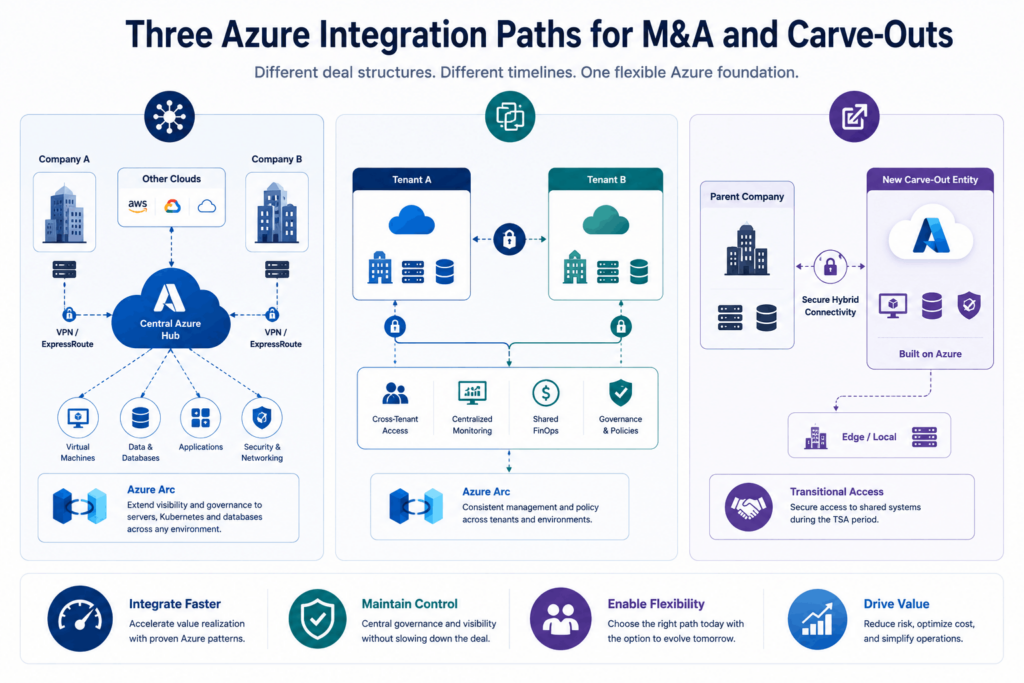
Common high‑level strategies that map well to M&A:
- Option 1: Azure as the “integration hub”
- A central Azure tenant and hub‑and‑spoke network become the place where both organizations connect.
- On‑prem data centers and any other clouds connect via VPN/ExpressRoute into a shared hub VNet.
- Azure Arc brings in servers, Kubernetes, and databases running outside Azure for central policy and management.
- Works well for mergers where the acquirer already has a mature Azure landing zone.
- Option 2: Parallel hybrid with delayed consolidation
- Each party keeps its own tenants and hybrid connections, but you implement cross‑tenant access, centralized monitoring, and shared billing/finops while deferring full consolidation.
- Azure Arc, plus centralized governance in one “master” tenant, provides a degree of control without disruptive moves early in the deal.
- Option 3: Azure‑centric carve‑out
- For carve‑outs, the new entity’s core IT is built on Azure (possibly Azure Local / Stack for edge), with minimal on‑premises footprint.
- Transitional connectivity back to the parent via secure hybrid connections offers access to shared systems during the TSA window.
Outcome: pick one as your primary strategy while acknowledging that different business units or regions may live in parallel strategies for a while.
Design the Hybrid Network Foundation
Networking is usually the first visible pain during overlapping IT: overlapping IP ranges, chained VPNs, poorly controlled routing, and inconsistent security controls.
Use hub and spoke as the default
Azure’s recommended pattern for hybrid connectivity is a hub‑and‑spoke architecture:
- Hub VNet (or Virtual WAN hub)
- Central point for connectivity: ExpressRoute/VPN gateways to on‑prem, Azure Firewall or NVA, and shared services like DNS.
- Acts as your “neutral meeting point” for multiple sites/tenants.
- Spoke VNets
- Application VNets belonging to different business units, environments, or tenants.
- Peered to the hub, with traffic filtered by Azure Firewall and NSGs.
- On-premises connections
- ExpressRoute for high throughput, low latency, and SLA-backed private connectivity.
- Site-to-site VPN where ExpressRoute is not available or for short-term TSA-style
- Point-to-point VPN for remote staff in the carved-out entity who still need access during transition.
Handle overlapping IP address space
In M&A, overlapping RFC 1918 ranges between companies are almost guaranteed. Handling this well avoids redesigning everything mid‑project.
Options include:
- NAT at the hub
- Use Azure Firewall or NVAs to perform source or destination NAT, so each side “sees” the other in a non‑overlapping range.
- Good for transitional connectivity where re‑IP is not immediately feasible.
- Segmented connectivity
- Build separate hubs (for example, one per acquired company) and control which spokes and VNets can reach which hubs.
- Overlapping networks then never meet directly; communication is via application‑layer integration (APIs, AVD, etc.).
- Gradual re‑addressing
- In longer‑term integrations, gradually re‑IP subnets while using NAT and selective routing in the interim.
Centralize security and routing
Enforce security controls centrally to avoid “shadow” connectivity:
- Use Azure Firewall or third‑party NVAs in the hub for traffic inspection and segmentation.
- Use route tables (UDRs) to steer traffic through your inspection point.
- Use NSGs and Application Security Groups on subnets and NICs in spokes for micro
- For multicloud and distributed sites, consider Azure Virtual WAN + Secured Virtual Hub for scalable, centrally managed connectivity.
Unify Identity Across Overlapping Estates
Identity is the backbone of any hybrid architecture in a merger: you’ll often have multiple AD forests, multiple Entra ID (Azure AD) tenants, and separate device management systems.
Map your identity topology
Baseline questions:
- How many on‑prem AD forests exist? Trust relationships already in place?
- How many Entra ID tenants exist, and which one is the “strategic” tenant?
- What are the current Entra Connect topologies (single‑forest, multi‑forest, multiple connectors, etc.)?
- Are devices already Hybrid Azure AD Join or Azure AD Join, and managed with Intune, ConfigMgr, or third parties?
Choose an interim and target identity state
Interim state (overlap period)
- Maintain separate forests but enable forest trusts where possible for resource access.
- Use multiple forests, single Entra tenant topology where appropriate to converge identities into one tenant for SSO and conditional access.
- Where multiple tenants must co‑exist, use B2B collaboration and cross‑tenant access settings to grant access without immediate migration.
Target state
- Aim for one primary Entra tenant with consolidated identity and governance.
Rationalize AD forests (where possible) or move toward more cloud‑native identity for new workloadsv
Enable hybrid join and conditional access
To consistently secure users and devices across overlapping IT:
- Configure Hybrid Azure AD Join for domain‑joined Windows devices, even across multiple forests, using supported Entra Connect topologies.
- Use Entra Conditional Access policies to control access to resources based on device compliance, risk signals, and location.
- For carved‑out entities, plan a device migration strategy (domain move, rejoin to new Entra tenant, or AVD‑first) aligned to the overall hybrid network design.
Select Azure Hybrid Services for Workload Placement
With connectivity and identity set, decide how to host workloads across on‑prem, Azure, and edge in a way that supports both the immediate overlap and the future steady state.
Understand key Azure hybrid services
Azure offers a spectrum of hybrid capabilities:
- Azure Arc
- Onboard servers, Kubernetes clusters, and SQL instances running on‑premises, in other clouds, or in other tenants.
- Apply Azure Policy, Defender for Cloud, and role‑based access control to non‑Azure resources.
- Azure Stack family (Azure Local, Stack HCI, Stack Hub, Stack Edge)
- Run Azure services on‑prem or at edge locations (for example, plants, branches).
- Useful in carve‑outs where the new organization retains sites with local processing needs or intermittent connectivity.
- PaaS services with hybrid reach
- Azure SQL Managed Instance, App Service, AKS, and integration services that can connect securely back on‑prem via a hybrid network.
Use a decision lens for placements
Use criteria from Azure’s hybrid options guidance to decide workload placement:
- Regulatory requirements → On‑prem or Azure Local / Stack Hub.
- Latency and locality → Edge or on‑prem with Arc‑enabled management.
- Modernization opportunity → Migration to PaaS in Azure (AKS, App Service, managed databases).
- Lifecycle and TSA duration → Short‑lived systems may remain on‑prem with Arc management; strategic systems move to Azure earlier.
For overlapping estates, a typical pattern is:
- Keep “brownfield” line-of-business apps running on existing hypervisors but onboard them to Azure Arc for central governance.
- Put new or modernized services into Azure IaaS/PaaS in the acquirer’s primary tenant.
- Use AVD (Azure Virtual Desktop) to provide unified client access to both old and new environments without complex network exposure.
Standardize Management, Monitoring, and Security
One of the main benefits of Azure in a hybrid M&A context is using it as a unified control plane even when workloads remain scattered.
Unified governance with management groups and policy
Within the primary Azure tenant:
- Define a management group hierarchy that can absorb subscriptions from acquired entities later (for example, “Corp”, “Acquired‑Co‑1”, “Carve‑Out‑X”).
- Apply Azure Policy and Blueprint‑like constructs (landing zone templates) to enforce minimum security and compliance standards across all hybrid workloads.
- Use role‑based access control consistently across subscriptions and resource groups.
For external environments:
- Use Azure Arc to extend policies and security baselines to on-premises and other clouds.
Centralized monitoring and logging
- Use Azure Monitor, Log Analytics, and Application Insights as the central telemetry platform.
- Onboard on-premises and other cloud servers via Azure Monitor agents and Azure Arc.
- Normalize logs into a central workspace to support cross‑environment investigations and reporting.
Security posture management
- Use Microsoft Defender for Cloud across Azure, on-prem, and multicloud resources (via Arc) for threat protection and security recommendations.
- Enable Defender for Identity (for on-prem AD) and Entra ID Protection to detect risky sign-ins and compromised accounts.
- Standardize endpoint protection and vulnerability management across overlapping estates, even if that means running parallel tools for a short time before consolidation.
Plan for Tenant and Subscription Integration
Many M&A and carve‑out projects succeed or fail on how well Entra tenants and Azure subscriptions are rationalized.
Tenant integration options
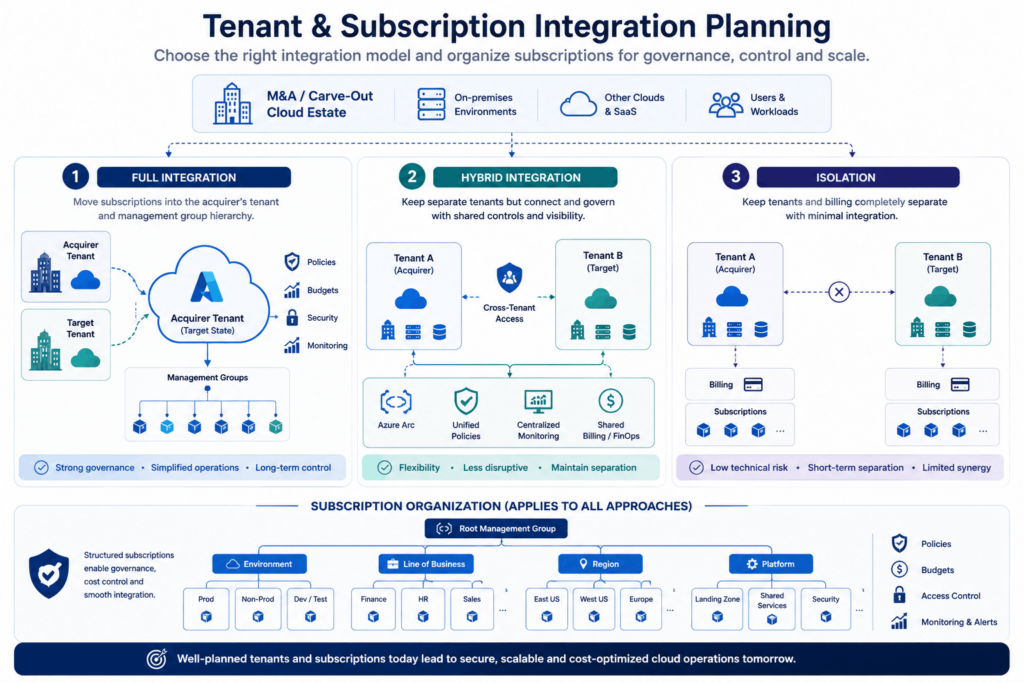
There are three broad approaches when integrating Azure environments after a merger:
| Approach | Description | When to Use | Pros | Cons |
|---|---|---|---|---|
| Full Integration | Move subscriptions into the acquirer’s tenant and management group hierarchy. | Clear long-term control and compliance strategy. | Strong governance, simpler operations. | Potentially disruptive, requires more planning. |
| Hybrid Integration | Keep separate tenants but link subscriptions under shared billing and apply unified policies via Azure Arc and cross-tenant management. | Medium-term overlap, regulatory separation. | Flexibility, less disruptive. | More complex identity and access model. |
| Isolation | Keep everything separate (tenants and billing). | Minimal integration, short-term financial interest only. | Low technical risk. | Lost synergies, duplicate effort. |
Subscription organization
Regardless of tenant strategy, subscriptions should be:
- Grouped by environment (Prod, Non‑Prod), line of business, or region.
- Attached to management groups that inherit policies and budgets.
- Prepared to absorb new subscriptions from the acquired or carved-out entity with minimal rework.
Use Transitional “Overlay” Patterns to Reduce Complexity
A powerful pattern in overlapping IT is to overlay new, Azure‑based access layers on top of legacy systems instead of integrating everything deeply on day one.
Examples:
- Azure Virtual Desktop for unified access
- Offer employees a single AVD workspace where they can reach legacy apps in both organizations through remote desktops or published apps.
- Under the hood, AVD session hosts connect over the hybrid network to back‑end systems without exposing them to the internet.
- Integration via APIs hosted in Azure
- Instead of direct DB‑to‑DB links between systems, stand up API gateways and integration services (like Azure API Management, Logic Apps) in Azure.
- Connect those services back to on‑premises using the hybrid network, gradually replacing point‑to‑point integrations.
- Shared data platforms in Azure
- For analytics and reporting across merged organizations, land data in Azure storage and analytics services.
- Use hybrid connectors to source from both sides while you plan long‑term consolidation.
These overlay patterns reduce the amount of low-level cross-connection you need to manage in the overlap period, and they are often easier to secure and audit.
Address Edge and OT/Industrial Scenarios
Given your focus on industrial and OT‑heavy clients, a quick note on carve‑outs that involve plants, factories, and remote sites.
Edge and local processing
Where sites must keep processing locally but still integrate with corporate systems:
- Use Azure Stack Edge, Azure Local, or Stack Hub to run workloads with local compute and storage, but with Azure‑consistent APIs and management.
- Use Azure IoT Edge and IoT Hub for device‑level integration, capturing telemetry to Azure while controlling devices locally.
Hybrid security for OT
- Keep OT networks segmented and connect only via well‑defined data diodes, gateways, or secure jump hosts.
- Use Azure as the monitoring and analytics plane, not as a place to directly expose OT assets.
- Onboard OT‑adjacent servers and jump hosts into Azure Arc and Defender for Cloud to bring them under unified security governance.
Phase the Implementation
Finally, turn the architecture into a phased, low‑risk delivery roadmap.
A typical phased approach:
- Foundation (0–3 months)
- Confirm the hybrid strategy and the target state.
- Stand up or validate the Azure hub (network, firewall, identity integration).
- Onboard a pilot set of on‑prem servers and clusters into Azure Arc.
- Core integration (3–9 months)
- Establish connectivity to all relevant data centers and tenants via VPN/ExpressRoute.
- Implement centralized logging, monitoring, and Defender for Cloud across Azure and Arc resources.
- Roll out AVD or other overlay patterns for critical business functions.
- Workload migration and optimization (9–18+ months)
- Migrate or modernize priority workloads into Azure IaaS/PaaS.
- Rationalize identity, management groups, and subscriptions as acquisitions settle.
- Optimize cost using Azure Hybrid Benefit and reserved instances across the combined estate.
- Steady‑state hybrid operations
- Treat Azure as the unified control plane for any remaining on‑prem or multicloud resources through Arc and consistent policy.
- Continue modernizing workloads off legacy platforms as timelines and budgets allow.