
How Microsoft AI Agents are Redefining Work
AI has moved beyond mere assistance. Today, the introduction of Microsoft AI agents signals a fundamental shift in how organizations operate, moving from simple generative text creation to autonomous action. These intelligent systems are poised to tackle tasks with you or, increasingly, on your behalf, leading to a profound transformation in workplace productivity.
This blog post will explore the technology underpinning these advanced systems, how they are being deployed through the Microsoft AI solution, and why they are being called the “new apps for an AI-powered world”.
Table of Contents
- Introduction
- The Architecture of AI Agents
- Transforming Business
- Deployment & Customization
- Responsible AI and Trust
Introduction: Beyond the Personal Assistant
For years, technologists have been excited by the prospect of autonomous systems working side-by-side with people. That vision is now reality. An AI agent takes the power of generative AI a step further; instead of just helping you draft an email, the agent can work alongside you or on your behalf.

These customized Microsoft agents can handle a wide range of duties, from responding to basic questions to managing complex, multistep assignments, such as reconciling financial statements or helping fulfill sales orders. What distinguishes them from a standard personal assistant is their ability to be tailored with particular, deep expertise. This evolution is not just about getting more value, but is truly a paradigm shift in how work gets done.
The recent advances in Large Language Models (LLMs) provide the necessary general problem-solving power that was previously missing, finally allowing developers to leverage decades of research into autonomous systems.
The Architecture of AI Agents: Components for Autonomy
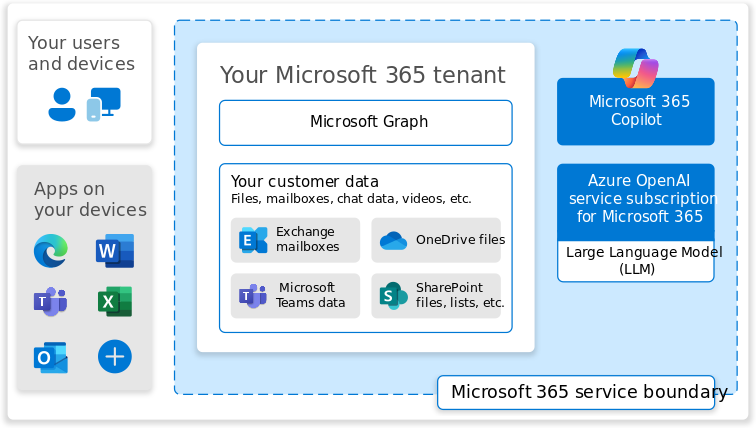
To function autonomously, Microsoft AI agents require three essential elements: a Large Language Model (LLM), Memory, and Tools.
Reasoning (The LLM)
The LLM provides the reasoning capability. This means the agent can identify a task requested by the user, create a detailed plan to complete it, and then perform the necessary actions. The agent observes the world, collects information, and provides input to the model to generate the action plan.
Memory Infrastructure
Memory is crucial for providing continuity, ensuring that every interaction doesn’t start from scratch.
- Short-term memory is the context of the current conversation between the user and the agent.
- Long-term memory is a collection of stored data that allows the agent to improve its performance over time.
Microsoft is addressing the challenge of context continuity, in the sense that models are “disconnected” between prompts by developing processes like “chunking and chaining.” This method divides interactions into relevant bits that can be stored and linked together for faster access, allowing the agent to recall specific project details accurately.
Tools and Entitlements
Tools are the functions, programs, or services (like Teams, PowerPoint, or various APIs) that the agent uses to perform an action. Entitlements are the secure, permitted access rights the agent needs to access the necessary information (e.g., who your boss is) and the computer programs required to act on your behalf.
Transforming Business: Key Use Cases and Capabilities
Microsoft AI agents are designed to boost productivity across numerous sectors, including finance, retail, manufacturing, and research. They operate around the clock (24/7) to handle duties that are often routine, time-consuming, or costly.
Examples of agents in action include
Financial and Supply Chain Management
Agents can review and approve customer returns, reconcile financial statements to close books, or alert supply chain managers to low inventory and automatically reorder stock.
IT and HR Support
The Employee Self-Service Agent simplifies IT help desk-related tasks, helping workers resolve laptop issues or find out if they’ve maxed out certain benefits.
Internal Knowledge
Agents can be created to know everything about a company’s product catalog to draft detailed responses to customer questions. Soon, every SharePoint site will come equipped with an agent tailored to the organization’s content, allowing employees to quickly tap into vast knowledge bases.
Communication
Interpreter in Teams provides real-time speech-to-speech translation during meetings.
By relieving employee pain points, such as complex expense reporting or project management, and taking on complex duties, these Microsoft agents are driving exponential impact and helping businesses streamline operations.
Deployment and Customization: The Microsoft AI Solution
Microsoft offers multiple pathways for deploying and customizing agents, establishing a comprehensive Microsoft AI solution for businesses of all sizes.
For non-developers, you can use ready-made agents available in Microsoft 365 and Dynamics 365. Alternatively, anyone can build purpose-built custom agents using Copilot Studio, often requiring no coding skills. Users can connect these custom agents to relevant business data, such as emails, reports, or customer management systems, to perform tailored tasks.
For large-scale, complex automation, developers can leverage the Microsoft Azure AI Platform. The new Azure AI Agent Service allows developers to choose from small or large language models (like GPT-4o mini) to orchestrate, develop, and scale agent-powered applications. This service is critical for streamlining complex workflows, such as order processing and customer data synchronization, establishing Azure as the foundation for enterprise-level automation. Furthermore, advanced models like OpenAI’s o1 series bring greater reasoning capabilities, allowing agents to break down complicated tasks into manageable steps.
Responsible AI and Trust: Managing Autonomous Actions
Because Microsoft AI agents can act autonomously, safety considerations are significantly elevated, requiring “much, much lower error rates” than other AI applications.
Microsoft manages this risk using its standard Responsible AI foundational playbook. To ensure accountability and security
Governance
The Copilot Control System helps IT departments manage security controls, governance, and data access, and tracks adoption across the enterprise.
Human in the Loop
Many agents, particularly those in Microsoft 365 and Dynamics 365, include “human in the loop” approvals. This means a human review is required to take the final step, such as reviewing and sending an email that the agent drafted.
The focus remains on continuous testing and moderation to ensure accuracy, allowing organizations to choose the right starting point for their needs while maintaining trust.
Key Takeaways
- Definition: Microsoft AI agents are advanced generative AI systems that can work alongside or on your behalf, handling complex, multistep, autonomous tasks.
- Core Technology: Agents require three components: a Large Language Model (LLM) for reasoning, Memory (short-term and long-term), and Tools (programs and APIs).
- Deployment: Businesses can utilize ready-made agents or build custom solutions using Copilot Studio (often without code).
- Enterprise Scaling: Developers use the Microsoft Azure AI Platform and the new Azure AI Agent Service to orchestrate and scale agent-powered applications for complex workflows.
- Safety: Due to their autonomy, agents include safety mechanisms like “human in the loop” approvals for final actions and are governed by the Copilot Control System.
- Future: Agents are expected to lead to a new ecosystem or marketplace, much like how apps transformed smartphones.
Frequently Asked Questions
What exactly are Microsoft AI agents and how do they differ from copilots?
Microsoft AI agents go beyond copilots by not only generating content but also taking autonomous action. They can plan, execute, and complete multistep business tasks—working with you or on your behalf.
How do Microsoft AI agents work behind the scenes?
They rely on three core components:
LLM reasoning to understand tasks and build a plan
Memory to retain context and improve over time
Tools & entitlements (apps, APIs, systems) to perform secure actions
This architecture enables true autonomy.
How can organizations deploy or customize Microsoft AI agents?
Businesses can use:
Built-in agents in Microsoft 365 & Dynamics 365
Custom agents in Copilot Studio (no-code/low-code)
Advanced, scalable agents via Azure AI Agent Service for enterprise workflows
How does Microsoft ensure the safety and trustworthiness of autonomous AI agents?
Microsoft applies its Responsible AI framework, Copilot Control System, secure identity governance, and human-in-the-loop approvals for sensitive operations—ensuring agent actions remain safe and auditable.