Plan a Hybrid Identity Strategy Before Cleaning Legacy Active Directory
Hybrid identity and legacy Active Directory are tightly linked. If you start “cleaning up” legacy AD without first designing how identities will work across AD and Microsoft Entra ID, you risk breaking sign-ins, apps, and admin workflows. This guide walks step-by-step through defining hybrid identity, assessing your current AD and Entra posture, identifying legacy AD risks, and choosing the right sync model before you touch cleanup or modernization.
Strategy before cleanup
Legacy Active Directory often contains decades of technical debt: old domains, stale users, forgotten groups, and dependencies no one remembers. At the same time, cloud adoption has introduced Microsoft Entra ID (formerly Azure AD) for SaaS, cloud apps, and modern access controls. If you delete or modify legacy objects in AD before understanding how they relate to Entra, you can break hybrid sign‑ins, group‑based access, or application authentication.
The right order is simple: design the hybrid identity strategy first, then execute cleanup and modernization under that strategy. That means defining what hybrid identity looks like for your organization, understanding the current state of both AD and Entra, mapping risks, and selecting a sync model that will remain stable while you clean up and evolve.
What hybrid identity is ?
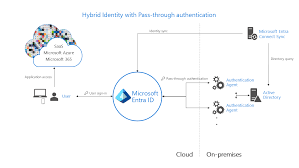
Hybrid identity is the model in which a user has one identity that works across on‑premises and cloud resources. A single user account can authenticate and be authorized to access:
- On‑premises resources such as file shares, legacy web apps, and line‑of‑business systems.
- Cloud resources such as Microsoft 365, SaaS apps, and custom applications are integrated with Microsoft Entra ID.
Under a hybrid identity, account lifecycle, attributes, and group memberships are coordinated across AD and Entra. Users do not need separate, unmanaged identities in multiple directories. Instead, there is a consistent identity fabric that spans both environments.
Common Hybrid Scenarios
You will typically see a mix of scenarios:
- On‑premises users synced to Entra ID, signing into both local resources and cloud apps.
- Cloud‑only users (for example, externals, partners, or some service accounts) are defined directly in Entra ID.
- Applications that still authenticate directly against AD (Kerberos, LDAP) alongside SaaS applications integrated with Entra ID and using OpenID Connect or SAML.
Understanding where each identity and each application live is mandatory before you change anything in legacy AD. Hybrid identity is not a single feature; it is the overall pattern that connects all these pieces.
Step 1: Assess current Active Directory posture
Start with AD, because most legacy risk originates there.
Map forests, domains, and trusts
Document:
- All forests and domains in your environment, including test or “temporary” ones that have lingered.
- Trust relationships between domains and forests, including any external or forest trusts.
This gives you the structural map. Many legacy issues come from old domains kept alive for a single application or historical reasons. Trusts can also hide dependencies; an application in one domain might rely on accounts or groups in another.
Analyze directory health
Before you rely on AD as the anchor for hybrid identity, ensure it is healthy:
- Check replication status to ensure domain controllers are consistent.
- Confirm DNS health, as AD relies on DNS for service location.
- Verify time synchronization, especially if Kerberos is in use.
- Review FSMO role placement and stability.
You also need to confirm backup and recovery capabilities. Ensure you have:
- Recent backups of domain controllers.
- Active Directory Recycle Bin is enabled where possible for object recovery.
- Documented restore procedures.
A cleanup or sync change on a brittle AD can turn a minor misconfiguration into widespread outages.
Understand object structure
Review how your objects are organized:
- OU structure: where users, groups, and computers are actually located.
- Delegation: Which teams or roles can modify which OUs?
- Special OUs for service accounts, admin accounts, or privileged groups.
Messy OU structures often indicate unmanaged growth. They also impact how you scope synchronization and cleanup. For example, syncing entire domains instead of specific OUs might bring a lot of legacy clutter into Entra that you do not want.
Highlight legacy patterns
Identify visible legacy markers, such as
- Old domains that exist “just for one app.”
- Retired domain controllers that were never fully removed.
- Long‑unused test environments that still contain accounts referenced in scripts or apps.
This step does not change anything yet. You are building a mental model of where legacy complexity might collide with hybrid identity.
Step 2: Assess current Microsoft Entra ID posture
Once AD is understood, do the same for Entra ID.
Tenant landscape
Determine:
- How many Entra ID tenants does your organization use, including lab, Dev/Test, or shadow tenants created by teams or acquired businesses?
- Which tenant is considered the primary corporate tenant for production identities and applications?
Multiple tenants complicate hybrid identity. You need clarity on which tenants will participate in hybrid scenarios, which are candidates for consolidation, and which should remain isolated.
Identity types and sign‑in methods
For the primary tenant, classify identities:
- Synced users whose source is AD.
- Cloud‑only users are created directly in Entra ID.
- Guest accounts representing partners or external users.
Review sign‑in controls:
- MFA adoption levels.
- Conditional Access policies and their coverage.
- Legacy authentication is still allowed for some protocols or apps.
Your hybrid strategy must account for how these identities are currently secured and where there are gaps.
Application and resource usage
Inventory:
- Enterprise applications integrated with Entra ID, including Microsoft 365 and third‑party SaaS.
- Service principals, managed identities, and application registrations.
- Group assignments are used for access to apps or resources.
Pay special attention to apps that rely on synced AD groups or specific attributes, because cleanup in AD that touches those groups or attributes can break access in the cloud.
Governance and security baselines
Determine whether basic governance is in place:
- Defined identity ownership.
- Baseline security controls (MFA, conditional access, and sign‑in risk policies).
- Monitoring and alerting via centralized logging.
If the Entra tenant is loosely governed, you may need to solidify its controls as part of the hybrid strategy. You do not want to connect a messy AD directly to an ungoverned tenant.
Step 3: Identify legacy Active Directory risks
With both AD and Entra mapped, identify the specific risks in legacy AD that impact hybrid identity.
Legacy accounts and groups
Look for:
- Stale user accounts
Disabled accounts never deleted, accounts with no logon activity for long periods. - Orphaned groups
Groups with no clear owner or documented purpose. - Excessive nesting
Complex group structures that are hard to reason about.
These objects often end up synced to Entra ID, cluttering the cloud directory and making access control harder to manage. But deleting them prematurely can break access if they are still referenced somewhere.
Legacy authentication and protocols
Legacy authentication patterns often include:
- Applications that rely on NTLM or older, insecure protocols.
- Unconstrained or misconfigured Kerberos delegation.
- Service accounts with hard‑coded passwords in scripts, batch jobs, or application configuration.
These patterns make hybrid identity more fragile, because they often bypass modern controls. You need to account for them, either by containing them or planning replacement, before you shift identity models or clean up accounts.
Structural and governance issues
Examples:
- OUs without clear owners, where anyone with broad rights can make changes.
- Administrators use high‑privilege groups (like Domain Admins) for routine tasks.
- Lack of documented joiner‑mover‑leaver processes.
These issues make it hard to know which objects are safe to change. Without governance, cleanup is guesswork.
Business and compliance impact
Not all legacy objects are equal. Some are attached to:
- Systems that handle regulated data.
- Critical business processes that cannot tolerate downtime.
Map which legacy elements support highly sensitive or critical workloads. Those areas require careful planning and sometimes a slower path, even after you have a hybrid strategy.
Step 4: Define hybrid identity principles and outcomes
Before selecting tools or configs, define what you want the steady state of hybrid identity to look like.
Target identity model
Decide:
- Every user should have exactly one primary identity, synchronized between AD and Entra, or only in Entra for certain categories (for example, some externals).
- How you will treat guests, contractors, and shared or service identities.
- Whether the HR system feeds AD, Entra, or both, and how that flow is governed.
This decision affects master data: where accounts originate, where changes are made, and how they propagate.
Security principles
Apply a consistent set of principles:
- Verify explicitly:
Do not rely on network location alone; enforce strong authentication and context‑based access where possible. - Use least privilege:
Minimize permanent admin rights, especially in legacy AD groups, and consider just‑in‑time access for privileged operations. - Assume breach:
Design a hybrid identity as if attackers might compromise either AD or Entra, and ensure that a breach in one does not automatically grant wide privileges in the other.
These principles should guide your decisions about which identities sync, how they are protected, and how legacy systems are isolated.
Governance outcomes
Define goals such as:
- Clear ownership for AD forests, domains, and the Entra tenant.
- Documented lifecycle rules for accounts and groups (creation, modification, deprovisioning).
- Consistent naming, placement, and grant patterns make it easier to identify and remove legacy clutter over time.
With outcomes defined, you can evaluate sync options and cleanup plans against them.
Step 5: Choose the right sync model before cleanup
With principles in place, choose your sync approach deliberately.
Understand available sync options
There are two main patterns:
- Microsoft Entra Connect Sync: traditional, feature‑rich sync engine deployed on‑premises, supporting complex AD topologies, writeback scenarios, and rich transformation rules.
- Microsoft Entra Cloud Sync: lighter‑weight, cloud‑managed sync using lightweight agents, intended for more flexible and scalable scenarios, especially multi‑forest or where you want to reduce dependency on a single on‑prem sync server.
Your choice affects how quickly you can adjust scopes, attributes, and topologies as you modernize.
Match sync tool to your topology
Consider:
- Single forest, single tenant: often simplest to run Connect Sync initially, possibly moving to Cloud Sync later if it aligns with your roadmap.
- Multi‑forest, single tenant: Cloud Sync can simplify multi‑forest scenarios by allowing multiple agents and configurations, avoiding over‑complex Connect rules.
- Special cases: mergers and acquisitions, lab or dev forests, and environments that should remain isolated or only partially synced.
You want a model that supports your current complexity but does not block future simplification.
Decide source of authority for identities
Clarify:
- Which attributes are authoritative in AD and which are authoritative in Entra ID.
- How you will handle UPNs, email addresses, and display names to avoid collisions and confusion.
- How custom attributes or directory extensions will be managed.
If you do not define this, cleanup actions might accidentally change attributes that Entra or applications depend on, causing subtle failures.
Plan for eventual migrations
Even if you start with Connect Sync, keep in mind:
- You may later move to Cloud Sync or consolidate forests.
- You may change which tenant is primary if there are multiple today.
Design sync configurations with migration in mind: avoid hard‑coding assumptions that will be painful to unwind later.
Step 6: Design high‑level sync and scope boundaries
Once you know the model, decide exactly what to sync.
Decide what to sync
Scope decisions include:
- Which forests and domains will be included in hybrid identity.
- Which OUs will be in sync scope and which will be excluded.
For legacy cleanups, it is often better to narrow the scope so only relevant, managed objects are synced. Old test OUs or deprecated domains can be excluded while you plan their eventual retirement.
Attribute and filtering strategy
Define:
- Attribute mappings needed for applications, HR integration, and governance reporting.
- Filters to exclude clearly obsolete or high‑risk objects (for example, certain service accounts) from being synced until they are properly evaluated.
By controlling what enters Entra, you prevent legacy clutter from spreading. Cleanup can then focus first on unsynced areas while leaving the core hybrid identity intact.
Handle special cases
Decide how you will treat:
- Service accounts: some should remain on‑premises only, others might be candidates for managed identities or other modern approaches.
- Break‑glass or emergency accounts: often kept on‑premises and/or in Entra, but handled with special precautions and not treated like normal users.
- Test and pilot users: used to validate new sync and governance changes before full rollout.
These special cases should have explicit rules so they do not become another source of legacy confusion.
Step 7: Establish governance before touching legacy objects
With sync boundaries defined, put governance in place before any cleanup.
Ownership model
Assign:
- Directory owners for each AD forest and the Entra tenant.
- Application owners who can speak to group and account usage.
- Clear approval flows for changing sync scope, deleting groups, or modifying key attributes.
Without named owners, you cannot reliably know whether a group or account is still required.
Policies for new identities and groups
Write and agree on:
- Naming conventions that encode purpose and scope.
- Rules about where new accounts and groups belong (which OU, which tenant, which group type).
- Joiner‑mover‑leaver processes that ensure identities and access are updated as people change roles or leave.
These policies prevent new legacy from being created while you are still cleaning up the old.
Audit, logging, and change control
Ensure:
- Changes in AD and Entra (especially group membership and attribute updates) are logged centrally.
- Cleanup activities follow a change management process with documented requests, approvals, and rollbacks.
- You can correlate sync changes with identity behavior (for example, sign‑in failures) when issues arise.
Good observability lets you experiment and clean with confidence instead of fear.
Step 8: Build a phased roadmap toward cleanup
Now that you have a hybrid identity strategy, convert it into a roadmap.
Separate strategy from execution
Confirm that:
- Hybrid identity design, sync model, and governance decisions are documented and agreed.
- Everyone understands that cleanup will follow these decisions, not precede or contradict them.
This prevents teams from making local changes that undermine the overall strategy.
Define cleanup waves
Plan:
- A pilot wave with low‑risk OUs or business units where you can test cleanup patterns such as identifying unused groups, migrating applications to new groups, and adjusting sync filters.
- Subsequent waves for more complex or high‑risk areas, using lessons learned from the pilot.
You can also schedule parallel streams, such as:
- Structural cleanup (OU and group reorganization).
- Account lifecycle cleanup (stale accounts).
- Application modernization (moving apps from AD to Entra‑based auth).
Guardrails and rollback
Before executing each wave:
- Confirm backups and AD Recycle Bin status.
- Define exactly how you will roll back if a cleanup step breaks something (for example, reinstating deleted groups, undoing a sync rule change).
- Set observation windows where changes are monitored before moving to the next step.
Guardrails make it possible to act decisively while containing risk.
Conclusion: Hybrid identity first, cleanup second
A legacy Active Directory environment is not just an administrative inconvenience; it is a structural risk that touches security, compliance, and productivity. But trying to clean it blindly, without a clear hybrid identity strategy, is more likely to cause outages than meaningful improvement.
The disciplined approach is to:
- Define hybrid identity in your context: one coherent identity across AD and Entra ID.
- Assess AD and Entra posture so you truly understand the current state.
- Identify specific legacy AD risks that affect identity and access.
- Choose a sync model that fits your topology and future plans.
- Establish governance so changes are controlled and observable.
- Only then, execute cleanup and modernization in planned, reversible waves.
When you respect that order, cleanup becomes an extension of a well‑defined hybrid identity architecture rather than a risky, one‑off project.