Copilot Studio at Ignite 2025: Smarter Enterprise Automation
The future of enterprise automation arrived at Microsoft Ignite 2025. This year’s announcements weren’t just product enhancements; they introduced an entirely new foundation for how organizations build, manage, and scale AI across their business. Among all the innovations showcased, Copilot Studio stood out as one of the most strategically important platforms for CIOs, IT leaders, and enterprise automation teams.
With multi-agent orchestration, deeper Microsoft Graph actions, enhanced governance, and new enterprise connectors, Copilot Studio is no longer just a tool for building chatbots; it has evolved into a true enterprise-grade agent development and automation platform.
In this blog, we break down the biggest updates from Ignite and why they matter for organizations preparing for large-scale AI adoption.
Table of Contents
- Multi-Agent Orchestration
- Microsoft Graph Actions
- Skills & Tools Marketplace
- New Developer Sandbox
- Line-of-Business Integrations
- Governance & Security
- Agent Memory Enhancements
- Multi-Modal Capabilities
- Unified Visibility & Monitoring
- What Enterprises Can Build Now
- Why These Updates Matter for Enterprise Leaders
- Conclusion
Multi-Agent Orchestration: The New Foundation for Enterprise Automation
One of the most exciting announcements at Ignite was the introduction of multi-agent orchestration inside Copilot Studio.
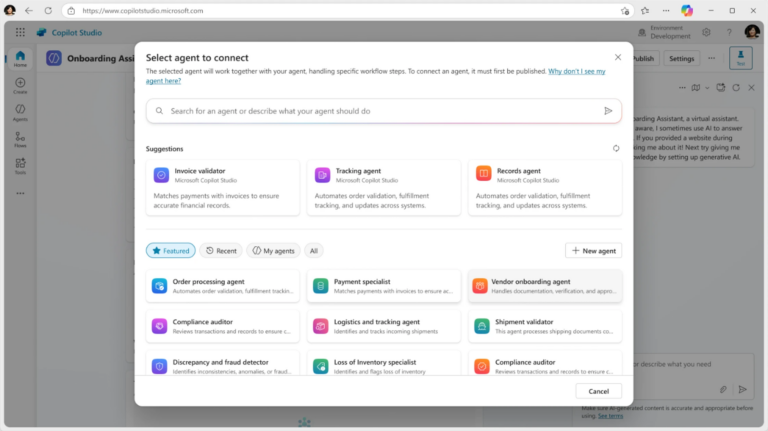
Instead of building a standalone Copilot, enterprises can now build multiple agents that cooperate, share context, and complete workflows together. This allows companies to automate processes that previously required multiple teams or systems.
What this means for organizations
- IT Ops agents can escalate issues to Security agents.
- HR agents can trigger IT onboarding or device provisioning workflows.
- Finance agents can work with data agents for reconciliation and reporting.
- Departmental agents can hand off tasks seamlessly.
This upgrade makes automation modular, scalable, and cross-functional, exactly what enterprises need as they prepare for Agentic AI at scale.
Microsoft Graph Actions: Copilot Can Now Take Real Actions
A major leap forward came with the expansion of Microsoft Graph Actions.
Copilot can now perform tasks, not just generate content. This means agents can directly interact with Microsoft 365 apps such as Outlook, Teams, SharePoint, Planner, OneDrive, and more.
Examples of what agents can now do
- Create or update files in SharePoint
- Schedule meetings in Outlook
- Update tasks in Planner
- Add entries in Excel
- Send follow-up emails
- Manage user information in Entra ID
This transforms Copilot Studio into a true automation engine for the Microsoft 365 ecosystem, enabling organizations to replace manual tasks with safe, governed, repeatable workflows.
Skills & Tools Marketplace: Faster Time-to-Value
Microsoft introduced a new Skills & Tools Marketplace, giving organizations access to prebuilt templates, connectors, skills, and reusable components.
This helps teams move from experimentation to real business solutions faster.
What’s available
- Industry templates for HR, Finance, IT, and Healthcare
- Predefined skills for common enterprise workflows
- Third-party connectors
- Reusable tools for internal enterprise development
With these resources, companies no longer need to build everything from scratch, dramatically reducing development time and increasing ROI.
New Developer Sandbox: Testing & Debugging Made Easy
Enterprises often hesitate to deploy advanced automation without a reliable and controlled testing environment. Microsoft has addressed this challenge by introducing a significantly enhanced sandbox for testing and simulation within Copilot Studio. This sandbox allows teams to experiment with new automations, validate logic, and understand how agents behave before moving anything into production. It provides IT departments with the confidence to build advanced workflows without risking system stability or exposing sensitive data. By enabling safe experimentation, organizations can accelerate innovation while maintaining compliance and operational integrity.
Key capabilities
- Simulate agent conversations across multiple scenarios for accurate behavior prediction.
- Validate multi-step workflows end-to-end to ensure consistency and accuracy.
- Test integrations with business systems to confirm successful data exchange.
- Track version changes and debug behavior with clear visibility into agent logic.
This enhanced sandbox dramatically improves reliability and helps enterprises fine-tune automation before deployment.
Deeper Integration with SAP, Workday, ServiceNow
Ignite 2025 introduced some of the most advanced integration capabilities Copilot Studio has ever offered. Enterprises can now connect Copilot agents more deeply with critical business systems such as SAP, Workday, and ServiceNow, enabling seamless data exchange and process automation. These integrations enable AI agents to perform meaningful actions, such as creating tickets, updating HR records, handling purchase orders, and synchronizing financial data. Organizations no longer need to rely on custom middleware or manual intervention, significantly reducing operational friction. For companies managing siloed systems, this marks a major step toward unified, intelligent workflow automation.
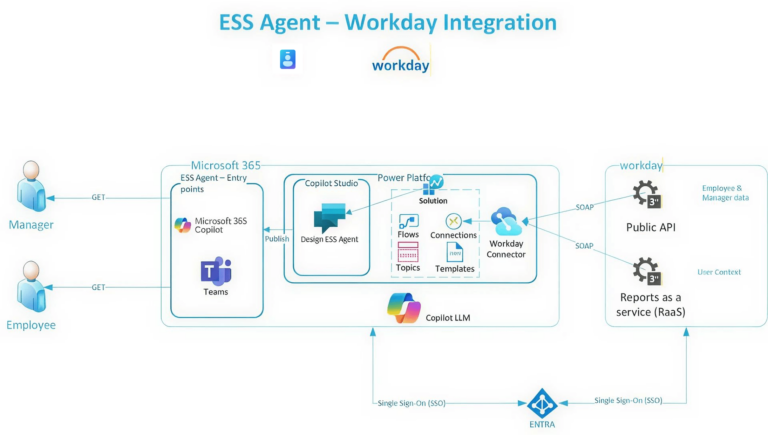
Copilot Studio now connects more deeply with
- SAP
- Workday
- ServiceNow
- Dynamics 365
- Salesforce
- Custom APIs
- Azure Functions & Logic Apps
These integrations enable end-to-end automation across departments from HR onboarding to supply chain operations, ushering in a new era of connected enterprise processes.
Governance & Security: Built for Enterprise Standards
As AI becomes more capable, the need for stronger governance and security grows exponentially. Microsoft addressed this by embedding enterprise-grade controls directly into Copilot Studio and aligning them with the broader Agent 365 governance framework. Organizations can now define how agents access data, what actions they can perform, and how their activities are monitored. The introduction of identity-backed agents through Entra ID ensures every action is tied to a secure, traceable identity. With built-in auditing, lifecycle management, and policy enforcement, enterprises can confidently scale AI automation without compromising security or compliance requirements.
Copilot Studio now includes
- Entra ID identities for agents to ensure secure authentication.
- Role-based access controls to limit permissions based on job function.
- Conditional Access policies to enforce security boundaries.
- Purview auditing & data classification for full compliance visibility.
- Lifecycle management for proper agent onboarding and retirement.
- Policy-based control over tools, systems, and data access.
This comprehensive governance stack is essential for regulated industries and enterprise-wide AI adoption.
Agent Memory & Context Upgrades
Copilot Studio now includes significantly enhanced memory capabilities, giving agents the ability to understand and remember ongoing workflows. This means agents can retain context across conversations, recall prior steps, and adapt their behavior based on user history. Such memory structures allow multi-day or multi-stage automations like onboarding flows or financial approvals to run smoothly without repetitive instructions. Shared memory across agents also enables coordinated handoffs, ensuring tasks move forward without human intervention. These upgrades make agents feel more natural, competent, and capable within real-world enterprise environments.
Agents can now remember
- Past interactions to maintain continuity.
- Workflow progress to avoid repeating steps.
- User context to personalize responses.
- Data from previous sessions for long-running tasks.
- Shared memory between agents for coordinated operations.
This evolution in contextual understanding helps enterprises unlock true autonomous process execution.
Multi-Modal Capabilities: Understanding Files, Images & Documents
With new multi-modal AI support, Copilot Studio agents can now process a diverse range of content formats, making automation far more powerful. Agents can interpret images, extract information from PDFs, analyze tables, and understand handwritten or uploaded documents. This opens up opportunities for automating tasks that traditionally required human review, such as invoice matching, contract analysis, technical troubleshooting, and compliance reporting. By bridging the gap between structured and unstructured data, enterprises can significantly reduce manual workloads and improve operational accuracy.
This unlocks new scenarios such as
- Image-based troubleshooting for IT and field operations.
- Document summarization for legal, HR, and compliance teams.
- Invoice extraction and processing for finance departments.
- Contract review and risk detection for legal teams.
- Form automation for onboarding and service requests.
Multi-modal capabilities bring AI closer to the way humans work—flexible, intuitive, and context-aware.
Unified Visibility & Monitoring for IT Teams
To support enterprise-wide AI adoption, Microsoft introduced a comprehensive agent monitoring dashboard within Copilot Studio. This dashboard gives IT teams a centralized view of how agents operate, how often they are used, and whether they are delivering expected outcomes. Organizations can quickly detect failures, identify patterns, and understand how automations are impacting productivity. By consolidating performance insights, IT teams gain the visibility needed to scale automation responsibly. This is especially critical as businesses begin deploying dozens or even hundreds of agents across departments.
IT teams can now view
- Usage analytics to understand adoption and ROI.
- Behavior patterns to detect anomalies or inefficiencies.
- Agent performance metrics to ensure reliability.
- Error reports for faster troubleshooting.
- Data interaction logs for audit and compliance needs.
Such visibility empowers IT leaders to continuously optimize their automation strategy.
What Enterprises Can Build Now
The enhancements announced at Ignite unlock a vast range of automation opportunities across business and IT. Organizations can create agents that handle routine, high-volume tasks or orchestrate multi-system workflows requiring intelligent decision-making. From IT service automation to employee onboarding and financial processing, enterprises now have the tools to design sophisticated AI-driven systems. These capabilities allow teams to shift from manual work to strategic initiatives, improving operational outcomes and employee satisfaction. As automation becomes more embedded across functions, organizations gain measurable efficiency and scalability.
Organizations can now build
- IT automation agents to resolve incidents, manage tickets, and streamline admin tasks.
- HR onboarding/offboarding agents to coordinate equipment, access, and documentation.
- Finance reconciliation agents to validate transactions and automate reporting.
- Security incident response agents to analyze alerts and assist in triage.
- Cross-department workflow agents to connect processes across systems.
- Custom department copilots designed for unique team needs.
- AI helpdesk agents to reduce ticket volumes and improve employee support.
- Multi-agent business processes for complex, multi-stage workflows.
These possibilities mark a new phase of enterprise automation maturity.
Why These Updates Matter for Enterprise Leaders
The updates introduced at Ignite 2025 align directly with the pain points and priorities of modern enterprise leaders. CIOs focus on modernization and efficiency, and these upgrades give them a clear pathway toward scalable automation. CISOs gain the governance and visibility they need to trust AI within sensitive environments. IT Directors benefit from tools that reduce manual workloads and enable sustainable automation programs. Modern Work leaders can amplify productivity by offloading repetitive tasks to intelligent agents. Meanwhile, Data and AI leaders gain a unified platform that connects data, AI models, and operational workflows, ensuring automation is grounded in trusted information.
Ignite’s updates support all of these goals by delivering secure, governed, and enterprise-ready AI capabilities.
Conclusion
Microsoft Ignite 2025 marked a clear turning point for enterprise automation. With major upgrades to Copilot Studio, organizations can now build intelligent agents that handle multi-step tasks, make decisions, and collaborate across systems. These capabilities help reduce manual work, streamline operations, and free teams to focus on higher-value initiatives. Combined with stronger governance, deeper integrations, and multi-agent orchestration, enterprises can now scale automation with confidence. Companies that adopt these advancements early will gain a measurable edge in productivity, efficiency, and overall innovation.
Key Takeaways
- Copilot Studio has evolved into a full enterprise automation platform, enabling intelligent, multi-agent systems.
- Graph Actions unlock real operational automation, allowing Copilot agents to update files, manage tasks, and interact with Microsoft 365 apps.
- New governance features ensure enterprise-grade security, with Entra ID identities, Purview auditing, and policy-based controls.
- Deep integrations with SAP, Workday, ServiceNow, and Dynamics 365 allow organizations to automate cross-system business workflows.
- Enhanced testing, memory, and monitoring capabilities help enterprises deploy automation safely and at scale.